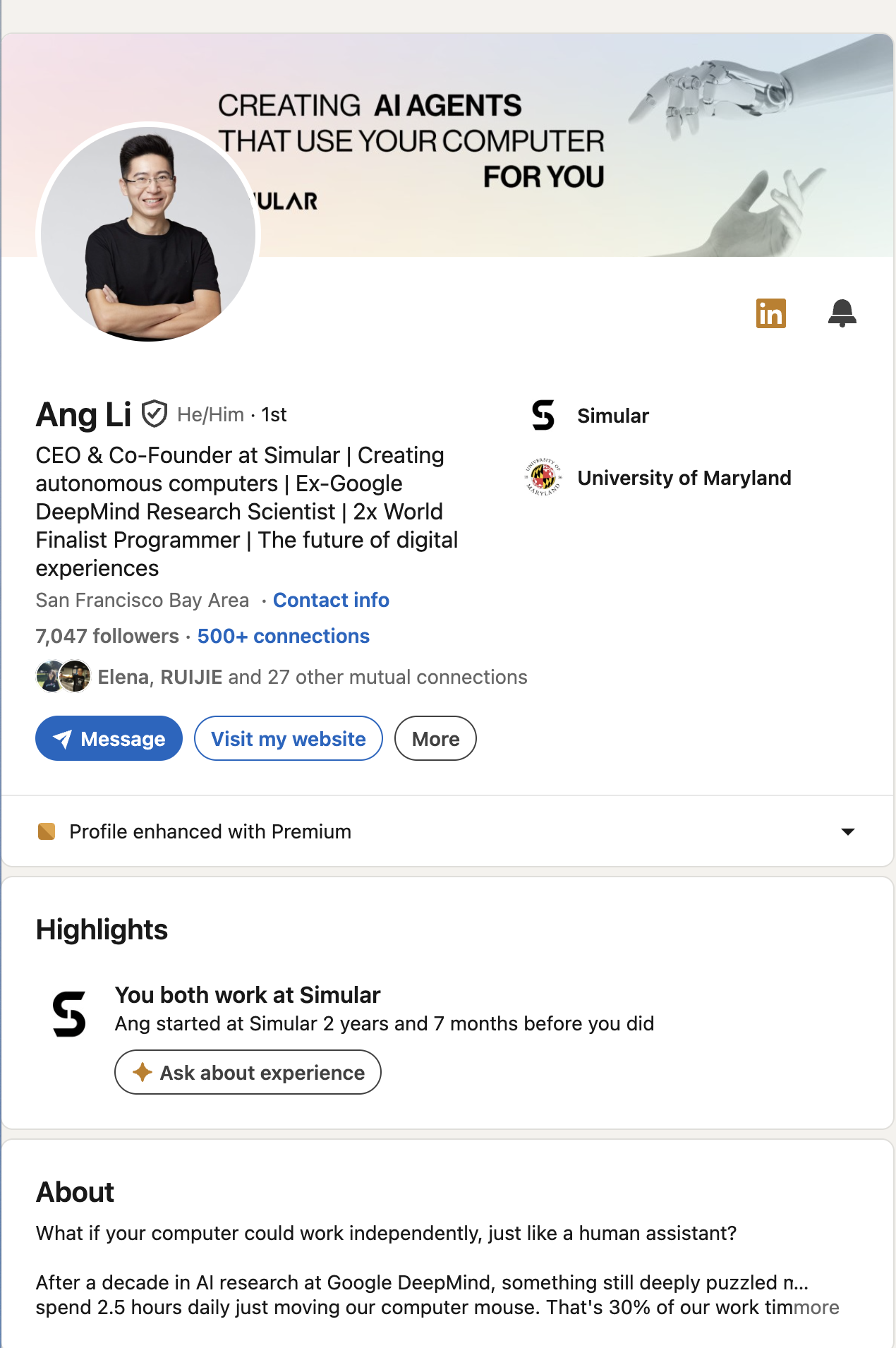
Step 1: Choose a Professional Profile Photo
Your photo is the first thing people see. Profiles with photos get more views than those without — it is the single highest-impact change you can make.
Photo requirements:
- Head-and-shoulders framing (face takes up 60-70% of the frame)
- Neutral or simple background
- Professional but approachable expression
- High resolution (minimum 400x400 pixels, LinkedIn recommends 800x800)
- Recent photo (within the last 2 years)
Common mistakes: Using a group photo crop, blurry selfies, vacation photos, or no photo at all. Each of these signals to recruiters that you are not serious about your professional presence.
How Sai helps: Sai cannot take your photo, but it can audit your current profile photo against LinkedIn's best practices and flag issues — wrong dimensions, low resolution, inappropriate framing — before you invest time optimizing other sections.
Step 2: Write a Headline That Sells, Not Just Describes
Your headline appears in search results, connection requests, comments, and posts. It is the most-read line on your entire LinkedIn profile — and most people waste it on their job title.
The formula: [Role] + [Value You Deliver] + [For Whom] + [Differentiator]
Bad headlines:
- "Marketing Manager at Acme Corp"
- "Looking for new opportunities"
- "Experienced professional seeking growth"
Good headlines:
- "B2B Marketing Manager | Driving pipeline through content & demand gen | SaaS"
- "Full-Stack Engineer | Building scalable fintech platforms | Ex-Stripe, Ex-Square"
- "Sales Director | Helping mid-market SaaS companies build outbound engines | $10M+ ARR generated"
- "Product Designer | Creating enterprise UX that reduces support tickets by 40%"
Headline formulas by role:
| Role Type |
Formula |
Example |
| Job Seeker |
[Target Role] | [Key Skill] | [Industry] |
"Data Analyst | SQL + Python | Healthcare & Biotech" |
| Sales / BD |
[Role] | [Outcome] | [Metric] |
"AE | Closing enterprise SaaS deals | 140% quota avg" |
| Founder / Exec |
[Title] at [Company] | [Mission] |
"CEO at FlowAI | Making workflow automation accessible" |
| Freelancer |
[Service] for [Client Type] | [Proof Point] |
"Brand Strategist for B2B startups | 30+ launches" |
| Career Changer |
[New Direction] | [Transferable Skill] from [Background] |
"UX Researcher | Applying 8yrs of psychology research to product" |
How Sai creates headlines: You tell Sai your target role, key skills, and value proposition. Sai reads your existing LinkedIn profile, pulls your most impressive achievements from your experience section, and generates 5-8 headline variations. You pick the one that resonates — or combine elements from multiple options. Sai then updates your headline directly on LinkedIn with your approval.
Step 3: Write an About Section That Converts
The About section (formerly Summary) is your elevator pitch. LinkedIn shows the first 3 lines before a "see more" click, so the opening must hook the reader immediately.
The 4-part structure:
Part 1 — The Hook (first 2-3 lines, visible without clicking "see more"): State what you do and the outcome you deliver. Use a specific metric if possible.
"I help B2B SaaS companies turn content into pipeline. In the last 3 years, I've built content engines that generated $4.2M in influenced revenue across 3 companies."
Part 2 — The Context (background and expertise): Briefly explain your career trajectory and areas of expertise. Show progression and relevance.
"I started in journalism, pivoted to content marketing in 2019, and found my sweet spot at the intersection of SEO, product marketing, and demand gen. I've worked across Series A startups and enterprise teams, which means I can build from zero or optimize at scale."
Part 3 — The Proof (achievements and specializations): List specific skills, tools, or achievements. Bullet points work well here.
"What I'm known for:
- Content strategy that drives MQLs, not just traffic
- SEO + GEO optimization (ranked 12 articles in Google AI Overview)
- Building content teams from 1 to 5 people
- HubSpot, Webflow, Ahrefs, Clearscope certified"
Part 4 — The CTA (what you want readers to do next): Make it clear what the next step is. Job seekers: invite messages. Founders: link to product. Sales: offer a conversation.
"Always happy to connect with marketers building content-led growth. DM me or reach out at email@example.com."
How Sai writes your About section: Sai reads your existing LinkedIn profile, your resume (if you upload one), and your target job descriptions. It drafts an About section using the 4-part structure, pulling real achievements from your experience. You review, edit, and approve — then Sai pastes it directly into your LinkedIn profile.
Step 4: Optimize Your Experience Section with Impact Statements
Most people list responsibilities in their experience section. Recruiters skip responsibilities — they are looking for impact.
The formula: [Action verb] + [What you did] + [Measurable outcome]
Before (task-focused):
- "Responsible for managing social media accounts"
- "Worked on product launches"
- "Handled customer support inquiries"
After (impact-focused):
- "Grew LinkedIn following from 2K to 15K in 8 months through a daily content strategy that generated 45 inbound leads per month"
- "Led product launch for enterprise analytics feature — 2,000 sign-ups in first week, $380K pipeline influenced"
- "Reduced average support response time from 4 hours to 45 minutes by building a knowledge base and training 3 junior agents"
How Sai rewrites experience: This is where Sai delivers the most time savings. Paste your resume or let Sai read your current LinkedIn profile, and it rewrites every bullet point into impact-driven statements. Sai identifies weak phrases ("responsible for," "worked on," "assisted with") and replaces them with specific, metric-driven language. For each role, Sai generates 4-6 bullet points prioritized by relevance to your target position.
Step 5: Add Skills Strategically (Not Randomly)
Skills are not a popularity contest. They are a search ranking factor. Profiles with 5+ skills listed receive more views because LinkedIn's algorithm uses skills to match profiles with recruiter searches.
Skills strategy:
- Start with the job description. Copy the top 5-10 skills from the job postings you are targeting. These are the exact keywords recruiters search for.
- Add core technical skills first. Python, SQL, HubSpot, Salesforce, Figma, React — whatever tools define your role.
- Add 3-5 soft skills that align with seniority. Junior roles: "Collaboration," "Data Analysis." Senior roles: "Strategic Planning," "Cross-Functional Leadership," "Stakeholder Management."
- Pin your top 3 skills. LinkedIn lets you feature 3 skills at the top of the section. Choose the 3 that most directly match your target role.
- Request endorsements from colleagues. Endorsements increase skill credibility. Ask 5-10 colleagues to endorse your top skills.
How Sai optimizes skills: Sai reads the job descriptions you are targeting, compares them against your current skills section, and identifies gaps. It then suggests specific skills to add, reorder, and pin — ensuring your LinkedIn profile matches what recruiters are actually searching for.
Step 6: Build a Featured Section That Shows (Not Tells)
The Featured section is underused by most LinkedIn users, which makes it a competitive advantage. Use it to showcase:
- Published articles or blog posts that demonstrate domain expertise
- Presentations or slide decks from conferences or internal talks
- Case studies or portfolio pieces that prove your skills
- Media coverage or press mentions that add third-party credibility
- Links to projects or products you built
Pro tip: LinkedIn video content grew 34% in 2024. Adding a 60-second introduction video to your Featured section significantly increases engagement because it lets visitors hear your voice and personality.
How Sai helps: Sai can draft featured section descriptions for each item, optimized with keywords from your target role. It can also identify which items from your Google Drive, portfolio, or blog would make the strongest featured content based on relevance to your target audience.
Step 7: Customize Your LinkedIn URL and Settings
Small details that matter:
- Custom URL: Change from
linkedin.com/in/john-smith-a3b2c1 to linkedin.com/in/johnsmith. Clean URLs look more professional on resumes and email signatures. - Open to Work settings: If you are job seeking, enable "Open to Work" — but use the recruiter-only setting to avoid alerting your current employer.
- Creator Mode: If you post content regularly, enable Creator Mode to add a follow button and display your content prominently.
- Profile visibility: Ensure your profile is set to "Public" so it appears in Google search results.
How Sai Builds Your Entire LinkedIn Profile Automatically
Here is the complete workflow when you use Sai to create or optimize your LinkedIn profile:
- Profile audit: Sai opens your LinkedIn profile, reads every section, and generates a completeness score with specific gaps identified.
- Resume import (optional): Upload your resume and Sai extracts achievements, skills, and career narrative to inform every profile section.
- Headline generation: Sai generates 5-8 headline variations using the [Role + Value + Audience + Differentiator] formula, based on your target roles.
- About section drafting: Sai writes your About section using the 4-part structure (Hook, Context, Proof, CTA), pulling real data from your experience.
- Experience rewriting: Sai rewrites every bullet point into impact-driven statements with metrics and action verbs.
- Skills optimization: Sai compares your skills against target job descriptions and suggests additions, removals, and reordering.
- Featured section setup: Sai recommends which portfolio items, articles, or projects to feature and drafts descriptions for each.
- Direct editing: With your approval at every step, Sai navigates to the correct LinkedIn profile section and makes the edits directly — no copy-pasting required.
The entire process takes 15-20 minutes with Sai, compared to 3-5 hours of manual work. And because Sai reads your actual experience data, every section is consistent and aligned with your target positioning.
Sai Cross-Capability Spotlight: Your LinkedIn profile is the foundation for every other LinkedIn activity. Once optimized, Sai can use your profile as the basis for LinkedIn outreach messages (prospects who receive your connection request will check your profile first), automated LinkedIn commenting (your comments link back to your profile), and lead enrichment (an impressive profile increases response rates). These workflows are all available through Sai's LinkedIn automation tools.


.svg)

.svg)