
ロボ・セクレタリーとは何か?――自律型コンピュータ群を運用するコンピュータ・エージェント
Palo Alto, California • Nov 8, 2026
Not always. An AI agent that only calls APIs or edits code in a repository can run in a container or a sandbox. An agent that runs code you do not trust needs the stronger isolation of a virtual machine, usually a lightweight microVM. And an agent that signs in to websites, fills forms or uses desktop apps needs more than a VM: it needs a full desktop with a browser that keeps its state between tasks.
This guide gives you a decision table, explains how containers, microVMs, VMs and cloud desktops differ for agents, and lists the local and cloud options for each. Simular publishes this guide and makes box by Simular, one of the options below.
The short answer: match the environment to the job
| What your agent does | What it needs | Options |
|---|---|---|
| Calls APIs, answers questions, drafts text | Nothing beyond the app it runs in | Claude or ChatGPT on their own |
| Edits and runs code in a repo | A shell; a container or sandbox is enough | Your laptop with a coding agent, Dev Containers, E2B, Modal |
| Runs code you do not trust (from users, the web or other agents) | Hardware isolation with its own kernel: a microVM or VM | E2B, Fly.io Sprites, Modal VM sandboxes, Firecracker |
| Signs in to websites, fills forms, downloads files | A desktop with Chrome that keeps logins | box by Simular, Orgo, E2B Desktop |
| Uses desktop apps and file dialogs | A full desktop with computer-use control | box by Simular, Orgo, Daytona, Windows 365 for Agents |
| Works across days, or hands work between agents | A persistent computer every agent can reach | box by Simular, Orgo |
The pattern: the more an agent acts like a person at a computer, the more of a computer it needs. The more you distrust what it runs, the stronger the wall around it should be.
Why people give agents a virtual machine
Three reasons come up again and again in the answers Google, ChatGPT and Perplexity give to this question.
- Isolation. A mistake, a malicious web page or a prompt injection stays inside the machine instead of reaching your laptop, your files or your production systems. Anthropic's own computer use documentation recommends running the tool in a dedicated virtual machine or container with minimal privileges.
- A whole operating system. An agent with a VM can install packages, run a browser and open desktop apps, not only call one function at a time.
- State you can keep, copy or throw away. Snapshots let you pause an agent and resume it later, fork it to try two approaches, or reset it to a clean state after each task.
The cost is setup and upkeep. A bare VM is an operating system and a terminal. The desktop, the remote display, the computer-use driver and the connection to your agent are yours to add and maintain.
Container vs microVM vs VM vs cloud desktop
| Environment | Isolation | Starts in | Has a desktop? | Keeps state? | Good for |
|---|---|---|---|---|---|
| Container (Docker, Dev Containers) | Shares the host kernel; gVisor adds a user-space kernel | Seconds or less | No | Only what you mount | Coding agents on code you trust |
| MicroVM (Firecracker, Cloud Hypervisor) | Own kernel, hardware-backed | Well under a second on most platforms | No, unless added | Pause and snapshot on some platforms | Running untrusted code at scale |
| Full VM (cloud server, Lima locally) | Own kernel, hardware-backed | Tens of seconds to minutes | Only if you install one | Yes, like any server | Long-running agents you manage yourself |
| Cloud desktop for agents | Its own isolated computer, run by a provider | Ready when the agent calls it | Yes, with a browser | Yes: files, apps and logins | Agents that browse, sign in and use apps |
The first three are building blocks: you choose one and assemble the rest. A cloud desktop for agents is the finished product built on top of one of them. For a deeper look at the desktop side, see what a cloud desktop is and our guide to getting a Linux desktop in the cloud.
When your agent does not need its own VM
- It only reads and writes text, or calls APIs with keys you scoped for it.
- It edits code in a repository you own and you review what it runs. A container, or the coding agent's own permission prompts, is enough.
- It reads web pages but never signs in. The browsing built into Claude, ChatGPT or a browser automation tool covers it.
When it does
- It runs untrusted code. Code from users, scraped from the web or written by another agent should run behind its own kernel. This is the main job of sandbox platforms such as E2B, Modal and Fly.io Sprites.
- It works like a person at a computer. Signing in, two-factor prompts, file dialogs and apps with no API need a real desktop and a browser that remembers sessions. A headless VM cannot click.
- It runs for hours or across days. A long task should not live on your laptop, and its files and logins should still be there tomorrow.
- Several agents share the work. One agent collects prices, another writes the report. They need the same files and accounts, taking turns on one computer rather than each starting from scratch.
Your options, local and cloud
On your own machine. Docker or Dev Containers isolate a coding agent from the rest of your laptop. Lima runs a Linux VM on macOS or Linux with one command, which some developers wrap as a disposable home for their agent. These are free but stop when your laptop sleeps, and a desktop inside them is extra work.
Cloud sandboxes and VMs you build on. E2B, Modal, Fly.io Sprites and machine0 give your code an isolated Linux environment through an API. They are the right base if you are building an agent product. Desktop add-ons exist (E2B Desktop, Daytona Computer Use, Cua), but you still write the agent loop.
Desktops for agents, run for you.Orgo rents always-on agent desktops by the month, and Windows 365 for Agents gives enterprise agents managed Windows Cloud PCs. Prices, limits and persistence for nine of these platforms are compared side by side in our guide to cloud computers for AI agents.
A computer for the agent you already use: box by Simular
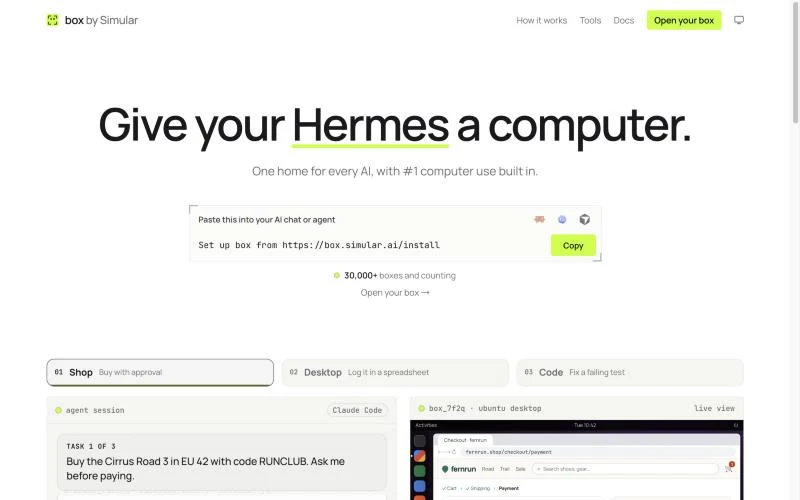
If the agent is Claude, ChatGPT or a coding agent you already pay for, you may not want to build anything. box by Simular is a cloud computer for the AI you already use: an Ubuntu Linux desktop with Chrome, files, apps and a terminal that keeps your logins between tasks. It does not include an agent; you connect your own.
- Claude or ChatGPT: add
https://mcp.box.simular.ai/mcpas a custom connector, sign in and approve. - Claude Code, Codex, Cursor, OpenCode or Hermes: run
npx @simular-ai/box connect. The box docs list each app's steps. - Watch and take over: the live view at box.simular.ai/box shows what the agent is doing. You step in for a sign-in, a 2FA code or a payment, then hand it back; box's agent never enters payment details.
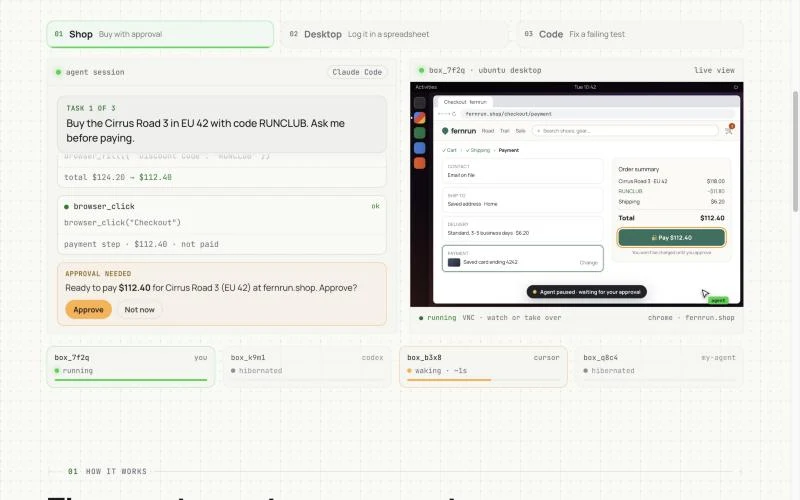
box takes the most direct route first: a shell command, then the web page itself, then a desktop app's named buttons and fields, and a screenshot only when nothing else works. It sleeps when idle and wakes when an agent calls it, with open programs, files and logins kept. box has a freemium version and is pay as you go after that. If you would rather give a coding agent desktop control through your own setup, our list of computer use MCP servers and the MCP server for computer use guide cover the alternatives.
Safety checklist, whatever you choose
- Give the agent its own accounts and scoped API keys, never your admin login.
- Keep secrets out of the environment unless the task needs them, and rotate them after.
- Block or allow-list outbound network access for agents that run untrusted code.
- Approve payments, password changes and deletions yourself.
- Reset or delete environments you no longer need.
FAQ
Do AI agents need their own virtual machine? Not always. An agent that only calls APIs or edits code can run in a container or sandbox. An agent that runs untrusted code needs VM-level isolation, and one that signs in to sites or uses desktop apps needs a full desktop that keeps its state.
What is the difference between a sandbox and a VM for AI agents? A sandbox is a short-lived, isolated environment created from code for one task; many run on microVMs. A VM is a whole computer you keep and manage. Sandboxes trade persistence for speed and scale.
Is a container safe enough for an AI agent? For code you trust, usually yes. Containers share the host's kernel, so for untrusted code use a microVM, or a container runtime with an extra layer such as gVisor.
Can I run an AI agent in a VM on my own computer? Yes. Lima, UTM or VirtualBox can run a Linux VM for your agent locally. It stops when your computer sleeps, and you set up the desktop and connections yourself.
What is the easiest way to give Claude or ChatGPT its own computer? Add a ready cloud computer as a custom connector. box by Simular gives the chat an Ubuntu desktop with Chrome through one link, with no VM to set up.
Facts about other products as of 8 November 2026.
自律型コンピュータを構築しても、人間が置き換えられるわけではありません。それは協力を意味する。
コンピューターから手を離してください。Simular を今すぐ無料でダウンロードしてください。
