
MCP Server for Computer Use: How to Give Claude, ChatGPT, Claude Code or Codex a Real Computer (2026 Guide)
Palo Alto, California • Nov 4, 2026
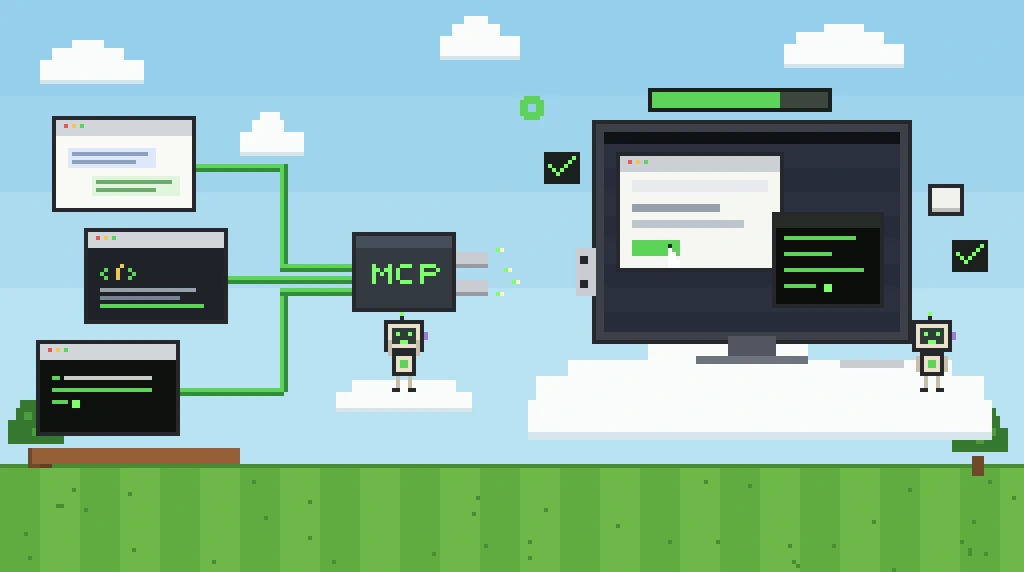
An MCP server for computer use is what lets an AI app see a screen and use a mouse, keyboard, browser and terminal through the Model Context Protocol. You add the server to your client, sign in, and the model gains tools such as screenshot, click, type and run command. Setup takes a few minutes: one terminal command for Claude Code, Codex, Cursor or VS Code, or a custom connector in Claude, ChatGPT or Gemini. The main choice is whether the server drives your own computer or gives the AI a separate one in the cloud.
This guide explains how an MCP server for computer use works, which tools it exposes, which apps support it, and how to set one up in each major client using Simular Box, a cloud desktop that connects as one remote MCP server. If you want to compare servers before setting one up, see our list of the best computer use MCP servers.
What is an MCP server for computer use?
An MCP server for computer use is a program that exposes a computer to an AI model as a set of callable tools. The Model Context Protocol, introduced by Anthropic in November 2024 and now supported by most AI clients, defines how a client discovers those tools and calls them over JSON-RPC. A computer use server typically offers tools in four groups: observing the screen (screenshots or an accessibility tree), acting on it (mouse and keyboard), driving a browser at the element level, and running shell commands or editing files.
The server does not think. The model in your client reads the observation, decides the next step and calls a tool; the server performs it and returns the result. That split is why the same server works with Claude, GPT and Gemini models, and why "computer use" can be added to an app that was never built for it. For the broader idea behind this, see what computer use is and our explainer on the autonomous computer.
How an MCP server for computer use works: client, server and computer
Every setup has three parts, and naming them clears up most confusion.
- The client is the app you talk to: Claude Code, Codex, Cursor, VS Code, or a chat app such as Claude, ChatGPT or Gemini.
- The MCP server is the bridge. A local server runs as a process on your machine and talks to the client over stdio. A remote server runs on the internet and the client reaches it over HTTP (the Streamable HTTP transport, which streams responses with server-sent events), usually signing in with OAuth.
- The computer is what gets driven. With a local server it is your own desktop. With a hosted server it is a machine in the cloud that belongs to the agent.
Chat apps in the browser can only use remote servers, because they cannot start a process on your laptop. Coding agents can use either.
What tools does a computer use MCP server expose?
Tool names differ between servers, but the groups are the same. Here is how they map in Simular Box, as an example of a full server:
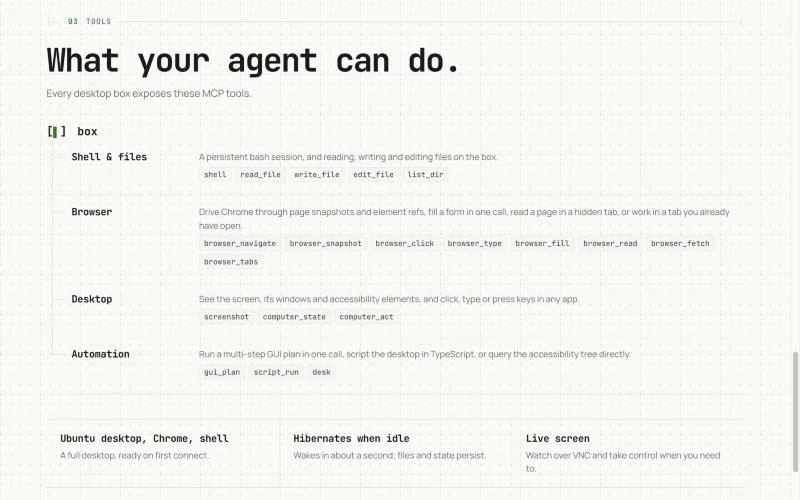
| Tool group | What it does | Simular Box tools | When the model should use it |
|---|---|---|---|
| Shell and files | Run commands in a persistent shell; read, write and edit files | shell, read_file, write_file, edit_file, list_dir | Anything that can be done without a screen: fastest and cheapest |
| Browser | Drive Chrome through page snapshots and element references | browser_navigate, browser_snapshot, browser_click, browser_type, browser_fill, browser_read, browser_fetch, browser_tabs | Web pages, forms and logged-in sites |
| Desktop | See the screen, windows and accessibility elements; click, type or press keys in any app | screenshot, computer_state, computer_act | Desktop apps, file dialogs, anything without an API |
| Automation | Run a multi-step GUI plan in one call, script the desktop, query the accessibility tree | gui_plan, script_run, desk | Repeated or multi-step GUI work, loops over many items |
| Machine | Check, wake, hibernate or save the computer | box_status, box_list, box_wake, box_hibernate, box_save | Managing the box itself |
How the agent chooses between shell, browser and screen
Screen control is the broadest and slowest way for an agent to act, so good clients and servers save it for last. Anthropic's Claude Code documentation describes the order Claude Code follows: use a dedicated MCP server for the service if one exists, use the shell if the task is a command, use a browser tool for web work, and fall back to full computer use only for native apps, simulators and tools with no API. A computer use MCP server that offers all three layers in one place lets the model follow that order without switching servers, which keeps runs faster and cheaper in tokens.
Local or remote: which computer should the AI use?
| Local MCP server (your computer) | Remote MCP server (a cloud computer) | |
|---|---|---|
| Your mouse and screen while it works | Shared with the agent | Free; the agent uses its own screen |
| Laptop can sleep or close | No | Yes |
| Access to your local files and logged-in apps | Yes | What you move or sign into there |
| Where a wrong click lands | Your real desktop | Inside the cloud machine |
| Works in Claude, ChatGPT or Gemini in the browser | No | Yes |
| Examples | Claude Code computer use (macOS), Cua Driver, Windows-MCP, Peekaboo | Simular Box, Orgo |
If your agent only needs web pages, a browser-only server such as Playwright MCP is enough. Add a full computer when a step needs a desktop app, a download, a file dialog or a terminal. For a side-by-side of hosted machines, see cloud computers for AI agents.
Which AI apps support an MCP server for computer use?
| Client | Local servers | Remote servers | How you add Simular Box |
|---|---|---|---|
| Claude Code | Yes | Yes | npx @simular-ai/box connect (installs the box plugin), or claude mcp add |
| Codex (app, CLI, IDE) | Yes | Yes | Installer, or [mcp_servers.box] in ~/.codex/config.toml |
| Cursor | Yes | Yes | Installer, one-click deeplink, or ~/.cursor/mcp.json |
| VS Code | Yes | Yes | Installer, or MCP: Add Server → HTTP |
| OpenCode, Hermes, OpenClaw, T3Code | Yes | Yes | Installer adapters |
| Gemini CLI | Yes | Yes | gemini mcp add --transport http box … |
| DeepSeek Harness | Yes | With a key | dsh plugin plus a personal key |
| Claude (web and desktop app) | Desktop only | Yes, custom connector | Settings → Connectors → Add custom connector |
| ChatGPT | No | Yes, custom MCP server plugin | Plugins → Add → Add custom MCP server |
| Gemini app | No | Yes, custom app (eligible accounts) | Settings → Connected Apps → Add a custom app |
Set up an MCP server for computer use with Simular Box
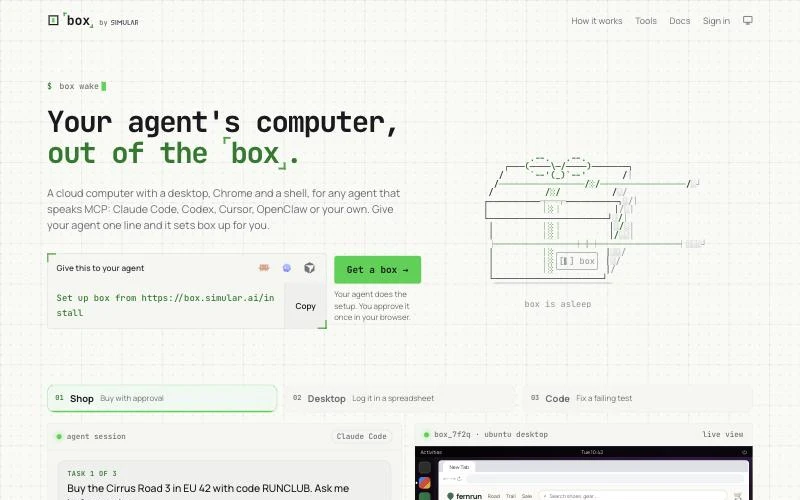
Simular Box is a cloud Linux desktop for your AI, added to your app as one remote MCP server. The AI gets an Ubuntu desktop with Chrome and a persistent shell, and you can watch it live at box.simular.ai/box and take over when needed. The server URL for every client is:
https://mcp.box.simular.ai/mcpThe whole flow is three steps: give your agent one line, approve the sign-in in your browser, and your agent has a computer.
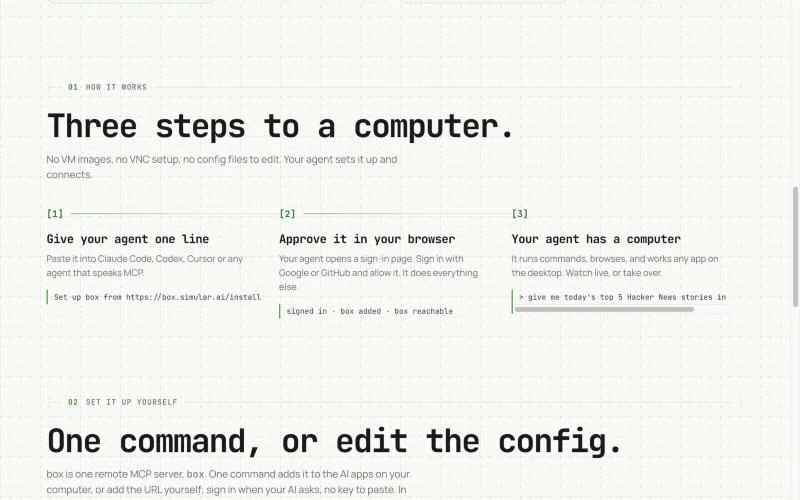
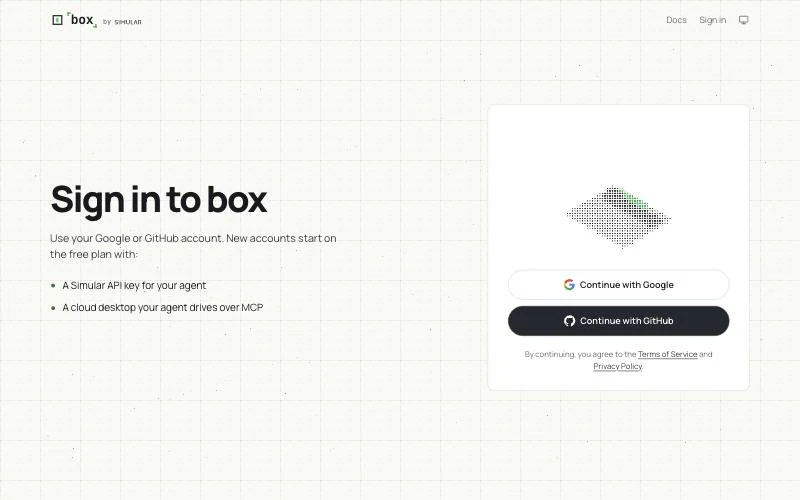
You sign in with a Google or GitHub account the first time your AI connects (MCP authorization over OAuth 2.0). New accounts start on the free plan, which includes a Simular API key for your agent and a cloud desktop it drives over MCP. The approval page asks which boxes the app may use and for how long. There is no key to paste; for a client that cannot sign in, create a personal key at box.simular.ai/keys and send it as Authorization: Bearer <key>.
Claude Code, Codex, Cursor, VS Code and more: one command
With Node.js 18.17 or later, run:
npx @simular-ai/box connectThe installer finds Claude Code, Codex, Cursor, OpenCode, Hermes, OpenClaw and VS Code on your machine, asks which should use Simular Box, and adds the server to each in its own config format. For Claude Code it installs the box plugin, which bundles the MCP server with a box skill that teaches the agent which tool to pick. It leaves other servers alone, backs up every file it changes, and running it twice changes nothing. Here is a real dry run:
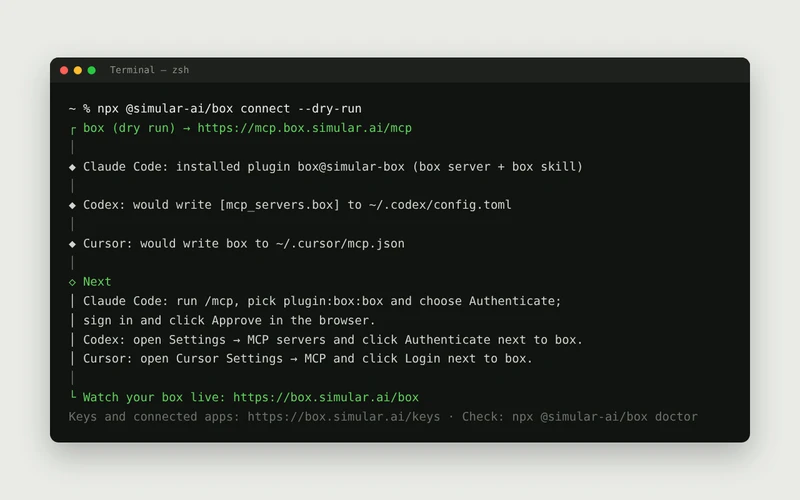
Useful flags: --client claude-code,codex to pick apps, --dry-run to preview, --yes to skip questions and --name if an app already has a different server called box. npx @simular-ai/box doctor checks the setup in each app and npx @simular-ai/box remove undoes it. The installer's source is on GitHub.
Claude Code by hand
claude mcp add --transport http box https://mcp.box.simular.ai/mcpThen run /mcp, pick box, choose Authenticate and approve in the browser.
Codex (app, CLI and IDE extension)
# ~/.codex/config.toml
[mcp_servers.box]
url = "https://mcp.box.simular.ai/mcp"

# then sign in:
codex mcp login box
The Codex app, CLI and IDE extension share this config, so one entry covers all three.
Cursor
{
  "mcpServers": {
    "box": { "url": "https://mcp.box.simular.ai/mcp" }
  }
}
Add this to ~/.cursor/mcp.json, then open Cursor Settings → MCP and click Login next to box.
Claude, ChatGPT and Gemini in the browser
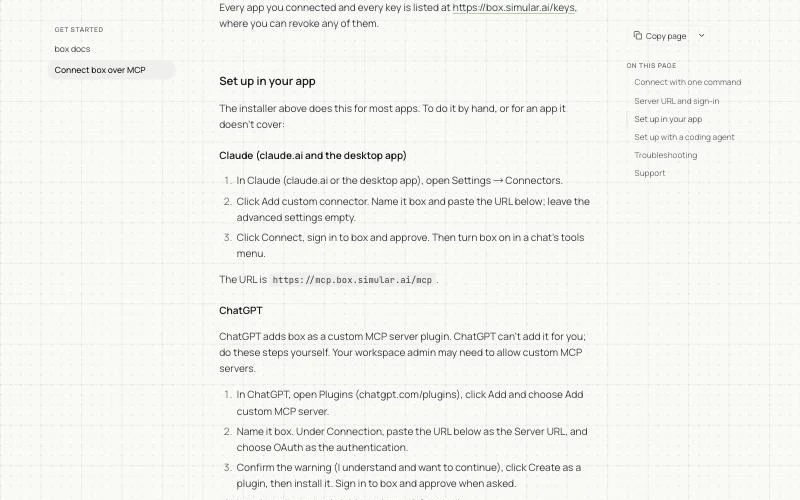
Claude (web or desktop app): open Settings → Connectors, click Add custom connector, name it box and paste the server URL. Click Connect, sign in and approve, then turn box on in a chat's tools menu.
ChatGPT: open Plugins at chatgpt.com/plugins, click Add and choose Add custom MCP server. Name it box, paste the server URL, choose OAuth, confirm the warning, create and install the plugin, then sign in. In a chat, type @ and pick box. A workspace admin may need to allow custom MCP servers first.
Gemini: on gemini.google.com, open Settings → Connected Apps, choose Add a custom app, paste the URL and sign in. Google currently offers custom apps to personal accounts of adults in the US using English; on Gemini CLI, run gemini mcp add --scope user --transport http box https://mcp.box.simular.ai/mcp, then /mcp auth box.
Step-by-step instructions for every client, including DeepSeek Harness and troubleshooting, are in the Simular Box MCP docs.
Let your coding agent do it
Set up box from https://box.simular.ai/installPaste that into Claude Code, Codex, Cursor or Gemini CLI. The agent reads the setup page as Markdown, runs the installer for its own app and asks you to approve the sign-in.
What your AI can do once connected
Start a new chat so the tools load, then try a first task:
- "Use box to open Chrome, search Google for 'Simular', and summarize the top 3 results."
- "Use box to open GitHub Trending and tell me what today's top 3 repositories do."
- "Use box to go to news.ycombinator.com and give me today's top 5 stories in a table."
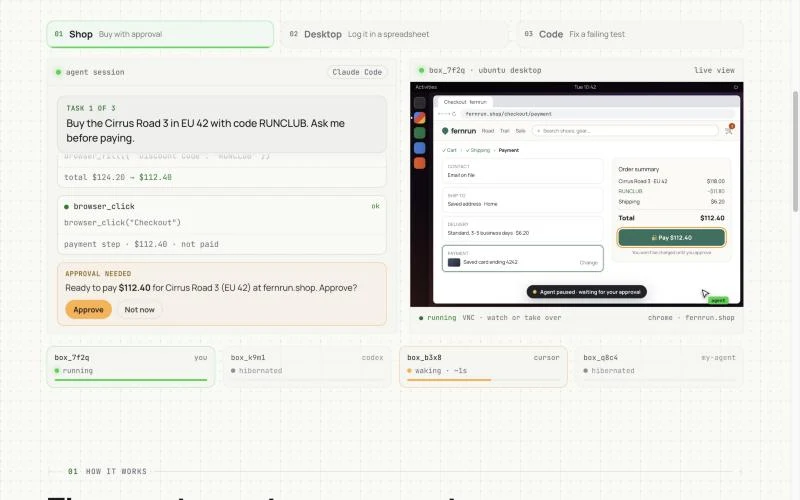
The live view above shows the pattern for anything sensitive: the agent works on its own desktop, then pauses and asks before a payment, a sign-in or a 2FA code, and you approve or take over in the browser. The same view shows each box, which agent is using it and whether it is running or hibernated; a box that is not in use hibernates and wakes in about a second when an agent connects.
Three workflows to try first
- Visual QA from a coding agent: "Build the change, deploy the preview, then use box to open the preview URL in Chrome, sign up with a test email, and send me screenshots of each step." The coding agent checks its own work while your laptop stays free.
- Research into a table from a chat app: "Use box to open these five vendor pricing pages and return a table of plan, price and limits, with the URL for each row." The browser tools read the page structure, so the table matches the page.
- A long job that outlives your laptop: "Use box to clone this repo, run the full test suite, and write the failures to failures.md." The shell does the work, the box keeps the result, and you can close the lid.
Under the hood: how Simular Box runs your computer
Each box is a Linux micro-VM with strict CPU and memory isolation, and the platform is GPU-ready. Boxes are served from a pre-warmed pool, which gives a sub-1.2-second p95 spin-up, and a VM is torn down and its memory reclaimed automatically when a session ends. Auto-scaling pipelines, multi-region failover, health-check telemetry and error watchdogs sit behind the pool, and the stack has been stress-tested at 1,000 concurrent VMs. The MCP server speaks JSON-RPC over Streamable HTTP for remote clients and stdio through local adapters, and the live view streams over low-latency noVNC and WebRTC. The core virtualization, micro-VM pooling and MCP routing run in production today.
Simular Box has a freemium version to start, and pay as you go after that.
MCP server for computer use vs a computer use API
A computer use API, such as the computer use tools offered by model providers, gives a developer raw actions to wire into their own agent loop: you host the machine, take the screenshots, send them to the model and execute what comes back. An MCP server for computer use packages the machine and the actions so that an existing client, like Claude Code or ChatGPT, can call them directly. Choose an API when you are building your own agent product; choose an MCP server when you want the AI app you already use to operate a computer. Our guide to computer use APIs covers the API route in detail.
Local alternatives
- Claude Code on a Mac: enable the built-in
computer-useserver from/mcpand grant Accessibility and Screen Recording. It is a macOS research preview on Pro, Max and Ultra plans and needs an interactive session. - Browser only:
claude mcp add playwright npx @playwright/mcp@latestadds Playwright MCP to Claude Code; other clients use the same package. - Windows or cross-platform:Windows-MCP for Windows apps; Cua Driver for macOS, Windows and Linux.
Troubleshooting
- No box tools after signing in: start a new chat. In Claude Code,
claude mcp listshows whether box is connected. - "Can't connect this agent" on the sign-in page: sign in again; if it repeats, remove the server and add it again.
- Signed out after a few days: access lasts the number of days chosen on the approval page; sign in again.
- The model says credits are used up: the free daily credit refreshes daily, or add credit on the billing page.
- Added box before November 4, 2026: the old URL
relay.simular.cloud/mcpstill answers but sign-in can fail; runnpx @simular-ai/box@latest connectto switch.
MCP server for computer use FAQ
What is an MCP server for computer use?
It is a Model Context Protocol server that exposes a computer's screen, input devices, browser and shell as tools an AI model can call, so the model can operate software the way a person does.
What is the best MCP server for computer use?
It depends on which computer you want driven. Playwright MCP is best for browser-only work, Cua Driver for local control across operating systems, and Simular Box for giving Claude, ChatGPT, Gemini or a coding agent a separate cloud computer. See our full comparison of the best computer use MCP servers.
How do I give Claude Code a computer?
Run npx @simular-ai/box connect or claude mcp add --transport http box https://mcp.box.simular.ai/mcp, then authenticate from /mcp. Claude Code can then use a cloud Ubuntu desktop with Chrome and a shell. On a Mac you can also enable Claude Code's built-in computer use for your own desktop.
Can ChatGPT use a computer through MCP?
Yes, through a remote MCP server added as a custom plugin. ChatGPT cannot start a local server, so the computer has to be hosted, as with Simular Box.
Does Codex support MCP servers for computer use?
Yes. Add the server to ~/.codex/config.toml and run codex mcp login box; the entry covers the Codex app, CLI and IDE extension.
Do I need a virtual machine to use an MCP server for computer use?
No. A local server drives your own computer. A separate machine is recommended when you want your laptop free, long tasks to keep running, or mistakes contained; a hosted server such as Simular Box provides that machine, already isolated as a micro-VM.
How does the AI see the screen?
Either through screenshots, which a vision model reads, or through an accessibility tree or browser snapshot, which lists elements as text. Snapshots are cheaper and more reliable when available; screenshots cover everything else.
Is computer use over MCP safe?
Run the agent on a separate computer, approve sign-ins and payments yourself in the live view, never paste passwords into chat, and revoke access you no longer need. Simular Box lists every connected app and key at box.simular.ai/keys.
How much does an MCP server for computer use cost?
Local open-source servers are free apart from model usage. Simular Box has a freemium version, with pay as you go after that.
Commands were checked against box.simular.ai/docs/mcp and the installer's own output on 4 November 2026.
Building autonomous computers doesn't mean replacing humans. It means cooperation.
Free your hands from the computer. Download Simular today for free.
