
Wir stellen SimuLang vor: Playwright für den gesamten Desktop
Palo Alto, California • Nov 8, 2026
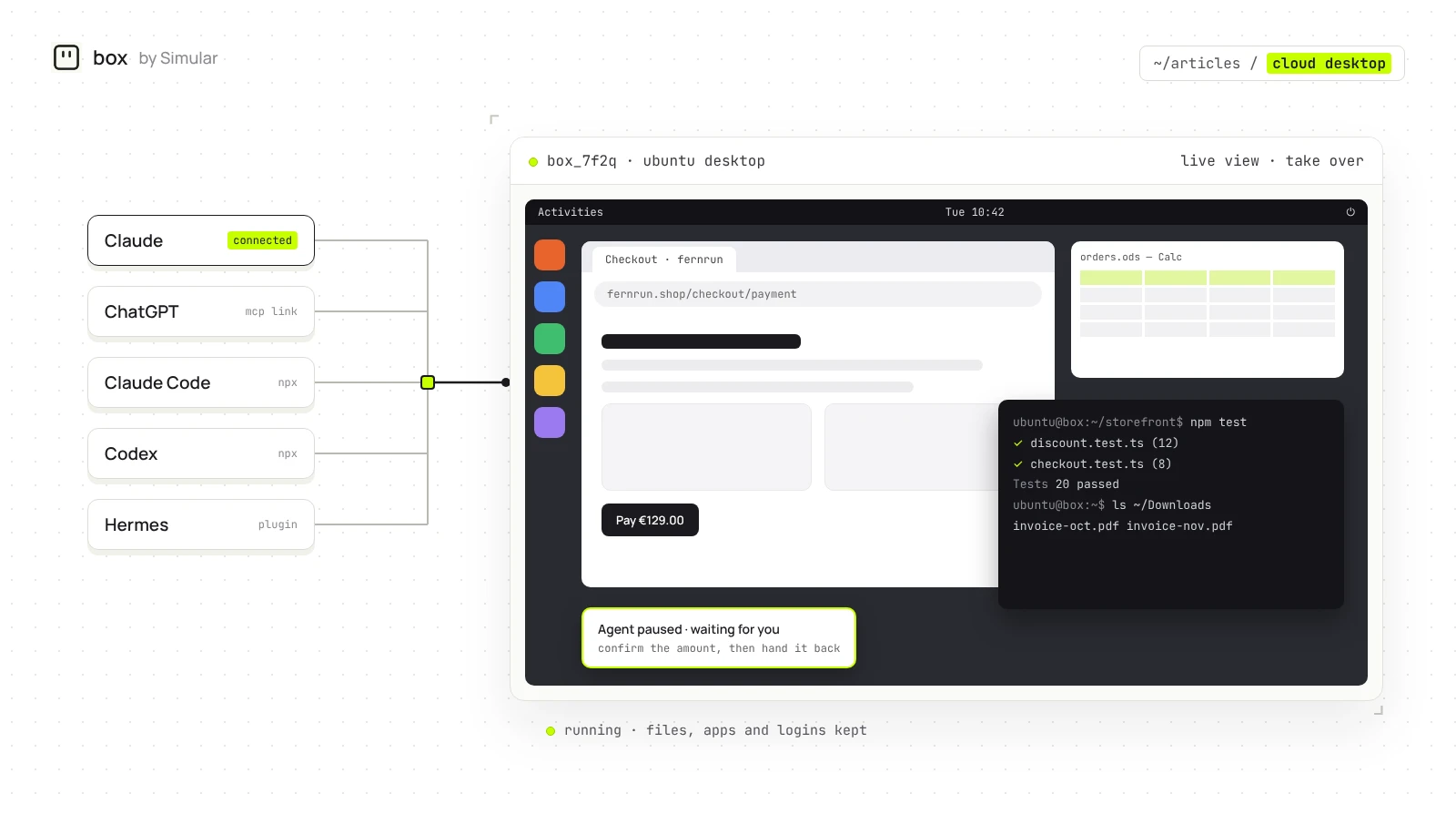
A cloud desktop is a complete computer, with an operating system, apps, a browser and files, that runs on a server in a data center instead of on the device in front of you. You reach it through a browser or a small app, and the server does the work. In 2026 the same idea has a second use: giving an AI agent such as Claude or ChatGPT a computer of its own to work on.
This guide explains how cloud desktops work, how they differ from a cloud PC, VDI, a VPS and a sandbox, and who needs one. The second half covers cloud desktops for AI, for three kinds of people who use AI every day, and how box by Simular gives the agent you already use a cloud desktop. Simular publishes this guide and makes box by Simular.
What is a cloud desktop?
A cloud desktop is a desktop operating system, usually Windows or Linux, hosted by a provider and streamed to you over the internet. Everything you would expect from a computer is there: a desktop, windows, a browser, installed software and a file system. Your own device only shows the screen and sends your clicks and keystrokes, so an old laptop, a tablet or a phone can run software it could never run locally.
Two things set a cloud desktop apart from a website or an app in the cloud. It is a whole computer, so any desktop software can run on it. And it persists: close the window and the desktop, its files and its open programs are still there next time.
How a cloud desktop works
- A provider runs the desktop on a server in a data center, isolated from other customers.
- The screen is streamed to you over a remote-display protocol such as RDP, VNC or WebRTC, often straight into a browser tab.
- Your mouse and keyboard input travels back to the desktop.
- Files and settings live on the server's disk, so they are there whichever device you connect from.
Software can drive a cloud desktop the same way a person does. Instead of a person watching the stream, an AI agent reads the screen, the web page or the app's controls and sends clicks and keystrokes, which Anthropic calls computer use. That is what makes cloud desktops useful for AI.
Cloud desktop vs cloud PC, VDI, VPS and sandbox
| Term | What it is | Who it is for | Has a desktop? |
|---|---|---|---|
| Cloud desktop | A full desktop hosted and streamed by a provider | Anyone who needs a computer they can reach from anywhere | Yes |
| Cloud PC | Microsoft's name for a personal cloud desktop, as in Windows 365 | Companies on Microsoft 365 | Yes, Windows |
| VDI | Virtual desktop infrastructure: a company runs many desktops on its own servers or cloud | Large IT teams | Yes |
| DaaS | Desktop as a service: VDI run by a provider, sold per seat | IT teams that do not want to run VDI | Yes |
| VPS | A rented virtual private server, often $5 a month, usually with only a command line | Developers and hosts | Only if you install one |
| Sandbox | A short-lived environment developers start from code to run untrusted code (see our E2B, Daytona and other sandboxes compared) | Developers building agents | Sometimes, as an add-on |
Why people use cloud desktops
- Work from any device, and pick up where you left off.
- Run heavy software without buying new hardware.
- Keep data off laptops that can be lost or stolen.
- Let IT set up a new desktop in minutes and revoke it in one click.
- Give contractors and short-term staff a computer without shipping one.
These are the reasons the glossary pages list, and they still hold. What is new is the user: more and more, the one working on the cloud desktop is an AI agent.
Why AI agents need a cloud desktop
Chat AI can plan, write and reason, but on its own it cannot click. To book a flight, export a report from a web portal, fill in a form or check that an app works, an agent needs a computer: a browser to sign in, files to save to and a desktop to open apps on.
There are two different things people mean by "running an agent in the cloud". Hosting the agent means the agent itself runs on a server, as ChatGPT, Claude and Codex cloud tasks already do. Giving the agent a computer means the agent, wherever it runs, gets a desktop it can use. A cloud desktop is the second thing. It is where the agent's work happens: the signed-in sites, the downloaded files, the apps it opened.
A cloud desktop also keeps that work in one place. Sign in to a site once and every agent you use can work with it. Files from yesterday's task are there today. And when a step needs a person, such as a 2FA code or a payment, you can open the same desktop, do that step and hand it back.
Do you need a cloud desktop for your AI?
| What you want your AI to do | Do you need a cloud desktop? | What to use |
|---|---|---|
| Chat, write, research, analyse files you upload | No | Claude or ChatGPT on their own |
| Write and run code in a repository | Usually not | Claude Code, Codex or Cursor, in the terminal |
| Read web pages | No | The browsing built into your AI app |
| Sign in to websites, fill forms, download and save files | Yes | A cloud desktop with Chrome that keeps logins |
| Use desktop apps, file dialogs or anything without an API | Yes | A cloud desktop with full computer-use control |
| Let several agents work on the same files and accounts | Yes | One cloud desktop shared by all your agents |
| Hand a long task off your laptop and get the result back | Yes | A cloud desktop your coding agent can offload to |
Cloud desktops for three kinds of AI users
People who mostly chat with Claude or ChatGPT
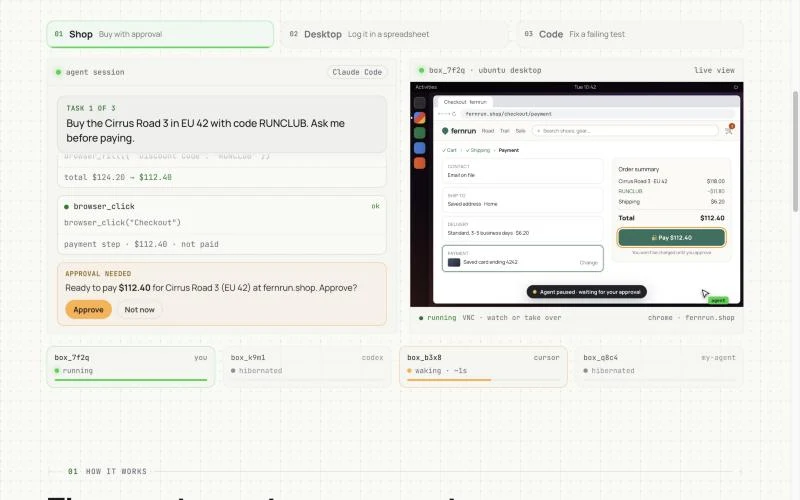
You pay for Claude or ChatGPT and use it every day, mostly in the chat. A cloud desktop lets the chat do things, not just answer: book the 9am flight with the airline account you already signed in to, download every invoice from a supplier portal into one folder, or compare five pricing pages and put the result in a spreadsheet. You stay in the chat, watch the desktop when you want, and step in yourself for anything that spends money: the agent never enters payment details.
What matters for you: it should work inside the app you already pay for, with no install, and your sign-ins should stay so you do them once.
People who keep agents running
You run OpenClaw, Hermes or Claude Code most of the day, sometimes several at once. A cloud desktop gives them one place to work that keeps yesterday's setup: the same signed-in accounts, the same files, the same apps. ChatGPT can put prices into a sheet on the desktop, and Claude can write the summary from the same sheet. When one agent hits its usage limit, another can carry on from the same screen.
What matters for you: one computer every agent can reach, state that persists between sessions, and a live view so you can see what each agent did.
Coders who want their agent to use a real desktop
You use Claude Code, Codex, Cursor or DeepSeek Harness and want the agent to test the UI it just built, sign up on the preview page, or drive a desktop app. You could wire a cloud machine together yourself, with a desktop, VNC, a computer-use driver and an MCP server (we compare the options in the best computer use MCP servers), but you would rather not maintain it. You also care how many steps and tokens desktop work takes.
What matters for you: one-line setup, control that uses commands and page structure before screenshots, and a way to move a long session off your laptop and bring the result back.
How box by Simular gives your AI a cloud desktop
box by Simular is a cloud desktop for the AI you already use: a Linux desktop with Chrome, files, apps and a terminal that keeps your logins between tasks. It does not include an agent. You bring Claude, ChatGPT, a coding agent or an always-running agent, on the subscription you already pay for.
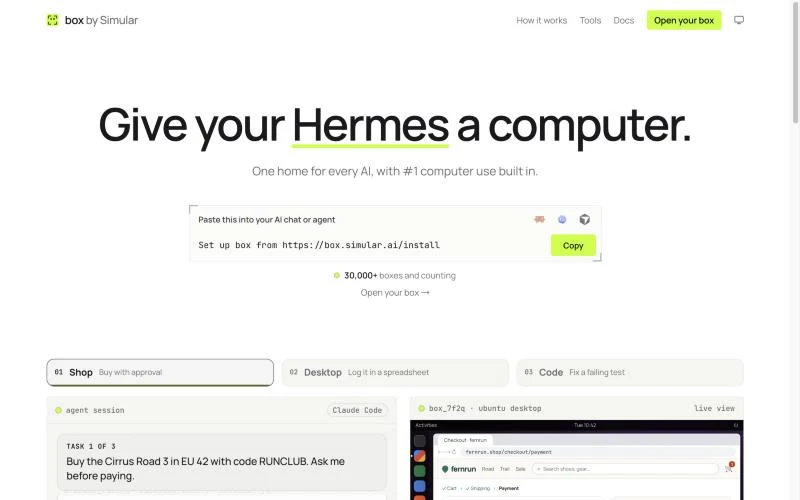
Connect it in one step. In Claude or ChatGPT, add one link, https://mcp.box.simular.ai/mcp, as a custom connector, then sign in and approve. For Claude Code, Codex, Cursor, OpenCode and Hermes, run npx @simular-ai/box connect. DeepSeek Harness has a plugin. Step-by-step instructions for each app are in the box by Simular MCP docs and our MCP server for computer use guide.
One computer for every agent. Sites you sign in to, files you save and apps you connect stay on the box. Switch from Claude to ChatGPT and nothing needs setting up again.
Full-stack control, screenshots last. The agent takes the most direct route first: a shell command, then the web page itself, then a desktop app's named buttons and fields. It looks at a screenshot only when nothing else works, and it can run several GUI steps in one call. Desktop tasks take fewer steps and fewer tokens.
Watch and take over. The live view at box.simular.ai/box shows the desktop as the agent works. Step in for a sign-in, a 2FA code or a payment, then hand it back.
Offload for coders. In Claude Code, /box:offload moves a task that is already under way, with its repo and context, into the box, and /box:back brings the commits back to your branch.
A box sleeps when idle and wakes in about a second when an agent calls it, with open programs, files and logins kept. box by Simular has a freemium version, and pay as you go after that; it is free during the beta.
What people do with a cloud desktop for AI
- Book travel or order supplies from the chat, with the agent pausing so you enter the payment yourself.
- Download statements or invoices from several portals and file them in one folder.
- Collect prices or listings from many sites into a spreadsheet that the next agent picks up.
- Test a web app end to end: sign up with a test email, click through every page, send screenshots back. For browser-only jobs, see our browser automation tools guide.
- Run a long coding or research session off your laptop and bring the result home.
How to choose a cloud desktop
- Who will use it. For yourself or your staff, a cloud PC or DaaS such as Windows 365 or Shells. For an AI agent, a desktop built for computer use.
- Which apps it must reach. Check that your AI app can connect: a custom connector for Claude or ChatGPT, or MCP for coding agents.
- What persists. Files, installed apps and signed-in sessions should survive between tasks.
- How the agent sees the screen. Page structure and app controls are faster and cheaper than screenshots alone.
- Whether you can step in. A live view with take-over handles sign-ins and payments safely.
- Operating system. Most agent desktops run Linux today; check if you need Windows or macOS apps.
Other cloud desktops worth knowing
| Product | What it is | Best for |
|---|---|---|
| Windows 365 | Microsoft's Cloud PC, with a separate Windows 365 for Agents tier | Companies on Microsoft 365 |
| Amazon WorkSpaces | AWS virtual desktops, with a preview that gives AI agents their own desktop | AWS customers |
| Shells | A personal Linux cloud desktop in the browser, from $14.95 a month | People who want a Linux desktop for themselves |
| Orgo | Always-on cloud desktops for agents, from $29 a month | Teams building agents that need persistent desktops |
| E2B Desktop | A Linux desktop add-on for E2B sandboxes | Developers building their own computer-use agent |
For a full comparison of cloud computers for AI agents on price, persistence and desktop support, see our guide to cloud computers for AI agents. To decide what kind of environment your agent needs, see do AI agents need their own virtual machine?
Cloud desktop FAQ
What is a cloud desktop? A full computer, with an operating system, apps, a browser and files, that runs on a server in a data center and is streamed to your device or driven by software.
Is a cloud desktop the same as a cloud PC? Mostly. Cloud PC is Microsoft's name for a personal cloud desktop in Windows 365. Cloud desktop is the general term and includes Linux desktops.
Is a cloud desktop the same as a virtual machine? A cloud desktop usually runs on a virtual machine, but it adds the desktop, the streaming and the management. A bare virtual machine or VPS often gives you only a command line.
Can ChatGPT or Claude use a cloud desktop? Yes, through a connector. Add box by Simular's link as a custom connector in Claude or ChatGPT, sign in, and the chat can use a Linux desktop with Chrome.
Do I need a cloud desktop if my AI already runs in the cloud? Only if it needs to sign in to sites, keep files, use desktop apps or share work with other agents. Reading web pages and writing code usually do not need one.
How much does a cloud desktop cost? Personal Linux cloud desktops start around $15 a month, Windows 365 is priced per user, and agent desktops range from usage-billed sandboxes to monthly seats. box by Simular has a freemium version, and pay as you go after that.
Facts about other products as of 8 November 2026.
Autonome Computer zu bauen bedeutet nicht, Menschen zu ersetzen. Es bedeutet Zusammenarbeit.
Befreie deine Hände vom Computer. Laden Sie Simular noch heute kostenlos herunter.
