
Wir stellen SimuLang vor: Playwright für den gesamten Desktop
November 13, 2026
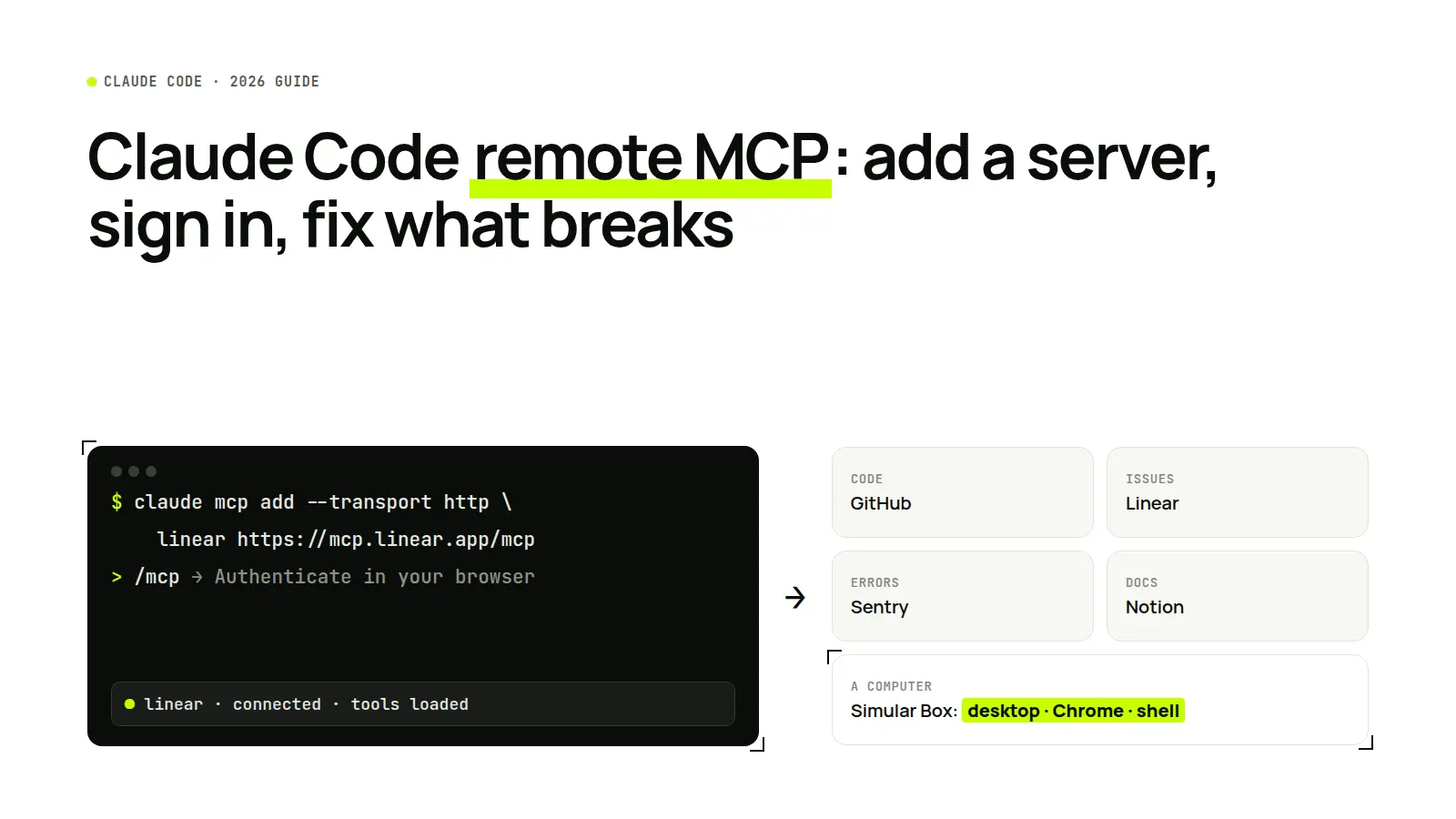
Short answer: To add a remote MCP server to Claude Code, run claude mcp add --transport http <name> <url> in your terminal, start Claude Code, type /mcp, and sign in to the server if it asks. Add --scope user to use the server in every project, or --scope project to share it with your team through .mcp.json. Claude Code remote MCP servers are hosted by the vendor, so there is nothing to install or keep running on your machine.
What is a remote MCP server in Claude Code?
The Model Context Protocol (MCP) is an open standard that lets an AI app call outside tools. A remote MCP server is one hosted on the internet and reached by URL over HTTP, rather than a program that runs on your own computer. In Claude Code, a remote server gives Claude new tools, such as reading GitHub issues or Sentry errors, without a local process, a Docker container or an API key in a local file.
Anthropic added remote MCP support to Claude Code on June 18, 2025. As Tom Moor, Head of Engineering at Linear, put it in that announcement: "Linear's MCP integration brings Linear projects and issues directly into Claude Code."
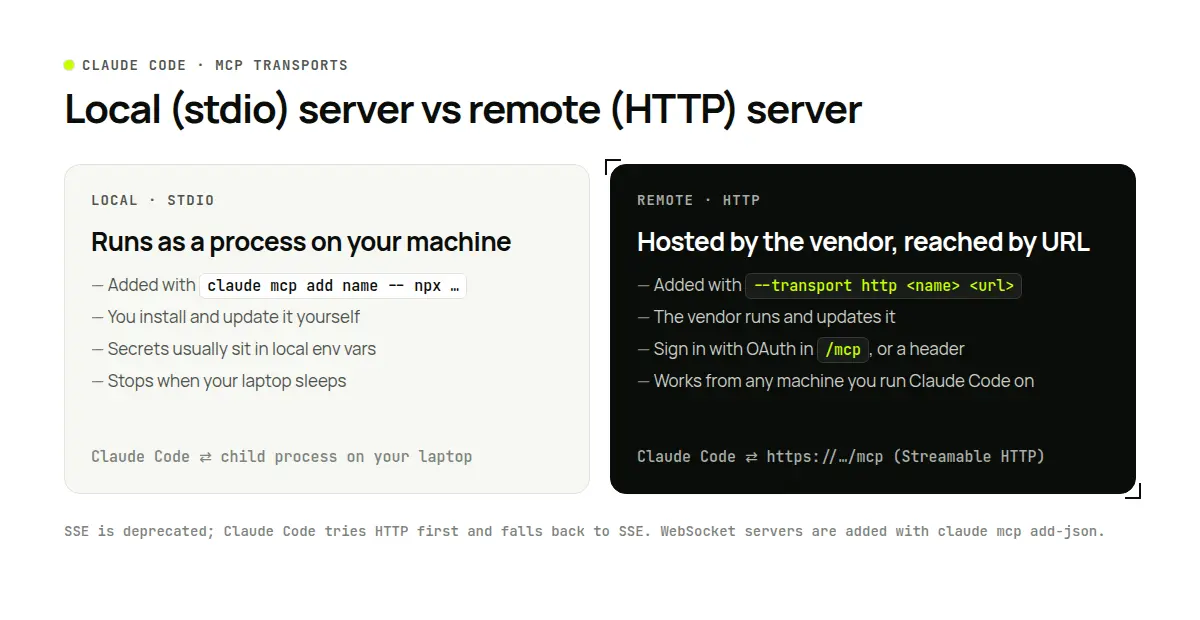
Remote MCP is not the same as running Claude Code remotely. Remote MCP connects Claude Code to tools hosted elsewhere. Running Claude Code on another machine, or controlling a session from your phone, is a different feature, which Anthropic calls Remote Control. The two work together: a Claude Code session you run on a server can use the same remote MCP servers.
How to add a remote MCP server to Claude Code
From the command line (recommended). HTTP is the recommended transport for remote servers. Run the command in your terminal, outside a Claude Code session:
# Basic syntax
claude mcp add --transport http <name> <url>

# Example: Linear
claude mcp add --transport http linear https://mcp.linear.app/mcp

# Example: a server that takes an API key in a header
claude mcp add --transport http my-api https://api.example.com/mcp \
  --header "Authorization: Bearer $MY_API_TOKEN"
In a JSON file. Teams often keep servers in .mcp.json at the project root. A remote entry needs a type of http (or streamable-http, the name the MCP specification uses):
{
  "mcpServers": {
    "sentry": {
      "type": "http",
      "url": "https://mcp.sentry.dev/mcp"
    }
  }
}
Leave out type and Claude Code reads the entry as a local stdio server, then skips it with an error that the entry has a url but no type.
SSE and WebSocket servers. The SSE transport is deprecated. From Claude Code v2.1.265, --transport http tries HTTP first and falls back to SSE for servers that only offer SSE; on older versions, use --transport sse. WebSocket servers are added with claude mcp add-json.
Pick a scope: local, project or user
The scope decides which projects load the server and whether your team gets it too.
| Scope | Flag | Loads in | Shared with team | Stored in |
|---|---|---|---|---|
| Local (default) | none, or --scope local | The current project only | No | ~/.claude.json |
| Project | --scope project | The current project only | Yes, through version control | .mcp.json in the project root |
| User | --scope user | All your projects | No | ~/.claude.json |
Use user scope for tools you want everywhere (docs, your issue tracker). Use project scope for servers the whole team needs on one repo; Claude Code asks each person to approve servers from a project's .mcp.json before it uses them.
Sign in: OAuth or an API key
Most hosted servers use OAuth. After adding one, start Claude Code, type /mcp, pick the server and choose to authenticate; a browser window opens for you to sign in. You can also run claude mcp login <name> from your shell.
For servers that take an API key, pass it in a header. In .mcp.json, reference an environment variable such as ${MY_API_TOKEN} instead of pasting the key, so the file can go into git without the secret.
Check that it works
- Run
claude mcp listto see every configured server, orclaude mcp get <name>for one server's status. - In Claude Code, type
/mcpto see which servers are connected and which still need sign-in. - Ask for something only the server can do, for example "List my open Linear issues assigned to me."
Remote MCP servers worth adding to Claude Code
Start with the services that hold your work, not a large bundle. Each server adds tools Claude has to choose between.
| Server | What Claude can do with it | Remote endpoint | Sign-in |
|---|---|---|---|
| GitHub | Read and update repos, issues, pull requests, Actions | https://api.githubcopilot.com/mcp/ | OAuth or token |
| Linear | Read and update issues and projects | https://mcp.linear.app/mcp | OAuth or API key |
| Sentry | Pull errors and traces while debugging | https://mcp.sentry.dev/mcp | OAuth |
| Notion | Read specs and team docs | https://mcp.notion.com/mcp | OAuth |
| Figma | Read design context to build UI | https://mcp.figma.com/mcp | OAuth |
| Vercel | Inspect projects, deployments and logs | https://mcp.vercel.com | OAuth |
| Simular Box | Use a cloud computer: shell, Chrome, desktop, files | See the box docs | OAuth, or a personal key for headless runs |
Endpoints are from each vendor's docs, checked November 13, 2026: GitHub, Linear, Sentry, Figma, Vercel, Notion (from Claude Code's docs). For servers that control a computer rather than a SaaS app, see our list of the best computer-use MCP servers.
Example: give Claude Code a cloud computer with one remote MCP server
Most remote servers connect Claude Code to an app. A different kind connects it to a whole computer. Simular Box (box by Simular) is a cloud computer served as one remote MCP server (Streamable HTTP, OAuth sign-in): an Ubuntu Linux desktop in the cloud with Chrome, files and a terminal.
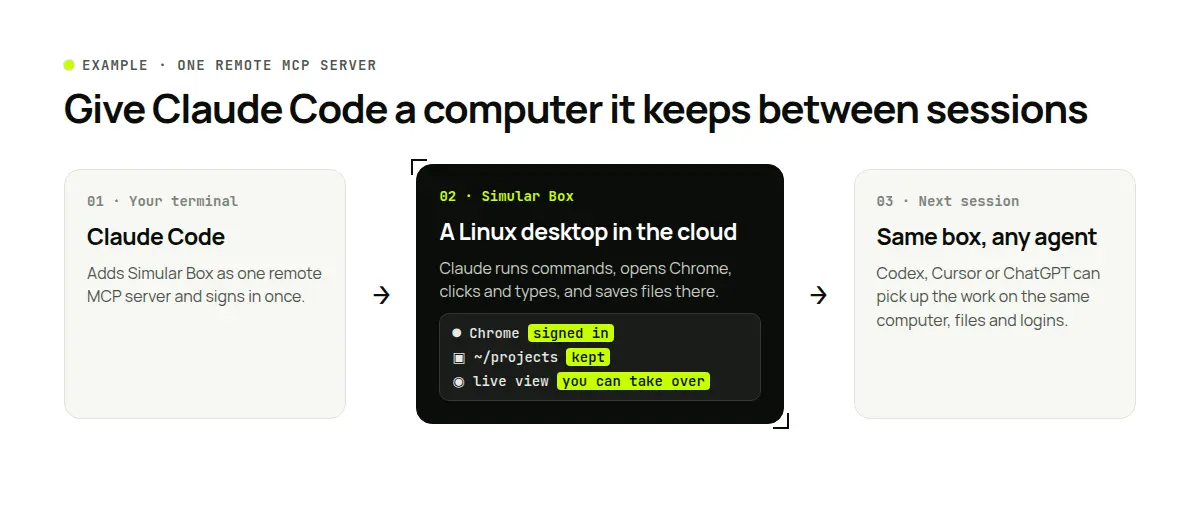
With box connected, Claude Code can:
- Keep heavy work off your laptop. Commands, builds, servers and browsers run on the box. Files and installed tools stay there after the session ends, so the next session picks up where this one stopped.
- Use a real browser. Claude opens your staging site or a dashboard in the box's Chrome, where your signed-in sessions stay. When a page needs a password or 2FA code, you take control and type it yourself.
- Keep API keys out of the chat. Keys you add as box secrets are used by commands on the box, while the AI only sees a stand-in value.
- Hand work to other agents. Codex, Cursor or ChatGPT can connect to the same box and continue on the same files; agents take turns on a box.
- Watch it live. The live view shows the box's screen as Claude works, and you can take control at any time.
Adding box to Claude Code takes one command and a sign-in, both in the box docs. Pricing starts with $5 of free credit; see box by Simular for plans. For background on why agents need their own computer, read do AI agents need a virtual machine? and MCP server for computer use. For other places to run Claude Code, see cloud computers for developers.
Limits to know: timeouts, output size and tool search
- Timeouts. For HTTP servers, each request gets at least 60 seconds to start answering. A whole tool call can run for about 28 hours by default; set
MCP_TOOL_TIMEOUT, or a per-servertimeoutin milliseconds, to cap it. - Output size. Claude Code warns when a tool returns more than 10,000 tokens and limits output to 25,000 tokens by default. Raise the limit with
MAX_MCP_OUTPUT_TOKENS. - Many servers. With tool search, on by default, Claude looks up the tools it needs instead of loading every tool from every server into context.
- Headless runs.
claude -pcan't stop to ask permission, so allow a server's tools for the run with--allowedTools mcp__<name>. Sign in to the server interactively on the same machine first, or use a header token on a CI machine.
All of these are documented in Connect Claude Code to tools via MCP.
Troubleshooting Claude Code remote MCP
| Symptom | Likely cause | Fix |
|---|---|---|
| Server skipped: has a "url" but no "type" | JSON entry without type | Add "type": "http" (or sse / ws) |
| Server shows "needs authentication" | OAuth not done, or the token expired | Open /mcp and authenticate, or run claude mcp login <name> |
| Sign-in fails with a redirect URI mismatch | The server expects a pre-registered callback | Add --callback-port, and --client-id if the server has no dynamic client registration |
| Can't finish OAuth over SSH | No browser on the remote machine | Run claude mcp login <name> in an ssh -t session: it prints the sign-in URL; open it on your own computer and paste the redirect URL back |
| 401 or 403 with a header token | Wrong or empty token | Check the variable the header reads; the connection fails rather than asking you to sign in |
| Server only speaks SSE | Older Claude Code version | Update Claude Code, or add it with --transport sse |
| Warning about the same name in two scopes | Duplicate definitions | Keep one and run claude mcp remove <name> --scope <scope> |
| Tools missing after adding a server | The session started before the server was added | Restart Claude Code, then check /mcp |
FAQ
Does Claude Code support remote MCP servers? Yes. Since June 2025, Claude Code connects to remote MCP servers over HTTP with claude mcp add --transport http <name> <url>, with OAuth sign-in through /mcp.
Is SSE still supported for Claude Code remote MCP? SSE is deprecated but still works. Newer versions fall back to SSE automatically; older ones need --transport sse.
Can Claude Desktop connect to remote MCP servers? Yes. In Claude on the web or the desktop app, a remote server is added as a custom connector under Settings → Connectors. If you sign in to Claude Code with the same claude.ai account, those connectors are also available in Claude Code.
Can I run Claude Code on a remote server? Yes. Install it on any Linux machine and run it over SSH, or use Anthropic's Remote Control to reach a session from another device. Remote MCP servers work the same way there.
Can Claude Code be used as an MCP server? Yes. claude mcp serve exposes Claude Code's own tools to another MCP client.
Where does Claude Code store remote MCP servers? Local and user scopes live in ~/.claude.json; project scope lives in .mcp.json at the project root.
Which remote MCP server gives Claude Code a computer? Simular Box is a remote MCP server for a whole cloud computer, so Claude Code can use a shell, Chrome and a desktop that persist between sessions.
Sources
- Anthropic: Remote MCP support in Claude Code
- Claude Code docs: Connect Claude Code to tools via MCP
- Claude Code docs: Remote Control
- Claude Code CLI reference
- GitHub MCP server setup
- Linear MCP
- Sentry MCP
- Figma MCP server
- Vercel MCP
- Simular Box docs
Commands and limits were checked against the Claude Code docs on November 13, 2026.
Autonome Computer zu bauen bedeutet nicht, Menschen zu ersetzen. Es bedeutet Zusammenarbeit.
Befreie deine Hände vom Computer. Laden Sie Simular noch heute kostenlos herunter.
