
Apresentando SimuLang: Playwright para todo o Desktop
Palo Alto, California • Nov 8, 2026
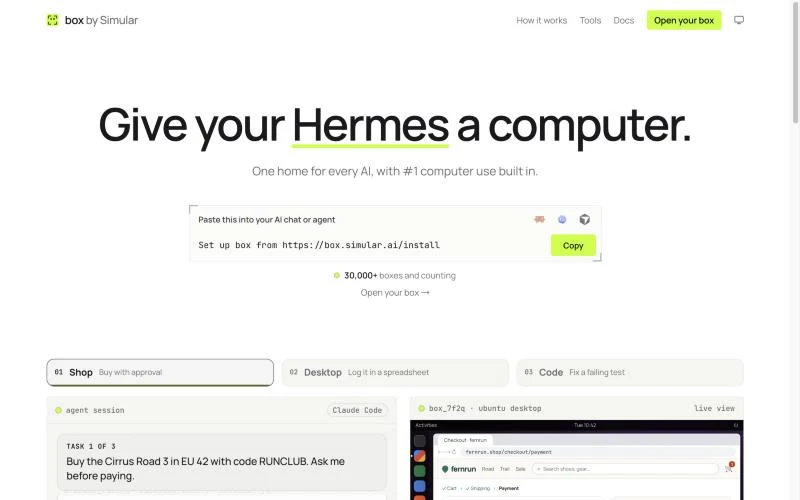
A Linux desktop in the cloud is a full Linux system, with a graphical desktop, a browser and files, that runs on a provider's server and that you open from a browser or a remote-desktop app. You do not need to own a Linux machine. There are three ways to get one: build it yourself on a rented server in about an hour, rent a managed Linux desktop by the month, or use a cloud desktop built for AI, such as box by Simular, if the main user will be Claude, ChatGPT or a coding agent.
This guide walks through all three, explains how to connect to a remote Linux desktop from Windows, macOS or Linux, and ends with a security checklist. Simular publishes this guide and makes box by Simular. For the bigger picture, see what a cloud desktop is.
Three ways to get a Linux desktop in the cloud
| Route | Setup time | Typical cost | Who maintains it | Can an AI agent use it? |
|---|---|---|---|---|
| DIY: VPS + XFCE + xrdp, X2Go or VNC | About an hour | A small VPS, roughly $5 to $25 a month | You | Only after you add a computer-use driver and an MCP server |
| Managed Linux desktop (Shells, Kamatera, Google Cloud Workstations) | Minutes | Monthly plan or hourly cloud billing | The provider | Not out of the box |
| Cloud desktop built for AI (box by Simular) | One link or one install line | Freemium version; pay as you go | The provider | Yes: Claude, ChatGPT, Claude Code, Codex, Cursor and other MCP clients |
Pick by who will sit at the desktop. If it is you, routes 1 and 2 are enough. If it is your AI, route 3 saves you building the connection layer.
Route 1: build it yourself on a VPS
You need a server with at least 2 vCPU and 4 GB of RAM; a lightweight desktop such as XFCE runs comfortably on that, while GNOME wants more. Any provider works, for example Hetzner, DigitalOcean or Akamai (Linode). The steps below use Ubuntu and xrdp.
- Create the server. Choose Ubuntu 24.04 LTS, 2 vCPU and 4 GB RAM or more, and add your SSH key.
- Install a desktop and xrdp. Connect over SSH and run
sudo apt update && sudo apt install -y xfce4 xfce4-goodies xrdp. - Tell xrdp to start XFCE. Run
echo xfce4-session > ~/.xsession, thensudo systemctl enable --now xrdp. - Do not open port 3389 to the internet. Tunnel it over SSH instead:
ssh -L 3389:localhost:3389 you@your-server. - Connect. Point a remote-desktop client at
localhost:3389and sign in with your Linux user. Clients are listed in the next section.
The Ubuntu desktop documentation covers variations such as GNOME. If you prefer X2Go, install x2goserver x2goserver-xsession instead of xrdp; it runs over SSH, so there is no extra port at all.
The cost of this route is upkeep: updates, backups, a firewall and fixing the desktop when a package upgrade breaks it are your job.
How to connect to a remote Linux desktop
Whichever route you choose, the desktop reaches you through one of four protocols.
| Protocol | How it works | Clients |
|---|---|---|
| RDP via xrdp | Microsoft's protocol, efficient and familiar | Windows App or Remote Desktop Connection on Windows, Windows App on macOS, Remmina on Linux |
| VNC | Shares the screen pixel by pixel; simple, slower over long distances | TigerVNC, RealVNC Viewer, Remmina |
| X2Go | Built on NX, tuned for slow links, runs over SSH | X2Go Client on all three systems |
| Browser streaming | The desktop is drawn in a browser tab through Apache Guacamole, noVNC or KasmVNC | Any modern browser, no install |
To reach a Linux desktop from Windows, the shortest path is xrdp on the Linux side and the built-in Remote Desktop app on Windows. From a Mac, use Windows App or an X2Go client. If you need to reach it from a locked-down work laptop, browser streaming avoids installing anything.
People also ask what is replacing RDP. For many teams it is browser streaming, because it needs no client and fits behind a single sign-on page. For AI agents, the answer is different: they do not need a picture of the screen streamed to them, they need a tool connection, which is route 3.
Route 2: rent a managed Linux desktop
If you want the desktop without the server work, a provider can host it for you. Shells sells a personal Linux desktop in the browser with several distributions to choose from. Kamatera and other cloud hosts offer Linux servers with a desktop image you can open from a browser. Google Cloud Workstations gives development teams managed Linux environments with a browser-based desktop option.
This route makes sense when the desktop is for a person: you get backups, updates and a login page handled for you, and you pay a monthly fee instead of spending evenings on maintenance. What none of these include is a way for an AI agent to use the desktop. You would still have to add a computer-use driver, an MCP server and authentication yourself.
Route 3: a Linux desktop your AI can use
An AI agent cannot use a VNC link the way you do. It needs a tool connection: a set of actions it can call, such as open a page, click, type, run a command or read a file, plus a way for you to watch and step in. Anthropic calls this computer use, and the standard way to plug it into an agent is an MCP server.
| What you want | Connection | What the AI can do |
|---|---|---|
| Look at the desktop yourself | RDP, VNC, X2Go or a browser tab | Nothing; it is your screen |
| Let Claude or ChatGPT use it from the chat | A custom connector (remote MCP) | Browse signed-in sites, fill forms, save files, use desktop apps |
| Let Claude Code, Codex or Cursor use it | An MCP server added to the coding agent | Test the UI it built, drive desktop apps, run long tasks off your laptop |
| Let several agents share it | One desktop all of them connect to | Pick up each other's files, logins and open apps |
box by Simular is a cloud desktop built for this. Each box is an Ubuntu Linux desktop with Chrome, files, apps and a terminal, and it keeps your logins between tasks. It does not include an agent; you bring the one you already use.
- In Claude or ChatGPT: add
https://mcp.box.simular.ai/mcpas a custom connector, sign in and approve. Nothing is installed. - In Claude Code, Codex, Cursor, OpenCode or Hermes: run
npx @simular-ai/box connect. - Watch and take over: the live view at box.simular.ai/box shows the desktop as the agent works. Step in for a sign-in, a 2FA code or a payment, then hand it back.
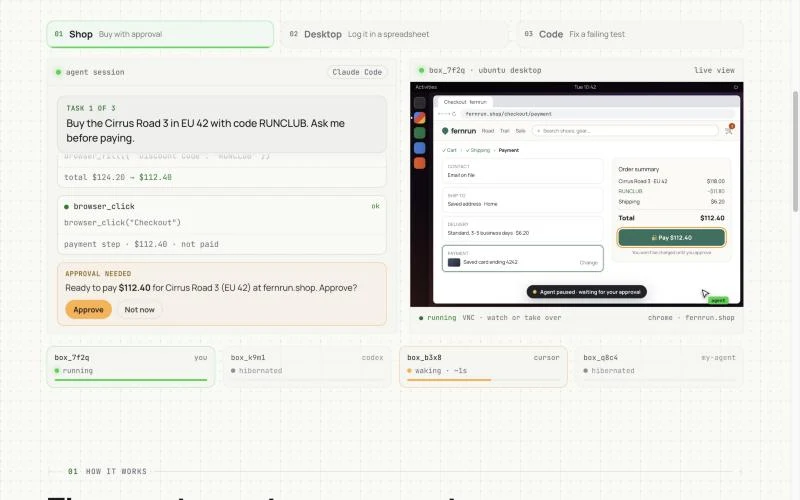
The agent uses the most direct route first: a shell command, then the web page itself, then a desktop app's named buttons and fields, and a screenshot only when nothing else works. A box sleeps when idle and wakes in about a second with open programs, files and logins kept. Setup steps for each app are in the box by Simular MCP docs; for a wider comparison, see our guides to cloud computers for AI agents and computer use MCP servers.
You can also open a box yourself, so the same Linux desktop serves you and your AI.
Security checklist for a Linux cloud desktop
- Keep the desktop behind a sign-in. Never expose VNC or RDP ports directly to the internet; use an SSH tunnel, a VPN or a provider's login page.
- Turn on automatic security updates (
unattended-upgradeson Ubuntu) if you run the server yourself. - Give AI agents their own accounts on the sites they use, not your main admin login.
- Approve payments, password changes and anything irreversible yourself, through take-over or a confirmation step.
- Delete or reset desktops you no longer use, along with the sessions saved in them.
FAQ
Is there a free Linux cloud desktop? Yes, with limits. Oracle Cloud's Always Free tier and the free credits most cloud providers give new accounts can run a small Linux desktop you build yourself. box by Simular is free during its beta and has a freemium version afterwards.
Which desktop environment is fastest over a network? XFCE and LXQt. They draw fewer effects than GNOME or KDE, so less data crosses the connection and they stay usable on 2 vCPU and 4 GB of RAM.
Can I run Ubuntu in a browser? Yes. Browser streaming tools such as Apache Guacamole and noVNC draw a remote Ubuntu desktop in a tab, managed services such as Shells do the same for you, and box by Simular shows its Ubuntu desktop in the browser through its live view.
How do I access a Linux desktop from Windows? Install xrdp and a desktop such as XFCE on the Linux machine, tunnel port 3389 over SSH, then connect with the Remote Desktop app that ships with Windows.
Can Claude control a Linux desktop? Yes, through a tool connection rather than a screen share. Developers can run Anthropic's computer-use tool against their own Linux machine; without writing code, you can add box by Simular as a custom connector in Claude and it can use an Ubuntu desktop with Chrome.
Facts about other products as of 8 November 2026.
Construir computadores autônomos não significa substituir humanos. Isso significa cooperação.
Liberte suas mãos do computador. Baixe o Simular hoje gratuitamente.
