


AI 브라우저 시뮬레이터
사이 만나기
Simular의 브라우저 및 데스크톱 자동화 기술로 구동됩니다.
디지털 업무 공간에서의 실제 작업을 위한 에이전트 AI 동료
모든 것에서 작동
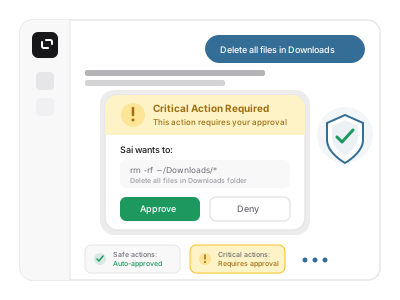
보안 및 승인
제로 셋업

What defines Sai
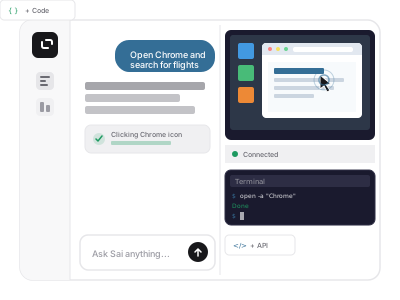
A browser AI experience built for real work
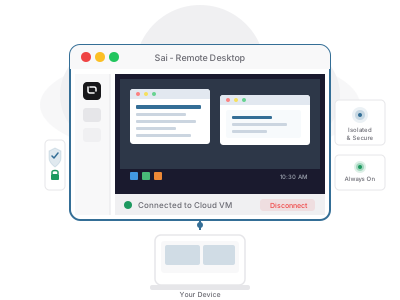
A secure digital workspace of its own
Guadrails built into every important step
Introduction to AI Browser Automation
AI browser automation helps make online tasks easier and faster. This technology allows businesses to use tools for automation, like web scraping and data extraction, which improve their efficiency. AI brings in intelligent browser bots that can carry out complex actions without much effort. Whether you need to automate a simple browsing task or handle web UI automation, AI is key to smoother online experiences.
Benefits of Using AI in Browser Automation
Using AI automation for browser tasks offers many advantages:
- Better Performance: AI agent tools can run performance testing automation. This means your applications will work smoothly and quickly.
- Automated Regression Testing: With automation software, it's easier to find problems after updates, which is great for keeping everything working right.
- User-Friendly Interfaces: Many automation services have easy-to-use interfaces, so you won't need a lot of training to get started.
- Cloud Computing Integration: AI can help with web application automation, giving your testing environments more flexibility, for both computer use agent and cloud based.
When companies use AI-enhanced web testing, they can save time and resources while making sure their systems are reliable.
Key Features of AI Browser Automation Tools
AI browser automation tools have several important features:
- Automated Browsing: Do repetitive tasks automatically without needing someone to click around.
- Web Automation Frameworks: These AI agentic frameworks support many coding languages and help with cross-browser testing automation.
- API Integration: It’s easy to connect with other software or services to add more functions.
- Automated Form Filling: Save time by having forms filled out automatically during online processes.
- ChatGPT Integration: Use conversational AI to assist customers or collect feedback quickly.
These features can help businesses operate more smoothly and improve customer satisfaction.
How AI Enhances Workflow Efficiency
AI significantly improves workflow efficiency in many ways:
- Automated Webpage Navigation: AI can manage several online tasks at once, cutting down on delays.
- User Experience Testing Automation: You can test websites easily to check how they perform under different conditions.
- Best Practices in Web Automation: Following industry standards is key to making your processes work well and reliably.
- Support from AI Testing Tools: AI assistants in workplace help ensure testing results are consistent and thorough.
By using these advances, companies can make their work smoother and focus on growth.
Get started for FREE with Simular AI and transform your business through the power of AI browser automation!
Understanding AI Browser Automation
AI browser automation is a cool way to make your online tasks easier. It helps you do things on the web automatically. With this technology, smart browser bots take care of boring stuff for you, which saves time and makes your work more productive. Here are some important parts of AI browser automation:
- Browser Automation Tools: These are apps that help automate your work with web pages.
- Automated Web Browsing: This lets you search the web, fill out forms, and move around sites all by itself.
- Web Scraping: It grabs data from websites without having to do it manually, making information collection super easy.
- User-Interface Automation: This automates how you interact with web apps, helping avoid mistakes.
- API Integration: It connects different apps to create more powerful automation tasks.
- Cloud Computing: This allows you to run your automation on powerful remote servers.
Benefits of AI Browser Automation
Using AI tools for browser automation can be very helpful. Here are some benefits:
- Better Efficiency: You can automate tasks like collecting data, so your team can focus on more important things.
- Less Mistakes: Using reliable automation software means fewer human errors in web interactions.
- Save Money: By making operations smoother, you can cut down on costs with browser automation software.
- Performance Testing Automation: You can check how well your website is working with ease using automation tools.
- Web Scraping with AI: It makes data collection quick for things like research and competition analysis.
- ChatGPT Integration: Integrate AI-driven chats to improve customer conversations effortlessly. In this way, AI browser can be used as a ChatGPT operator alternative.
How AI Browser Automation Works
Learning how AI automation functions will help you use it better. Here’s what you need to know:
- Web Automation: You can write scripts using languages like JavaScript or Python to carry out tasks in browsers.
- Automated Form Filling: You can set up data to fill in forms on websites automatically.
- GitHub Resources: You can find open-source projects online that provide code examples for building your automation skills.
- Code of Conduct: It's crucial to follow guidelines to use automation tools responsibly.
- Translations and License: Many tools offer support in different languages and follow licensing rules for safe use.
Use Cases for AI Browser Automation
AI browser automation is used in many different ways across businesses:
- Invoice Processing: Automatically fill in fields on bills and financial documents.
- Password Management: Keep your login details secure and fill them in automatically.
- Email Automation: Send emails according to a schedule without lifting a finger.
- Chatbot Deployment: Use smart bots to respond faster to customer inquiries.
- Automated Webpage Navigation: Make user journeys on websites easy by clicking links automatically.
- AI-Enhanced Web Testing: Quickly check if your website works smoothly.
Popular Tools for AI Browser Automation
There are many great tools for AI browser automation:
- Automation Software: These are full platforms designed for browser tasks.
- Docker Solutions: They help run your automation scripts easily in isolated environments.
- Y Combinator Projects: Innovative startups often share cutting-edge browser automation libraries.
- Click Automation Tools: These can mimic clicks and other actions to handle routine tasks in your browser.
- Multi-Browser Support: Many tools let you work across different web browsers without issues.
- Web Automation APIs: These allow you to add automation features to your existing applications.
- Desktop AI Browser Automation: Desktop AI assistant has the capability to act as an AI browser.
Getting Started with AI Browser Automation
Starting with AI browser automation is simple. Follow these steps:
- Choose an Automation Tool: Pick something that suits your needs!
- Learn the Basics: Get to know web scraping frameworks and the basics of automation.
- Utilize Telemetry: Keep track of your automation efforts to see how you can improve.
- Incorporate Generative AI: Use advanced tech like ChatGPT to make the experience interactive.
- Engage in Regression Testing: Set up automated tests to keep your quality high.
- Optimize User Experience: Make sure automation helps your website visitors have a better experience.
Explore the benefits of AI browser automation now! Get started for FREE and change how you interact with the web!
Understanding AI Browser Automation
AI browser automation is changing how we use the internet. With automation, businesses can make their web automation tasks easier and faster. Here’s a quick overview of this exciting tech:
- Browser Automation Tools: These are programs that help automate different actions in web browsers.
- Web UI Automation: This means automating interactions with user interfaces on websites.
- Robotic Process Automation (RPA): This uses AI to carry out a lot of digital tasks quickly and accurately.
- Automated Web Interactions: Complete tasks like data entry or retrieving information without human input.
With AI leading the way, these tools cut down on mistakes and boost productivity in many areas.
Benefits of Using AI for Browser Automation
Bringing AI into your browser automation setup can really improve how you work. Check out these great benefits:
- Efficiency: Automate boring tasks like web scraping and data extraction, so you can focus on what really matters.
- Productivity: AI tools can take on multiple jobs at once, making workflows smoother.
- Automated Form Filling: Save time by letting AI handle online data entry.
- Web Application Automation: Speed up testing and get better results using smart browser bots.
These advantages help simplify everyday digital tasks and enhance operational efficiency.
Key Features of Simular AI’s Browser Automation Tools
Simular AI offers browser automation tools loaded with features to make things easy for users:
- User Interface: A simple layout ensures everyone can find what they need.
- Automated Browsing: Our software lets you run tasks without lifting a finger.
- Cloud Computing: Access your automation tools from anywhere, at any time.
- API Integration: Use click automation tools to improve your current setup.
- Browser Performance Optimization: Keep resources efficient for quicker loading.
Seamless Web Interactions
- User Experience: Enjoy smooth browsing with automated webpage navigation that feels natural.
- Automated User Interaction: Employ AI browser plugins for an engaging experience without manual work.
Automated Workflows Made Easy
Setting up automated workflows is super simple:
- Automation Service: Our solutions allow for real-time processing of tasks with ease.
- Multi-Browser Automation: Handle tasks across various web browsers without hassle.
- Web Automation Frameworks: Use organized methods to speed up task execution.
Getting Started with Simular AI’s Browser Automation
Ready to jump into AI browser automation? Follow these steps:
- Visit GitHub: Check out our tools and resources.
- License: Look over the licensing details.
- Setup: Download the required software and plugins.
- Installation: Use our guides for a straightforward installation process.
- Explore Libraries: Find powerful browser automation libraries for extra features.
Use Cases for AI Browser Automation
AI browser automation can help many different industries. Here are some examples:
- Invoicing: Make billing easier and faster.
- Data Management: Efficiently gather, organize, and use data.
- Email Handling: Automate replies and sorting of messages.
- Chatbots: Improve customer service with quick responses.
- 2FA Management: Secure logins using automatic authentication.
- Automated Regression Testing: Maintain software quality through repeated checks.
- Web Bot Development: Build smart bots to help with online tasks.
- Performance Testing Automation: Test website performance regularly to spot areas for improvement.
Conclusion
Using AI in browser automation boosts efficiency and helps businesses grow. The right tools make it easier to be productive and effective. Try Simular AI today and see how it can transform your work!
How does Sai work across the desktop?
Connect to the tools you already use with zero setup
Sai works across the software and platforms you already rely on, without requiring complicated setup or manual integrations. Just describe the task in natural language, and Sai can begin working from there.
Assign work to a private virtual machine
Give Sai a task, and it runs inside its own private virtual machine. That means your real computer environment stays untouched, so you can automate work safely without worrying about disrupting your local setup.
Operate software directly across desktop and browser
Sai can click, type, navigate interfaces, switch between tools, and complete tasks across both desktop applications and browsers. It works more like a real teammate using software, not just a chatbot giving suggestions.
Improve, repeat, and scale over time
Sai keeps context across tasks, so work does not have to restart from zero every time. You can refine outputs, build reusable skills, and create automation workflows that can be triggered again whenever you need them.
