
隆重推出 SimuLang:桌面版 Playwright
Palo Alto, California • Oct 13, 2026• by Simular Team
Simulang 是一种用于自动化浏览器、原生应用和操作系统级工作流的脚本语言,旨在由AI代理编写。我们刚刚开源了 Simulang。您现在只需一条命令即可安装它:
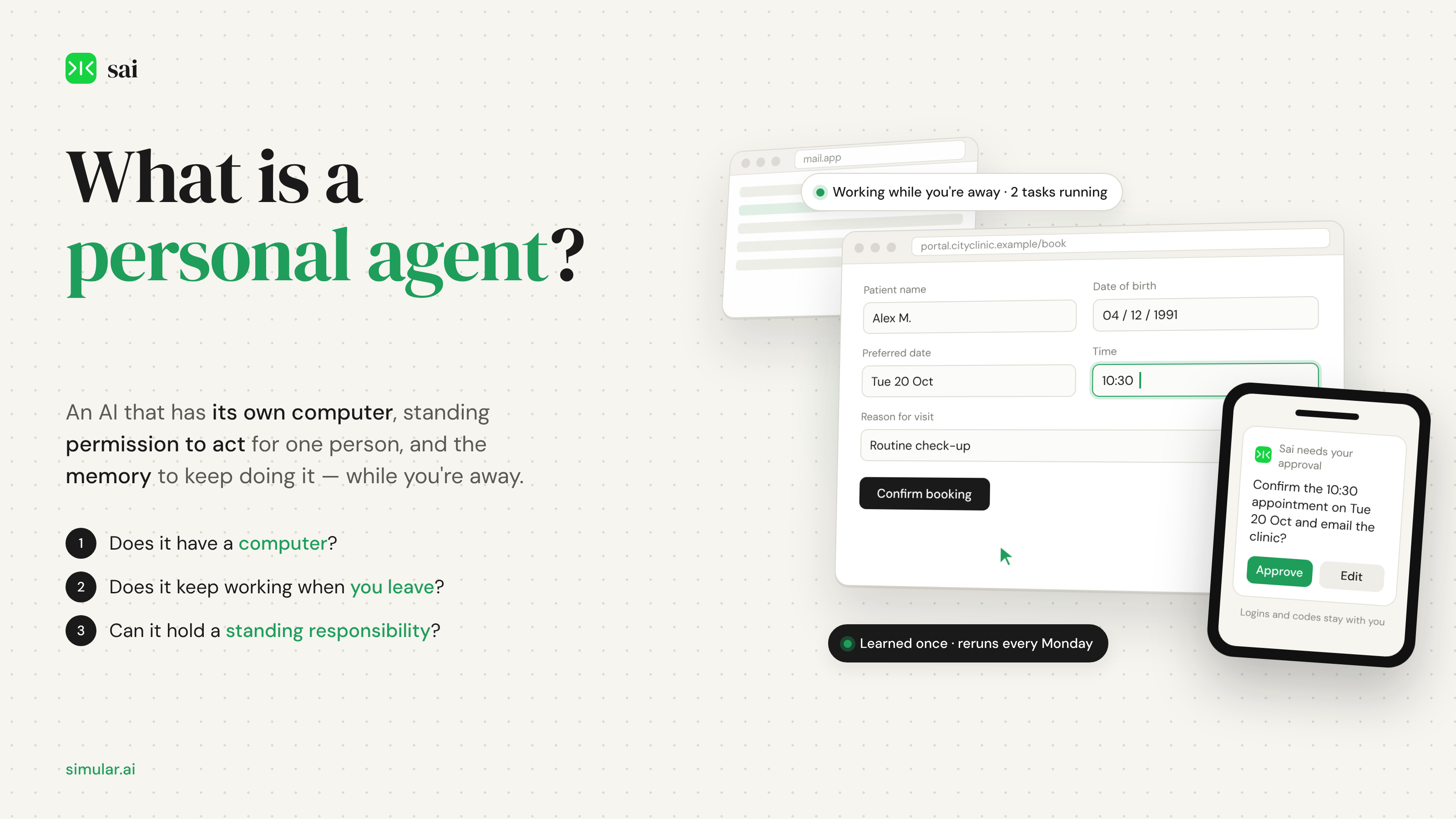
What is a personal agent?
A personal agent is software that works for one person. It holds that person's context (their calendar, inbox, files, logins and preferences), it has a computer of its own or supervised access to theirs, and it is allowed to take actions, not just suggest them: open a website, fill in a form, send an email, move a file, make a booking, check out a purchase. It runs whether or not the person is watching, reports back when something changes, and asks for approval at the points its owner has marked as sensitive. Over time it remembers how the person likes things done and takes on recurring responsibilities rather than one-off requests.
Three tests separate a personal agent from a chatbot with plugins. First, does it have a computer? Ben Thompson's formulation in Stratechery in September 2026 is the clearest: "The key thing to understand about agents is that they are not just AI: they are an AI that has access to a computer." Muse runs on a dedicated cloud virtual machine with its own browser; dots runs "on its own cloud computer with its own cloud browser"; Sai "lives in its own cloud virtual machine"; Claude and Perplexity's Personal Computer can take over a Mac. Second, does it keep going when you leave? Meta says Muse "keeps working after people close the app"; Google says Spark "keeps working when the laptop is closed or the phone is locked"; OpenAI says a dot "keeps making progress between conversations". Third, can it hold a standing responsibility? Scheduled and recurring tasks, triggers such as "when a statement arrives, check it for new fees", and learned routines are now table stakes. If a product passes all three, it is a personal agent; if it passes none, it is an assistant, however good its answers.
"Personal" is about whose goals the agent serves, not where it runs. A personal agent can live in the cloud, on your laptop, or on a Mac mini in a cupboard; what makes it personal is that it is configured, permissioned and remembered for one individual rather than a team or a company. That is also why the category has its own economics. As a16z observed in its October 2026 consumer AI report, "Personal agents, in particular, show potential to monetize on transactions rather than seats."
Personal agent vs AI assistant: what actually changed
The names are confusing because the same companies use both. Apple describes Siri AI as "a profoundly more capable and personal assistant" and never says agent; Amazon calls Alexa+ "your personal AI assistant that gets things done" while describing self-directed web browsing; Meta uses "agent" and leads with the computer. The table below is the distinction that holds up across products, whatever they are called.
Two of those rows matter more than the others. "Where it works" is what Thompson's definition is about: an agent needs a screen, a keyboard and a mouse somewhere, because the long tail of personal admin lives in web forms, portals and desktop apps that have no API. "Failure mode" is why every serious personal agent shipped with an approval system and not just a terms-of-service page. When an assistant is wrong you re-read; when an agent is wrong an email has gone out or a card has been charged.
Why 2026 became the year of the personal agent
Three things converged. Models became reliable enough at reading screens and clicking the right thing that vendors were willing to let them act on real accounts: on the OSWorld 2.1 benchmark of real desktop tasks, the leading agents now report partial-score results in the high seventies and low eighties, where two years ago the best was under 40%. Cloud computers became cheap enough to give every user one; Muse, dots, Spark and Sai all run on a per-user virtual machine rather than on your phone. And the large platforms concluded that the chat window was the wrong product. Meta's launch post put it bluntly: "It doesn't just answer questions, it actually does the work."
Notice the last column. Every entry that calls itself an agent answers the question "where is the computer?" in its launch materials, and most answer "we give you one". That was not true of any mainstream consumer AI product at the start of 2026. Demand was already there: Accenture's January 2026 survey of 25,590 consumers in 16 countries found that 80% would delegate at least one daily activity to a personal AI agent and 74% were open to agents handling renewals, reorders and negotiation, though only around a tenth were comfortable with fully autonomous shopping. The products arrived to meet a willingness that was waiting for a safety model.
What a personal agent is made of
Strip the branding away and every personal agent on the market is the same five parts, and the differences between products are mostly differences in how each part is done.
A computer
This is the part that distinguishes the category. The agent needs somewhere to run a browser, open files and operate apps; this is what computer use means in practice. There are three designs. A cloud computer the vendor provides (Muse Secure VM, dots, Gemini Spark, Sai's Windows or Linux cloud computer, Perplexity Computer) is always on, never needs your laptop open, and keeps your personal device out of the blast radius if something goes wrong. Your own device (ChatGPT Work's Computer Use, Claude's desktop app, Perplexity's Personal Computer on a Mac, Sai in bring-your-own-device mode) can reach local files and apps that only exist on your machine and keeps data where it already is. A hybrid offers both, which is where the category is converging: Muse added Mac desktop control two weeks after launch, dots lets you grant access to your local computer, and Sai lets the same agent run on a cloud machine or your Mac mini.
Permissions
An agent is only as useful as what it is allowed to touch, and only as safe as what it is not. The better products expose scopes per service rather than one big switch: Muse lets you grant email read-only or read-and-send; dots has four behaviours per rule (act without asking, act if pre-approved, ask before acting, hand off to you); Google says Spark is "designed to ask first before high-stakes actions such as spending money or sending emails"; Sai routes logins, passwords and phone verifications to you rather than typing them. A pattern worth looking for is credential isolation: Muse and dots store passwords and payment details where the model itself cannot read them, and Muse checks out with one-time Link by Stripe cards so a merchant never sees your real card.
Approvals and the audit trail
Because the failure mode is a wrong action, the approval model is the product. Look for three things: a default of asking before consequential steps, the ability to pre-approve specific routine actions so the agent stops interrupting you, and a complete record afterwards. Meta's design goes furthest in architecture, with a separate Sentinel agent on the same VM that must approve anything Muse sends to the internet; OpenAI's auto-review model checks account-affecting actions and keeps some, such as password changes, human-only; Sai sends approval requests to your phone and notifies you over iMessage or Telegram. Every product on the timeline above publishes an activity view or audit trail.
Memory and learning
Memory is what makes the agent personal on the second day. At minimum this is saved facts and preferences, which every product now has and most let you edit or tell the agent to forget. The more valuable form is procedural: remembering how a task was done so it can be repeated. Sai's version is explicit, "teach it once, and Sai reruns on a schedule, getting more reliable and cost-efficient each time", because a routine it has learned is compiled into a repeatable procedure rather than re-reasoned from scratch; Spark calls the equivalent "learned skills" such as monitoring an inbox and producing a daily digest.
Channels
A personal agent that lives only in an app is an assistant with extra steps. The 2026 generation reaches you, and is reached, where you already are: Muse inside WhatsApp and Instagram, dots over Slack, Teams and text, Alexa+ through Echo devices, Sai over iMessage and Telegram, Martin by phone call. a16z's observation about this cohort was that "most of these agents strive to be available everywhere, like a human assistant, you can text, email, or call."
What a personal agent can do for you today
The honest answer is: the admin you keep putting off, provided it lives in a browser or a desktop app the agent can reach. These are the use cases the current products demonstrate in their own materials (for a product-by-product comparison, see our ranking of the best personal agents), with the caveat that reliability varies by task length and by how unusual the website is.
Inbox and calendar triage. Reading what arrived overnight, drafting replies for approval, moving meetings, and producing a morning briefing. This is the most mature use case; Spark's inbox monitoring, Claude's scheduled briefings and Muse's commitment tracking all do it, and it is the default first task people give Sai.
Bookings and reservations. Restaurants, travel, appointments and service providers. Alexa+ books through OpenTable, Vagaro and Thumbtack "with no need to supervise or intervene"; Muse books travel and negotiates; Sai fills the booking form on whatever site the provider uses, which matters for the clinic or garage that has never heard of OpenTable.
Purchases with a safety net. Reordering household items, buying the thing you asked it to research, checking out with a one-time card. This is where approval settings earn their keep; Muse and dots both require confirmation before purchases by default, and consumer surveys show most people want it that way.
Forms, portals and paperwork. Insurance claims, school registrations, government portals, warranty registrations, expense submissions. These are the tasks with no API and no integration, which is precisely why a personal agent needs a computer rather than a list of connectors. Sai's launch examples are of this kind: copying cells from a spreadsheet into a web form, uploading invoices, retyping data between systems.
Recurring monitoring. Watching a bank statement for new fees, a price for a drop, a portal for a status change, a folder for a new file, then telling you or acting. Spark's triggers and Sai's scheduled reruns are built for this, and it is the use case where "keeps working when the app is closed" stops being a slogan.
Files and documents on your own machine. Organising folders, turning a pile of PDFs into a summary, building a document from local files. Claude, Perplexity's Personal Computer, Spark's macOS app and Sai in bring-your-own-device mode work on the actual files rather than copies you upload.
How to choose a personal agent
Five questions sort the market. Where is the computer, and do you want the agent on your own device or on one it brings? If your tasks are mostly web portals and you want your laptop out of the loop, a cloud computer is the safer and more convenient default; if your tasks are local files and desktop apps, you need device access or a hybrid. What happens at the password prompt and the checkout? Prefer products where the model never sees credentials and where purchases and messages ask first by default. Can it hold a schedule? If the thing you want is "every Monday" or "whenever X happens", confirm the product has recurring tasks and triggers, not just a chat. Does it get better at your routines? Procedural memory, whether it is called learned skills, replay or routines, is what turns a demo into a habit. And what does it cost at the usage you expect? Plans range from free tiers (Muse, Sai Explore, Alexa+ with Prime, Perplexity's Mac app) through $20 to $100 a month, to $100 to $500 plans for always-on or heavy use (dots with ChatGPT Pro, Spark with AI Ultra, Sai Unlimited, Perplexity Max), with several vendors moving to usage or transaction pricing on top.
One more filter that most buying guides skip: ask whether the vendor publishes how often the agent completes a task. Chatbot benchmarks measure answers; the relevant measure for an agent is completion of multi-step work on real software. OSWorld is the public benchmark for that, and a vendor who reports a score and a cost per task is telling you something a feature list cannot.
Where Sai fits
Sai by Simular is a personal agent built around the computer. Simular calls it a robosecretary: "for ambitious multitaskers, Sai runs autonomous computers to offload the endless screen tasks that devour your day." It lives in its own cloud Windows or Linux computer, so tasks run without your laptop open, or on your own Mac or Windows machine (a Mac mini is the suggested always-on setup) when the work needs your local apps and files. You hand it a task in plain language, it operates the browser and desktop applications the task touches, and it sends approval requests for important actions to your phone; logins, passwords and phone verifications are never typed by the agent. Your setup, logins, preferences and context persist between sessions, and a routine you have taught it reruns on a schedule, getting cheaper and more reliable each time because the learned procedure is replayed rather than re-reasoned. Simular is the research group behind Agent S, and reports Sai at a 77.3% partial score on OSWorld 2.1 at $14.34 per task with trajectories public, which is the kind of completion figure this guide suggests asking every vendor for.
Pricing is on sai.work/pricing: Explore is free with a pooled Windows cloud computer and credits refreshed daily; Pay as you go is $50 a month for 50,000 credits with a dedicated cloud computer billed only while it runs, or your own device with only AI usage counted; Sai Unlimited is $500 a month with an always-on cloud computer. If you want to test the definition in this article, give Sai the one piece of admin you have been avoiding and watch it ask you before the step that matters. Try Sai free.
