
Oops! Something went wrong while submitting the form.


.svg)
Marketers rarely fail because their ideas are bad; they fail because the math is fuzzy. A SaaS marketing budget template forces you to line up every dollar with a channel, a forecast, and a revenue expectation. In one place you can see ARR, CAC, payback, and pipeline targets, then have an honest conversation with your CFO about what each program is really worth.
Now imagine that instead of babysitting spreadsheets, you hand this template to an AI computer agent. Each week it logs into ad platforms, CRMs, and billing tools, pastes fresh numbers into Google Sheets and Excel, refreshes formulas, flags overspend, and drafts a short narrative for your leadership team. You stay in strategy mode; the agent lives in the rows and columns, turning a static template into a living financial cockpit that quietly keeps your growth engine on course.
Before you automate, you need a solid baseline. Here is a practical manual workflow many SaaS teams start with.
Step 1: Create your budget file
Name the file clearly, for example: 2025_SaaS_Marketing_Budget_v1.
Step 2: Set up core tabs
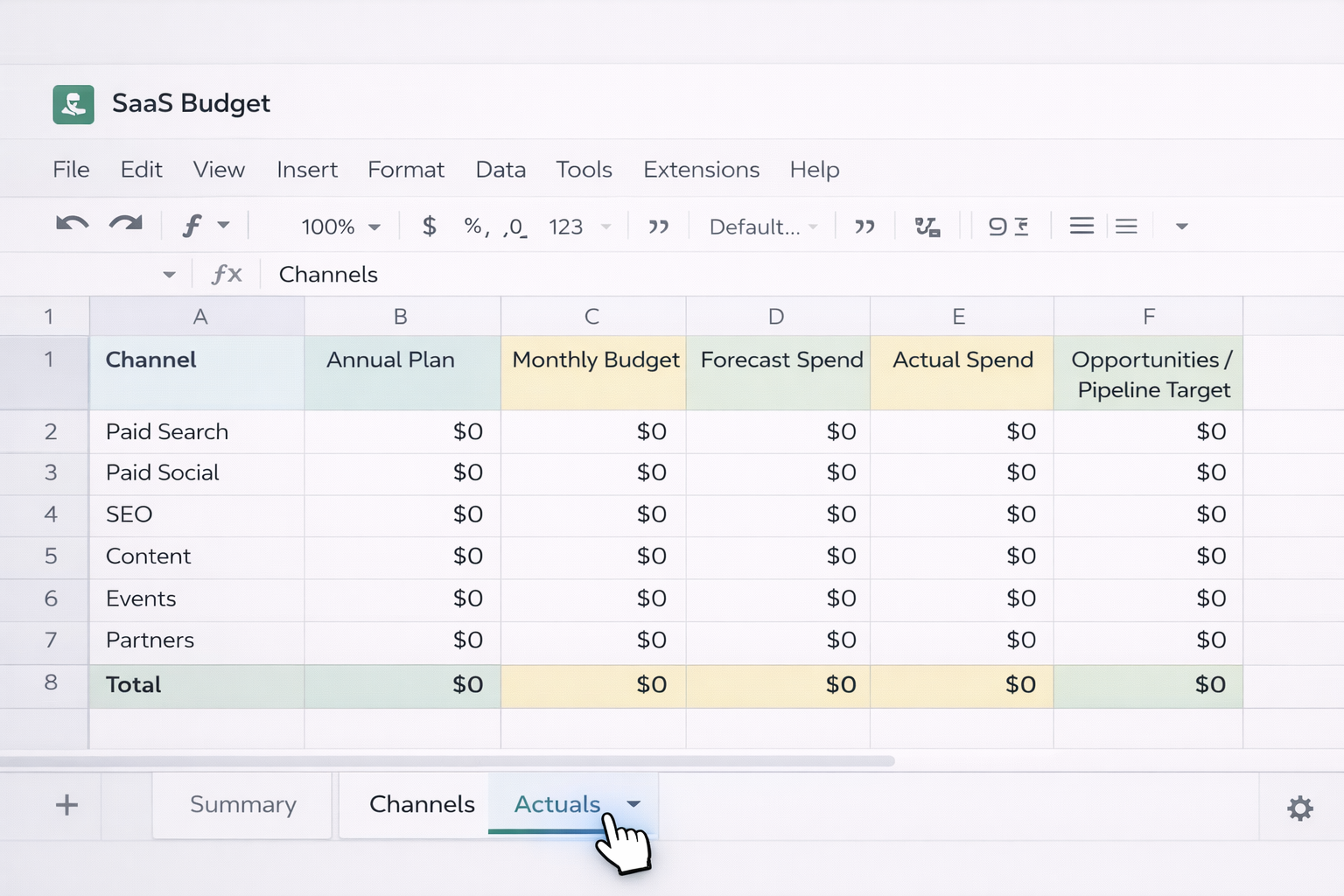
Create at least three sheets/tabs:
Summary – high-level view: ARR, total budget, CAC, payback.Channels – rows for Paid Search, Paid Social, SEO, Content, Events, Partners, etc.Actuals – monthly spend and results pulled from real data.
In Channels, add columns:
Use formulas to make it dynamic:
Opportunities * Win Rate * ACV.Total Spend / New Customers.
Step 3: Enter your annual plan and monthly budget
Start from your revenue target and benchmarks (for example 8–14% of ARR for balanced-growth SaaS). Allocate that marketing budget across channels based on strategy. In Summary, use SUM formulas to ensure each section rolls up to your total budget.
Step 4: Track forecast vs. actuals every month
At month start, copy Monthly Budget to Forecast. As invoices come in, log them in Actual Spend. Add a simple variance column:
Actual Spend - Forecast SpendActual Spend / Forecast Spend - 1This gives you clarity, but it’s still very manual: logging into ad platforms, exporting CSVs, copy-pasting into Sheets/Excel, and updating formulas.
Once your structure is stable, you can stop doing all the grunt work by hand. No-code tools can push data into Google Sheets and Excel for you.
Option A: Connect ad platforms to Google Sheets with add-ons
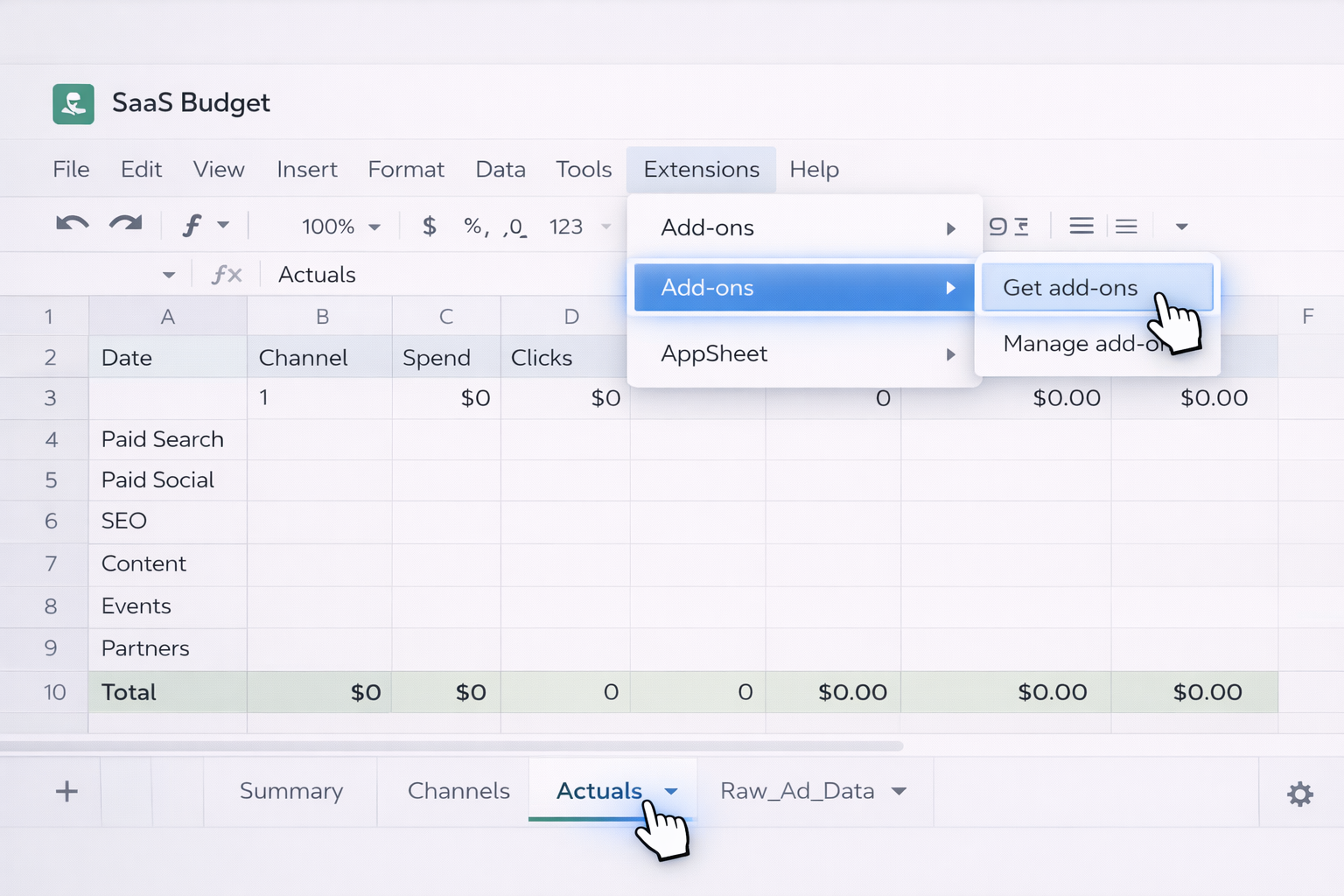
Actuals tab.
Typical setup:
Raw_Ad_Data tab.Actuals tab, use IMPORTRANGE or lookup formulas to aggregate that data by channel and month.
Pros:
Cons:
Option B: Use iPaaS tools to push data into Excel or Sheets
Tools like Zapier, Make, or Power Automate can:
Example workflow:
Actuals with Date, Channel, Spend, Leads, Opportunities.
Pros:
Cons:
At this stage you’ve eliminated some repetitive work, but someone still has to watch for failures, reconcile anomalies, and explain the numbers. That’s where an AI computer agent shines.
Traditional automation moves data; an AI agent can actually do the work the way an analyst would. Sai is designed exactly for this: it behaves like a power user on your desktop, browser, and cloud tools.
Imagine month-end. Instead of blocking your Friday, you trigger a Sai workflow:
2025_SaaS_Marketing_Budget file.Because Sai runs on your actual desktop environment with production-grade reliability, you can encode this as a multi-thousand-step workflow and trust it to complete without babysitting. Every step is transparent: you can read, inspect, and modify what the agent does before you promote it to production.
Pros:
Cons:
Numbers alone don’t convince stakeholders; narrative does. You can:
The agent can assemble slides, charts, and talking points, turning your raw template into a board-ready deck while you focus on decisions.
Pros:
Cons:
Sai can also run in the background:
Over time, this turns your SaaS marketing budget template into a living system, maintained by an AI computer agent that never forgets, never gets bored, and always works from the same transparent playbook you defined.
.png)
%20(1).svg)