
SimuLang을 소개합니다: 데스크톱 전체를 위한 Playwright
캘리포니아주 팔로알토 • 2026년 8월 28일 • 작성: Simular 팀

An autonomous computer is a computer that an AI agent operates on its own. It has a real machine, in the cloud or on your desk; an agent that sees the screen and uses the apps on it the way a person does; and a memory that turns every finished task into a procedure it can run again. You give it an outcome, not a step. It keeps working when you close your laptop, runs on a schedule or in parallel with other machines, asks before the steps that matter, and gets faster and cheaper each time it repeats a job.
The phrase is new, and almost nobody uses it yet. In 2026 every large platform shipped an agent that needed somewhere to run, and each launch had to answer the same question: where is the computer? Meta gave Muse a secure virtual machine, OpenAI gave dots its own cloud computer, Google keeps Gemini Spark running in its cloud. Those are agents that happen to have a computer. An autonomous computer turns the idea around: the computer is the product, and the agent is how it runs itself. Simular describes itself as "the autonomous computer company" and raised its $21.5M round to build exactly this. This guide sets out what we mean by the term, how we build one, and who it is for.
What is an autonomous computer?
An autonomous computer is a full computer (operating system, desktop apps, browser, files, terminal) whose operator is software. The agent receives a goal in plain language, plans the steps, carries them out with the same mouse, keyboard and screen a person would use, checks the result, and reports back. Between tasks it remembers what worked, so the next run of the same job is a replay rather than a fresh reasoning exercise.
Four tests separate an autonomous computer from the things it is often confused with:
- It has a machine of its own. The agent is not a chat window with plugins. It has a desktop to work on: a cloud computer it is given, or your own Mac or Windows machine with your permission.
- It works through the interface every app already has. It can operate software with no API (vendor portals, legacy desktop clients, admin consoles) because it uses the screen, the same way computer use agents do.
- It runs without you. It keeps going after you leave, runs on a schedule or a trigger, and can run on many machines at once.
- It gets better with practice. A task it has done once becomes a procedure it can repeat reliably and cheaply, and it repairs that procedure when an interface changes.
A product that passes the first three is a capable computer-use agent. The fourth is what makes the computer autonomous rather than merely automated: it learns the job instead of renting a model's attention every time.
Autonomous computer vs computer use agent vs RPA vs AI assistant
The four categories overlap in demos and diverge in daily use. The table shows where each one stops.
| AI assistant | RPA | Computer use agent | Autonomous computer | |
|---|---|---|---|---|
| What you give it | A question | A recorded script | A task | An outcome, once or on a schedule |
| Where it works | A chat window | A configured bot runner | Your screen or a sandbox | Its own cloud computer, a fleet of them, or your device |
| Software with no API | No | Yes, until the UI changes | Yes | Yes, and it repairs itself when the UI changes |
| Runs while you are away | No | Yes | Sometimes | Yes, on schedules and triggers, in parallel |
| Cost of the 100th run | n/a | Low, after costly setup | Same as the first: a model call per step | Close to zero: the learned procedure replays as code |
| Who maintains it | Nobody needs to | An automation team | You, by watching it | The agent, with approvals at the steps you mark |
The row that matters most is the cost of the hundredth run. A computer use agent built only on a large model pays the same reasoning bill every time it opens the same invoice portal. An autonomous computer behaves more like a person on their hundredth invoice: faster, cheaper and more predictable. We wrote about why that curve is missing from today's agents in the power law of practice is absent from agents.
How an autonomous computer works
Every autonomous computer is the same five layers. Products differ in how well each layer is built, and the layers below are the questions worth asking any vendor.
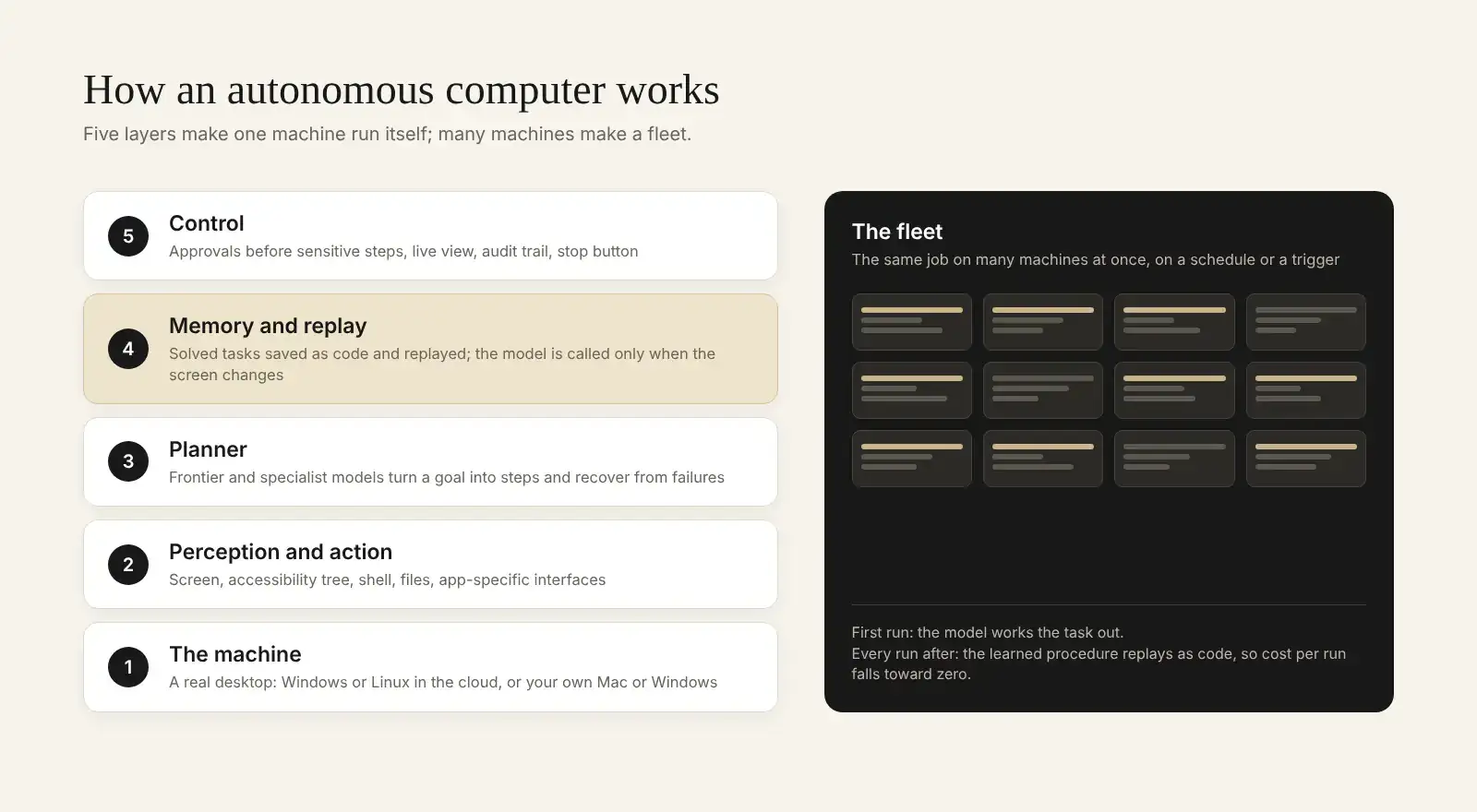
- The machine. A real operating system with a desktop, a browser, files and a terminal. It can be a cloud computer the vendor runs (always on, isolated from your laptop) or your own device (closest to your files and logged-in apps). The best designs offer both.
- Perception and action. How the agent sees the computer and acts on it. Screenshots and clicks work everywhere; accessibility trees, shells, file readers and app-specific interfaces are faster and more exact where they exist. A good autonomous computer picks the cheapest interface that works for each step.
- The planner. The model, or mix of models, that turns a goal into steps, notices when a step failed and recovers. This is where frontier models earn their cost.
- Memory and replay. The procedure that worked is kept, as code, and replayed next time. The model is only called back when the screen does something the procedure did not expect.
- Control. Approvals before sensitive steps, a live view of the machine, an audit trail, and a stop button. Because an autonomous computer acts rather than answers, this layer is the product's safety model.
Above those five sits the property that gives the category its name: a fleet. One autonomous computer is a tool you open. Many of them, each working a copy of the same job, are a workforce you schedule. When the fifty-portal task runs on fifty machines, throughput scales with machines, not with the length of one queue.
How Simular builds autonomous computers
Simular's approach rests on one research bet: neither a large model alone nor hand-written code alone can run a computer reliably and cheaply, but the two together can. We call it neuro-symbolic computer use. It is backed by three lines of work: the neuro-symbolic runtime, the open-source Agent S family, and public results on OSWorld, the standard benchmark for agents that use real computers.
Neuro-symbolic: the model discovers, the code repeats
The neural half is a mixture of frontier and specialist models that explores a new task: reading the screen, choosing actions, recovering from surprises. The symbolic half is code. Once a task has been solved, the procedure is compiled into a script in SimuLang, Simular's open-source language for automating browsers, desktop apps and the operating system, and replayed deterministically. SimuLang addresses interface elements through the accessibility tree rather than pixel coordinates and falls back to vision only when an app exposes nothing, so a replayed step takes milliseconds and no tokens.
When a replay meets a screen it did not expect, the agent hands the step back to the model, works it out, and writes the fix into the procedure. Independent judge models check the screen before a step is marked done, so the agent is not grading its own homework. Simular's research on this method reports 15 to 217 times lower cost per run and 3.4 to 5.1 times lower latency than running the same base models step by step, and up to 90% fewer tokens on repetitive tasks. That is the mechanism behind "teach it once": the first run costs what any agent costs, and later runs cost close to nothing.
Agent S4: an agent that improves the interfaces agents work through
The Agent S family is Simular's open-source research line. In December 2025, Agent S3 became the first agent to reach human-level performance on OSWorld 1.0, scoring 72.6% against a human baseline of 72.36%. In October 2026 Simular introduced Agent S4, which does not solve tasks itself. It studies a task agent's trajectories and evolves the interfaces that agent works through: a bulk spreadsheet editor where the agent was typing cell by cell, a direct shell where it was clicking a terminal open.
The effect is large. With an interface repository evolved by Agent S4, the open Qwen3.8-27B model reached 21.3% binary success on the full 108-task OSWorld V2 benchmark, 3.8 times the same model with fixed interfaces, above GPT-5.5 at about 4.3% of its cost. On ScienceBoard's 169 tasks in six scientific applications, the evolved repository solved 99 against 93 for the seed. The paper, Evolving Agent Interfaces, and the code in the Agent S repository are public. For an autonomous computer this matters because interfaces are a third way to improve, separate from the model and the harness, and they keep improving as apps change.
Results on real computers
OSWorld scores agents on long, real tasks in a real operating system. Version 2.0, released in June 2026 by the XLANG Lab at the University of Hong Kong, is built from 108 tasks that take skilled people more than an hour. The figures below are from Sai tops OSWorld 2.1; Sai's trajectories are public on Hugging Face.
| Benchmark | Agent | Partial score | Binary success | Cost per task |
|---|---|---|---|---|
| OSWorld 2.1 | Sai (Simular) | 77.3% (79.4% counting repeated runs) | 41.7% | $14.34 |
| OSWorld 2.1 | Claude Opus 5 | 77.67% | — | Not published |
| OSWorld 2.0 | Sai (Simular) | 73.0% | 28.25% | $15.70 |
| OSWorld 2.0 | Claude Opus 5 Max Thinking | 70.6% | — | $23.70 |
| OSWorld 2.0 | GPT-5.6 Sol Max | 62.6% | 23.14% | $26.62 |
| OSWorld 1.0 | Agent S3 (Simular, open source) | 72.6% vs 72.36% human baseline | — | — |
Two cautions. Scores from OSWorld 1.0 and 2.x measure different things and are not comparable: 1.0 is short, self-contained tasks, while 2.x is long work that runs past a hundred steps across several apps. And a benchmark reports success across attempts, while real work needs the same success on the hundredth run. That gap is the reason the neuro-symbolic replay layer exists.
Two ways to use an autonomous computer from Simular
The same engine ships in two products. Sai is for people and teams who want work done; the Sai API is for developers and agents that need a computer to delegate to.
Sai: the robosecretary

Sai is Simular's robosecretary: "for ambitious multitaskers, Sai runs autonomous computers to offload the endless screen tasks that devour your day." You describe a task in plain language. Sai works on its own Windows or Linux cloud computer, so the task runs with your laptop closed, or on your own Mac or Windows machine when the work needs your local apps and files. It sends approval requests for important actions to your phone, never types logins, passwords or phone verifications itself, and shows a live view of the machine while it works. A task you have taught it once reruns on a schedule and gets cheaper and more reliable each time, and for batch work it can run many cloud computers in parallel.
Sai API: an autonomous computer for your agents
The Sai API puts the same agent behind one API call. Your code or your agent sends a task to POST /v1/agents/message; Sai wakes a Windows or Linux cloud computer (or your own machine), does the GUI work, streams progress as events, pauses for approval before sign-ins and other sensitive steps, and returns the result with its cost per task. It is available over REST, a Python SDK and an MCP server (@simular-ai/sai-mcp) for Claude Code, Codex, Cursor and other MCP clients. Repeated workflows can be saved as replayable code, so a scheduled job pays for the model only where the screen changes. Our guide to giving your AI agent a computer use tool compares it with Anthropic, OpenAI and Gemini primitives and includes integration code.
| Sai | Sai API | |
|---|---|---|
| For | Individuals and teams who want tasks done | Developers, AI agents and products that need GUI work done |
| How you use it | Chat, iMessage, Telegram; schedules | REST, Python SDK, MCP server |
| Computers | Windows or Linux cloud computer from Simular, or your own Mac or Windows machine; up to 5 cloud computers at once on Pay as you go | |
| Approvals | Push to your phone | Approval events over the API; link-only steps for logins |
| Pricing | Explore free (daily credits); Pay as you go $50/mo (50,000 credits); Sai Unlimited $500/mo; Enterprise custom | |
| Start at | sai.work | platform.simular.ai |
Who an autonomous computer fleet is for
The pattern is the same in every role: software with no usable API, a task repeated with small variations, and a person currently doing it by hand. Where that pattern holds, a fleet of autonomous computers turns a person's afternoon into a scheduled batch.
| Who | The repeated screen work | Start with |
|---|---|---|
| Founders and solo operators | Invoicing, supplier portals, filings, inbox triage | Sai |
| Finance and accounting | Invoice entry, reconciliations, month-end reports in ERP screens | Sai, then Enterprise |
| Sales and business development | Enrich a record, check the last touch, draft the follow-up, log it in the CRM | Sai, many machines in parallel |
| Marketing and e-commerce | Pulling platform reports, updating listings, prices and stock across seller consoles | Sai on a schedule |
| Developers and agent builders | GUI steps inside a larger workflow: portals, admin consoles, QA of real sign-up flows | Sai API |
| Enterprise IT and operations | Legacy desktop applications that will never get an API | Sai Enterprise; Windows 365 for Agents |
The enterprise row is not hypothetical. At Microsoft Build 2026, Sai ran an overnight claims-processing workflow inside a legacy line-of-business application on a Windows 365 for Agents Cloud PC: reading scanned claim forms, verifying coverage and entering results through the UI with no API.
What an autonomous computer does today: six use cases
- Recurring data entry. Copy rows from a spreadsheet or CSV into a web form that has no import, every day. Taught once, replayed as code. See workflow templates for ready-made examples.
- Invoices and statements. Pull this month's invoices from a vendor portal that offers only a web login, rename them and file them, or upload them to accounting software.
- The same task across many sites. Fill the same form on fifty supplier portals, or pull the same report from twenty dashboards, on fifty machines at once.
- Legacy desktop apps. Enter claims, orders or records into a Windows client that predates APIs.
- Monitoring. Check a portal for a status change or a price for a drop on a schedule, and act or report when it moves.
- QA and support reproduction. Run a real sign-up flow in a real browser, or follow a bug report step by step on a Windows machine and record what happens.
Limitations: when not to use an autonomous computer
An autonomous computer is the right tool where software has only a screen. It is the wrong one in four cases. If a documented API or SDK covers the task, write code: it is faster, cheaper and exact. If the task is a one-off that takes thirty seconds, doing it yourself is quicker than describing it. If the first run is all you will ever need, the replay saving never arrives and you pay full model cost. And if the work needs judgement you would not delegate to a new hire, an approval step is not a substitute for that judgement.
Two cautions apply to every vendor, including us. Benchmark figures on this page are vendor-reported; read the methodology and the trajectories, which for Sai are public. And an agent that acts on real accounts can make real mistakes, so set approvals on anything that sends, pays or deletes, and keep credentials out of the agent's hands.
How to get started
Pick the one screen task you do every week and dread. Run it once on Sai's free Explore plan and watch the live view; approve the steps it asks about; then schedule it. If the task is a step inside software you are building, create a key on platform.simular.ai and call the Sai API from your agent. For a ranked view of the market, see our comparison of the best autonomous computers and of the best personal agents.
FAQ
What is an autonomous computer in simple terms?
A computer that runs itself. An AI agent operates it the way a person would, finishes the tasks you give it while you are away, and remembers how it did them so the next run is faster and cheaper.
Is an autonomous computer the same as a computer use agent?
No. A computer use agent is the software that operates a screen. An autonomous computer is that agent plus a machine of its own, schedules and parallel runs, approvals, and a memory that turns solved tasks into repeatable procedures.
How is an autonomous computer different from RPA?
RPA replays a script a person recorded and breaks when the interface moves. An autonomous computer writes its own procedure from a plain-language goal and repairs it when the interface changes.
Does an autonomous computer need my laptop to stay on?
Not if it runs on a cloud computer. Sai's cloud computers keep working with your laptop closed. Running on your own device is optional, for tasks that need local files or apps.
What technology does Simular use to build autonomous computers?
Neuro-symbolic computer use: models discover how to do a task, SimuLang code replays it, and the model is called back only when the screen changes. The open-source Agent S family, including Agent S4, improves the interfaces the agent works through.
How reliable are autonomous computers in 2026?
On OSWorld 2.1, Simular reports Sai at a 77.3% partial score and 41.7% binary success at $14.34 per task. Reliability on repeated runs is higher for tasks that replay as code.
Are autonomous computers safe to use with my accounts?
Use one that asks before sensitive actions, never types your credentials, and shows what it is doing. Sai routes logins and verifications to you and sends approvals to your phone.
How much does an autonomous computer cost?
Sai starts free with daily credits. Pay as you go is $50 a month, Sai Unlimited $500 a month with an always-on cloud computer, and Enterprise is custom. The Sai API uses the same plans.
