
Oops! Something went wrong while submitting the form.

At 9:47 p.m., a founder I know was still refreshing Slack, chasing an “urgent” approval that should’ve taken two clicks. The work wasn’t hard. It was just scattered—across inboxes, tabs, and the same questions asked again and again.
A workflow management system is the “map” your work follows: who does what, in what order, with what rules, and what happens when something gets stuck. The best ones don’t just track tasks—they automate handoffs, enforce consistency, and surface bottlenecks before they become fires. That’s why workflow automation has become foundational in modern operations, especially as teams scale and manual processes break down (see Axero’s 2026 overview: https://axerosolutions.com/insights/top-workflow-automation-software/ and their definition of workflow automation: https://axerosolutions.com/glossary/workflow-automation). Enterprise workflow automation also emphasizes triggers, rules, and cross-system handoffs to reduce follow-ups (Activepieces’ enterprise guide, “Tools in 2026”: https://www.activepieces.com/blog/enterprise-workflow-automation-software-tools).
Used well, workflow systems make onboarding repeatable, keep sales follow-ups consistent, and stop approvals from vanishing into email. The trade-off: some tools are rigid (great for compliance, painful for change), some are flexible but require setup, and some “AI” features are more copywriting than execution. The real question isn’t “Does it have automation?” but “Can it execute your workflow where the work actually happens—browser, desktop apps, files, and all?”
We tested workflow management systems the way real teams use them: under deadline pressure, across messy tool stacks, and with humans still in the loop. Instead of judging “feature checklists,” we ran repeatable scenarios (lead capture → enrichment → outreach draft → CRM update; purchase request → approval chain → record update; content brief → draft → review → publish checklist) and scored each platform on execution quality and operational fit. Key methods and dimensions:
Workflow management systems used to mean “a nicer way to assign tasks.” In 2026, that’s not enough.The modern workflow stack has split into two camps:1) Systems that coordinate humans (assignments, approvals, dashboards).2) Systems that actually execute work (automation engines, RPA, and now computer-use AI agents).If you’re a business owner, agency lead, sales operator, or marketer, you feel the difference in your bones. Coordination tools reduce confusion. Execution tools reduce labor.And that’s why Simular Pro sits in a different category than most “workflow software.” It’s not just a place where tasks live. It’s an autonomous computer-use agent platform designed to do the tasks.Below are the top 6 workflow management systems we’d pick when the goal is: delegate more work, reduce follow-ups, and keep execution transparent.
Most workflow tools assume a hidden truth: the work gets done by a human.Simular Pro challenges that assumption.It’s a highly capable computer-use agent platform that can automate nearly everything a human can do across the desktop environment. That matters because real workflows aren’t just APIs. They’re a messy mix of browser tabs, PDFs, spreadsheets, Slack messages, CRM screens, file folders, and “just log into the portal and click the thing.”If you want a consumer-facing one-liner, here’s the feel:“Work smarter with Sai. Reclaim your time. Sai handles the rest.”Or the technical version:An AI agent that completes your work through a remote desktop.What makes Simular Pro stand out for workflow management is not that it can “generate content.” It’s that it can execute full workflows with production-grade reliability and transparent execution—every action is readable, inspectable, and modifiable.Why it’s different (practical, not hype)- Work like a human: clicking, typing, navigating GUIs. When your workflow breaks because a website changed its API, GUI-based execution can still succeed.- Long workflows: designed for thousands to millions of steps. That’s the difference between a demo bot and a real operations machine.- Transparent execution: you can audit what happened, step by step. This is crucial for trust, training, and compliance.- Simple integration: webhooks for existing production pipelines.Example workflows that map to real teamsSales & Marketing- Find YouTube influencers, collect stats, and populate a Google Sheet.- Pull leads from a CRM, enrich context, draft cold emails, and stage them for approval.- Summarize announcements across multiple Discord channels into a tracking sheet.General Administration- Generate NDAs, send via DocuSign, and place signature boxes correctly.- Find files related to a topic (e.g., “Generative AI”) and reorganize folders.Recruiting & Scheduling- Source candidates, summarize profiles into a spreadsheet, respond to emails, schedule Zoom.Web Data Extraction- Pull top cited papers, download PDFs, upload to Drive, and log metadata.Pros- True end-to-end delegation: not just routing. It performs the work.- Desktop-capable: handles workflows trapped inside legacy UIs and portals.- Guardrails + autonomy: runs on its own, but can double-check critical actions.- Transparent logs: great for teams who want “no black boxes.”Cons- Not a typical Kanban board: if you only need task lists, it’s more power than you need.- Best results need clear definitions: like any agent, it benefits from crisp acceptance criteria and “done means.”PricingSimular Pro is typically provisioned via access / contact-based onboarding (pricing can vary by setup and requirements).
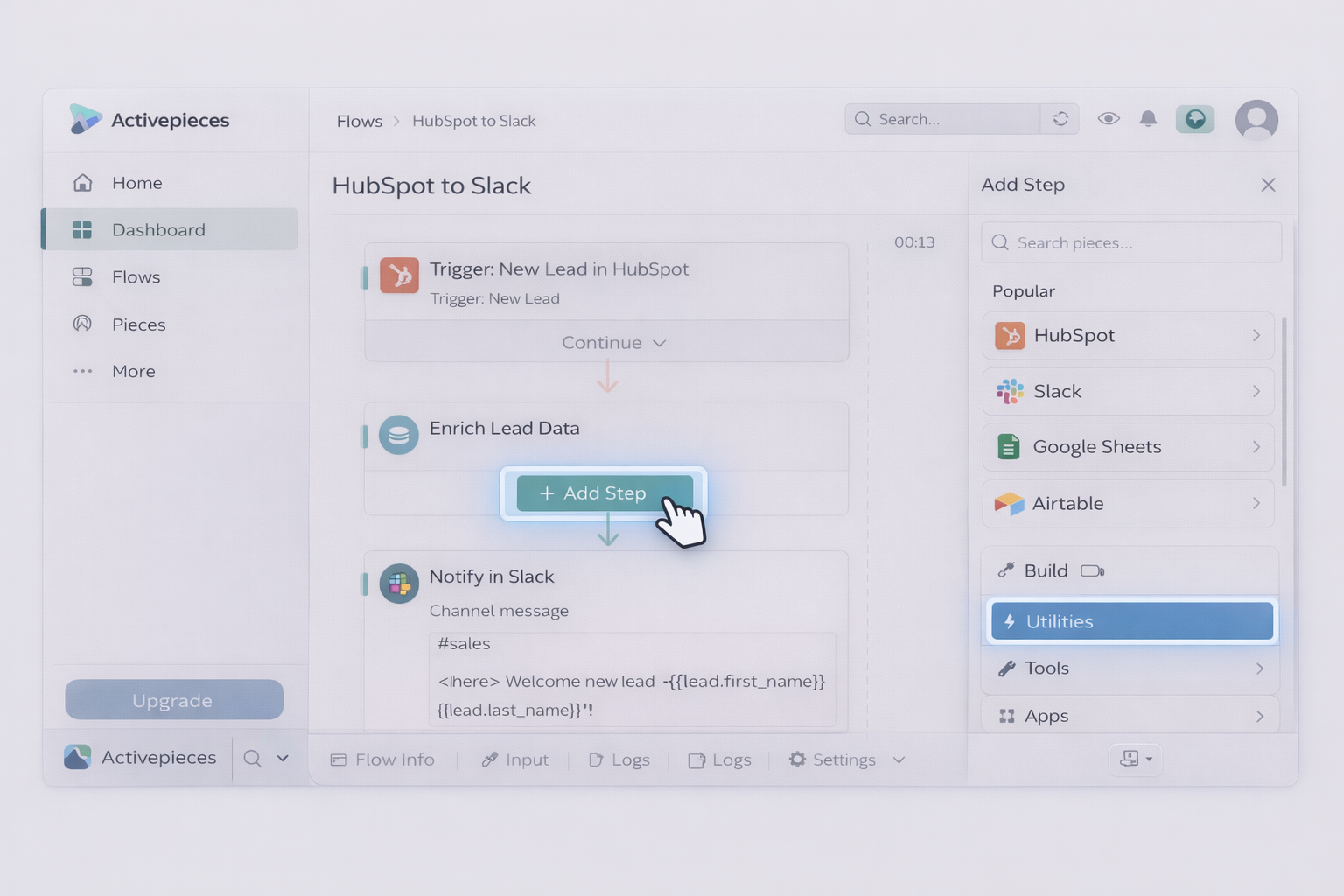
Activepieces is a workflow automation platform that feels like a builder’s toolkit. You create flows visually, connect systems, and ship automations fast. The biggest advantage is control: you can run it in a way that reduces vendor lock-in and makes ops teams feel safer about long-term ownership.In the Activepieces “enterprise workflow automation tools in 2026” write-up, the key framing is exactly right: as organizations grow, workflows stretch across teams and systems, and each handoff adds delay. The right automation tool keeps work moving without follow-ups.Where Activepieces shines- Cross-app workflows that are mostly API-driven.- Teams that want a no/low-code canvas but still want developer escape hatches.- Organizations that care about governance, deployment options, and extensibility.Example workflows- New lead in HubSpot → enrich with a data provider → notify Slack → create an onboarding task.- Form submission → route approval → write to Google Sheets/Airtable → send confirmation email.- Content repurposing: upload a webinar link → generate summaries → post drafts into a content queue.Pros- Strong integrations: lots of connectors means less custom plumbing.- Good “automation backbone”: you can standardize common processes.- Control: self-hosting options can be a real differentiator for some teams.Cons- Not a desktop executor: if the task lives inside a GUI-only portal, you’ll need RPA or an agent.- Work can become “integration spaghetti”: without discipline, many small flows become hard to govern.PricingActivepieces offers an open-source edition (free to self-host). Cloud pricing varies by plan and usage.
UiPath is the classic answer when workflows require strict governance, desktops, legacy systems, and audited automation at scale.If Simular Pro is an always-on AI coworker, UiPath is more like a fleet of programmable robots. Powerful, but usually heavier to implement.Where UiPath shines- Repetitive, deterministic processes (invoices, claim handling, data entry).- Regulated environments that require role-based controls, audit trails, and centralized management.- Organizations that can support the build/maintain lifecycle (often IT-led).Example workflows- Invoices arrive → extract fields → validate against ERP → route exceptions for approval.- Daily report pulls → consolidate spreadsheets → publish to a shared location → notify stakeholders.- Customer onboarding in legacy systems → create accounts → assign permissions → log completion.Pros- Desktop automation: can interact with applications that don’t offer APIs.- Governance: enterprise controls, scheduling, monitoring.- Mature ecosystem: lots of implementation partners and patterns.Cons- Heavier build cost: you often need specialized skills.- Maintenance burden: UI changes and edge cases can create “bot babysitting.”PricingTypically enterprise licensing (quote-based).
Make is the tool that agencies and marketing ops teams reach for when they want something working today.It’s visual. It’s fast. And for API-friendly workflows, it’s wonderfully effective.But Make is not a computer agent. It won’t “open the app and click around.” It connects services and moves data.Example workflows- Facebook Lead Ads → CRM → Slack alert → email follow-up sequence.- Google Sheets row added → generate a doc → upload to Drive → notify client.- Webinar registration → tag contact → create tasks → send calendar invite.Pros- Speed: excellent time-to-first-automation.- Great for agencies: you can templatize client automations.- Broad integration coverage: lots of marketing tools supported.Cons- Browser/connector world: if a tool isn’t supported and has a weak API, you’ll struggle.- Complexity creep: large scenarios can become hard to debug.PricingUsually tiered, usage-based (operations/runs). Exact tiers change; evaluate based on your monthly run volume.
Workato is what you pick when workflows span departments and core systems. It’s less about “one team automating a task” and more about “the company standardizing process execution.”If your business has Salesforce, NetSuite, HRIS, support systems, and data warehouses—and you’re tired of brittle point-to-point integrations—Workato can become the orchestration layer.Example workflows- Closed-won deal → provision accounts → create implementation project → sync billing → notify finance.- Support escalation → route approvals → update CRM → create engineering ticket with context.Pros- Enterprise-grade connectors and governance: built for complex stacks.- Cross-team consistency: one workflow can enforce standards across regions and teams.Cons- Not a desktop actor: mostly system-to-system.- Can be expensive and process-heavy: best when you have real scale.PricingGenerally quote-based enterprise pricing.
monday.com is a workflow management system in the “coordination” camp. It’s excellent for clarity: who owns what, what’s blocked, what ships this week.Its automations help with reminders and routing, but it’s not designed to execute complex work end-to-end. That’s not a knock. Many teams need visibility before they need autonomy.Example workflows- Client onboarding board with dependencies, due dates, approvals.- Content production pipeline: brief → draft → edit → design → schedule.- Sales pipeline tracking with task reminders and status changes.Pros- Adoption: teams often actually use it.- Templates: quick start for common workflows.- Visibility: easy reporting and stakeholder updates.Cons- Not autonomous execution: it manages work, doesn’t do the work.- Automation limits: deeper automation can require external tools.PricingTypically per-seat tiers, with automation capacity varying by plan.
Depending on your constraints, you might also evaluate Kissflow (business-friendly low-code workflows), Pipefy (template-driven processes), ServiceNow (ITSM-heavy enterprise workflows), Asana/Wrike (project-centric workflow coordination), or Nintex (automation-heavy process tooling).
If your biggest pain is “we don’t know what’s happening,” start with a coordination-first system like monday.com.If your pain is “we’re drowning in cross-app busywork,” a workflow engine like Make or Activepieces can remove hours of copy/paste.If your pain is “we must automate desktop apps and legacy systems,” UiPath is the proven enterprise path.But if your pain is the one that quietly steals your life—endless clicking, logging into portals, moving files, pulling data, formatting sheets, sending the same emails—then you don’t just need workflow management.You need execution.That’s why Simular Pro is the best overall pick here: it’s built to operate like a human across the desktop, run long workflows reliably, and keep execution transparent so you can trust (and improve) what it does.Try Simular and delegate the work you’ve been carrying around in your head: https://www.simular.ai/