Top 10 Best Medical Dictation Software for Clinics (Tested)

February 28, 2026

At 6:47 p.m., the clinic is quiet again—but the day isn’t over. A provider is still staring at a blinking cursor, trying to reconstruct a full patient story from memory, half-finished templates, and a few rushed bullet points.

That’s the real promise of medical dictation software in 2026: not “cool AI,” but fewer late nights, fewer missed details, and fewer notes that feel like they were written under pressure. Modern tools range from classic voice dictation to ambient AI scribes and API-first transcription engines, and the right choice depends on how you actually work.

Medical dictation software converts spoken clinical language into usable documentation—anything from raw transcripts to structured SOAP notes and letters—so clinicians can capture nuance without typing every word. It’s used for point-of-care note drafting, telehealth documentation, radiology-style reporting, and even coding support. The upside is speed and consistency; the downside is risk: accuracy drift, hallucinated details, and workflow friction are well-documented concerns in AI scribes and voice recognition (see the 2026 market and risk framing from AssemblyAI: https://www.assemblyai.com/blog/best-medical-speech-recognition-software-and-apis-in-2026, plus workflow benchmarking from Software Finder: https://softwarefinder.com/resources/medical-dictation-software, and clinician-first tooling examples in Freed’s 2026 roundup: https://www.getfreed.ai/resources/best-medical-dictation-software).

How we evaluated

We tested medical dictation software like we’d test any mission-critical automation: in real workflows, with messy audio, and with “what happens next?” as the core question. Many tools can transcribe; fewer can reliably deliver chart-ready output; almost none can also complete the downstream desktop work (EHR entry, attachments, letters, and follow-ups) without hand-holding.

Testing methods (real-world):

  • Scripted accuracy pass: same clinical script read 3x per tool, checking med terms, numbers, and speaker mix.
  • Noisy-room pass: air conditioner + hallway chatter, to see where confidence collapses.
  • Workflow pass: “visit ends → note ready → pushed into EHR/doc” timed end-to-end.
  • Editing burden score: how many fixes to reach “signable.”
  • Failure-mode review: missing negatives, invented items, wrong meds, incorrect patient instructions.

Evaluation dimensions:

  • Ease of use: setup time, learning curve, and how fast a new clinician can produce a usable note.
  • Output type: raw transcript vs structured note (SOAP) vs letters/codes.
  • Autonomy: does it only produce text, or can it execute the workflow steps around it?
  • Transparency/HITL: can you see what happened, edit actions, and approve critical steps?
  • Pricing clarity: predictable per-user vs usage-based vs enterprise-only.
  • Ideal for (ICP): solo clinicians, small clinics (2–50), enterprise hospitals, dev teams.
  • Desktop task OK?: can it actually operate across desktop apps (EHR, email, PDFs), or is it browser/API-only?

Comparison Summary

ProductPricing (Starting)Key AdvantagesAutonomous?Ideal ForDesktop Task OK?
Simular ProContact / plan-basedAutonomous computer agent; transparent execution; full desktop workflowsYesOps-heavy clinics, billing teams, admin coordinators, agencies supporting healthcare clientsYes
FreedVaries (subscription)Clinician-focused notes; SOAP output; lightweight EHR push via browserPartialSmall & midsized clinics (2–50 clinicians)Mostly browser-based
Dragon Medical One~$99/month (vendor listed in 2026 comparisons)Strong dictation; enterprise adoption; mature vocabulariesNoHospitals & enterprise clinicsYes (dictation on desktop), not workflow automation
Amazon Transcribe Medical~$0.075/min (usage-based)API-first; scalable; good for custom pipelinesNoDevelopers building clinical documentation toolsNo (API)
DeepgramUsage-based / plan-basedFast STT; speaker separation; flexible integrationsNoTeams that want raw transcription with controlNo (API/service)
Philips SpeechLive~$12.90/user/month (as cited in 2026 comparisons)Simple cloud dictation; familiar workflowNoGeneral clinics needing basic dictationLimited (dictation-focused)
INVOX MedicalVendor/quote-basedTraditional dictation; on-prem/hosted optionsNoClinics preferring legacy-style deploymentYes (dictation), not automation
VoiceBox MD~$49/month (starting)Budget-friendly medical dictation; mobile supportNoSolo clinicians and small practicesLimited
Otter.ai~$16.99/user/month (starting)Meeting-style transcription; searchable summariesNoGeneral healthcare admin, non-clinical documentationNo (not desktop agent)
Rev.ai~$0.03/min (AI transcription)API + optional human workflows; strong tooling ecosystemNoDev teams and ops teams needing transcription at scaleNo (API)

1) Simular Pro — Best “Medical Dictation Workflow” Option When You Actually Need the Work Done

Most people shop for “medical dictation software” like they’re shopping for a better microphone. But the real pain isn’t the dictation step. It’s everything that happens after.

A note gets drafted. Then someone still has to:

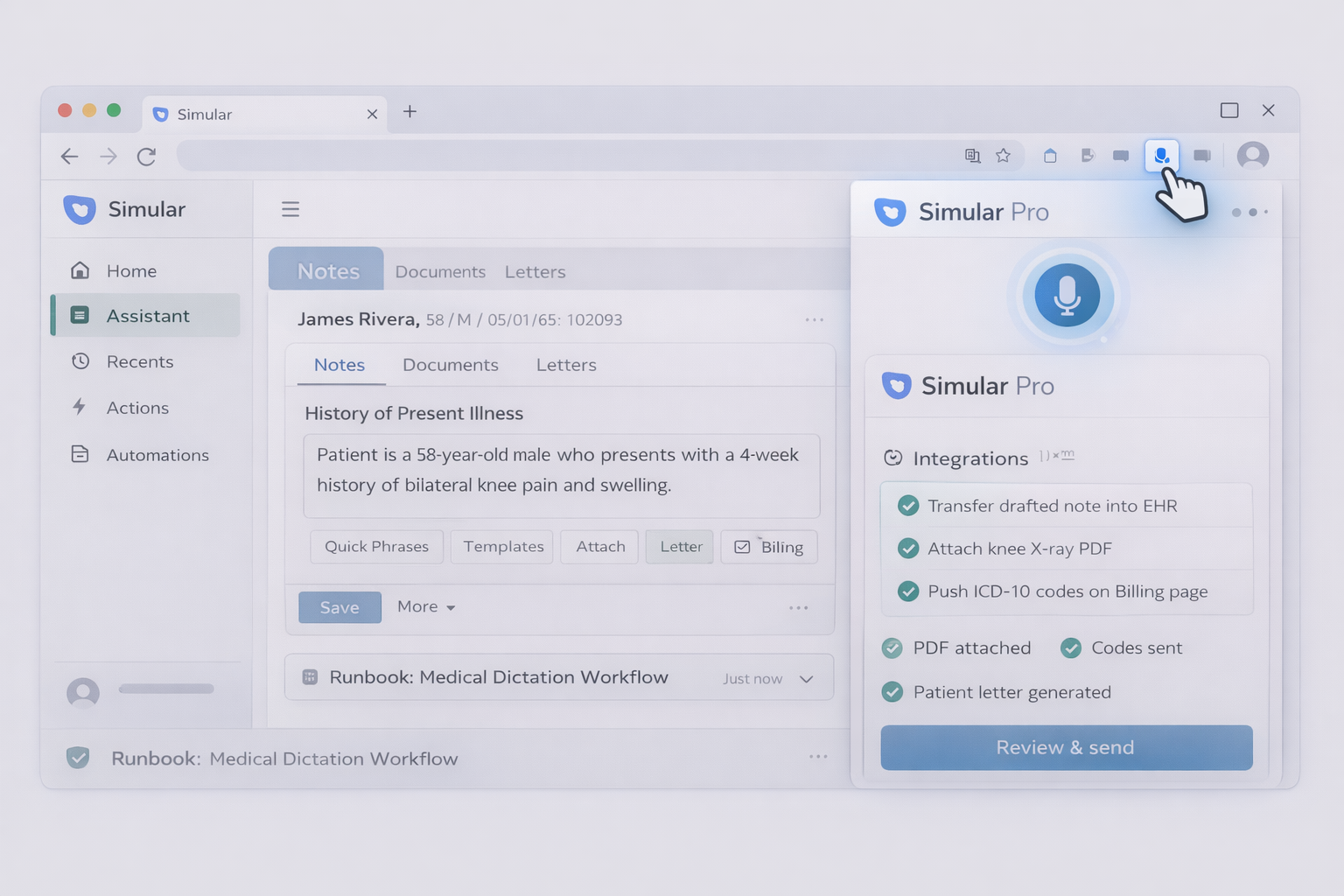
  • move the text into the right EHR field
  • attach PDFs
  • generate a patient letter
  • push ICD-10 codes into the billing workflow
  • notify staff
  • close the loop

That’s where Simular Pro is different.

Simular Pro isn’t just a speech-to-text tool. It’s an autonomous computer-use agent platform that can operate across the entire desktop environment—clicking, typing, navigating UIs like a human would—while staying transparent. Every action is readable, inspectable, and modifiable. No black box “trust me.”

If you want the consumer-facing one-liner:

  • An always-on AI co-worker doing your job even when you’re not there.
  • An AI co-worker that never clocks out.

And here’s the practical interpretation for clinics: Simular Pro can wrap your dictation tool of choice (Freed, Dragon, an API pipeline, etc.) and then execute the rest of the workflow on your behalf.

Why this matters in medical dictation specifically

AI transcription and AI scribes can fail in subtle ways. Risk discussions in the industry repeatedly point to issues like invented details, misrecognition of medical terms, and compliance exposure if errors go unnoticed. So even if you adopt a great dictation engine, you still want guardrails and human-in-the-loop approvals.

Simular Pro is designed with that reality in mind:

  • Work like a human: it can use GUIs, terminals, and APIs—so you’re not blocked by “we don’t integrate with that EHR.”
  • Autonomous, reliable: built to handle long, multi-step workflows.
  • Transparent execution: you can audit steps and adjust them.
  • Guardrails: it can pause and ask before critical actions.

Pricing

Simular Pro is typically plan-based / contact sales (it’s positioned as a pro-grade automation platform rather than a single dictation app).

Where Simular Pro fits (real use cases)

Think of Simular as the “finisher” that turns dictation into completed documentation and closed-loop operations.

Example workflow 1: Dictation-to-EHR + follow-ups

  1. Clinician dictates with their preferred tool.
  2. Simular Pro picks up the output (from a doc, inbox, portal, or downloaded file).
  3. Simular logs into the EHR via desktop, pastes into correct structured fields.
  4. Generates follow-up tasks in a PM tool.
  5. Drafts patient instructions letter, exports PDF, uploads to portal.

Example workflow 2: Claims + attachments

  1. Pull claim-related emails and attachments.
  2. Rename files consistently.
  3. Upload to payer portal.
  4. Update internal spreadsheet/CRM.

Example workflow 3: Agency support for healthcare clients If you’re an agency or ops team supporting clinics, Simular can standardize repeatable admin routines: daily dictation processing, file routing, QA checks, and reminders.

Pros

  • Can execute the full “dictation → documentation completed” chain
  • Works across desktop apps (not just browser-only flows)
  • Transparent logs make compliance reviews easier
  • Good fit for repetitive, high-volume back-office workloads

Cons

  • Not a dedicated dictation engine by itself (you pair it with one)
  • Requires thoughtful setup: what actions need approval, what can be automated

Bottom line: If your biggest cost is not typing but “everything after the typing,” Simular Pro is the most direct path to time back.

2) Freed — Clinician-First AI Scribe for Small & Midsized Clinics

Freed has a very clear thesis: clinicians don’t need more raw transcription. They need notes that look like how they practice.

In Freed’s 2026 positioning, it’s framed as more than dictation: a purpose-built AI medical scribe and clinician assistant that produces chart-ready notes with minimal editing, especially for small to midsized clinics (2–50 clinicians). That focus matters. Many tools “work,” but only after you babysit them.

Pricing

Freed is generally subscription-based (their public content emphasizes free trial availability; exact pricing can vary by clinic size and plan).

What it’s best at

  • Turning natural conversation into structured notes (often SOAP-style)
  • Reducing time spent hunting through charts between visits
  • Helping with follow-up documents like letters

Example workflows

Workflow A: Visit → SOAP note → EHR push

  • Press record at the start of the visit
  • Talk naturally
  • Review note moments later
  • Push into a browser-based EHR (via extension)

Workflow B: Multi-language clinic support

  • Capture visits in multilingual environments
  • Standardize the final note format so downstream staff can work consistently

Pros

  • Strong “note quality” emphasis (not just verbatim transcripts)
  • Designed around clinician mental load: fewer clicks, less formatting
  • Often quick to start (minimal IT)

Cons

  • If you’re in an Epic-only hospital environment, some tools may be better aligned to that ecosystem
  • Browser-based push is helpful, but the rest of the workflow can still be manual (attachments, portals, billing steps)

How Simular Pro can complement Freed

A common pattern is: Freed creates the note; Simular finishes the workflow.

  • Simular pulls Freed’s output
  • files it in the right EHR sections
  • generates letters and uploads them
  • routes tasks to staff

3) Dragon Medical One — The Classic Enterprise Dictation Workhorse

Dragon Medical One is the name everyone recognizes because it’s been the default answer for years in enterprise dictation.

It’s not trying to be an ambient scribe in the same “hands-off” way newer tools are. The value is still very much “dictate fast, get accurate text, stay inside your workflow.” That’s why it continues to show up in 2026 comparisons of medical speech recognition options.

Pricing

Public comparisons often cite around $99/month, though real pricing can vary by contract and deployment.

Best use cases

  • Specialists who rely heavily on templated language and consistent phrasing
  • Clinics and hospitals with established voice dictation habits
  • Situations where providers want direct control (speak → see text → correct immediately)

Example workflows

Workflow A: Voice-driven charting

  • Dictate directly into EHR fields
  • Use voice commands for navigation and formatting (where supported)

Workflow B: Standardized reporting

  • Create structured “macros” for frequent findings
  • Reduce variability across providers

Pros

  • Mature dictation experience and vocabularies
  • Strong adoption in enterprise environments
  • Works well when you have consistent mic setups and stable desktop environments

Cons

  • It’s still mainly dictation, not end-to-end workflow automation
  • Getting “after the note” tasks done (letters, upload, portal messages) remains manual unless you build extra automations

Where Simular Pro fits

Simular can take the finished dictated note and then complete downstream tasks: file routing, portal uploads, follow-up letters, and billing support.

4) Amazon Transcribe Medical — Best for Developers Building Custom Pipelines

Amazon Transcribe Medical is not a “clinician app.” It’s a building block.

It shines when you have a product team or a technical ops group that wants to embed transcription into a larger system: a custom scribe interface, an internal documentation tool, a call center workflow, or a telehealth platform.

Pricing

Commonly cited around $0.075/min (usage-based). This is attractive at scale, but you must budget engineering time.

Best use cases

  • Startups building healthcare documentation products
  • Larger organizations that want full control over data flow, formatting, and UI

Example workflows

Workflow A: Telehealth recording → transcript → note draft

  • Record visit audio
  • Run transcription
  • Pass transcript into an NLP step to produce SOAP notes
  • Store in your system

Workflow B: Quality assurance + audit logs

  • Save both audio and transcript
  • Attach to case review
  • Track changes from draft to final

Pros

  • Scales well
  • Fits modern API-first architectures
  • Good for “we want to own the workflow” teams

Cons

  • Not turnkey. You will still need formatting, clinical note structuring, and EHR integration
  • “Accuracy” is not the only requirement; clinical usability and safety checks become your responsibility

Where Simular Pro fits

If your team generates the note via a pipeline, Simular can do the last-mile desktop work: logging into web portals, updating EHRs, attaching files, and triggering follow-ups.
5) Deepgram — Fast Speech-to-Text When You Want Control (Not a Scribe)

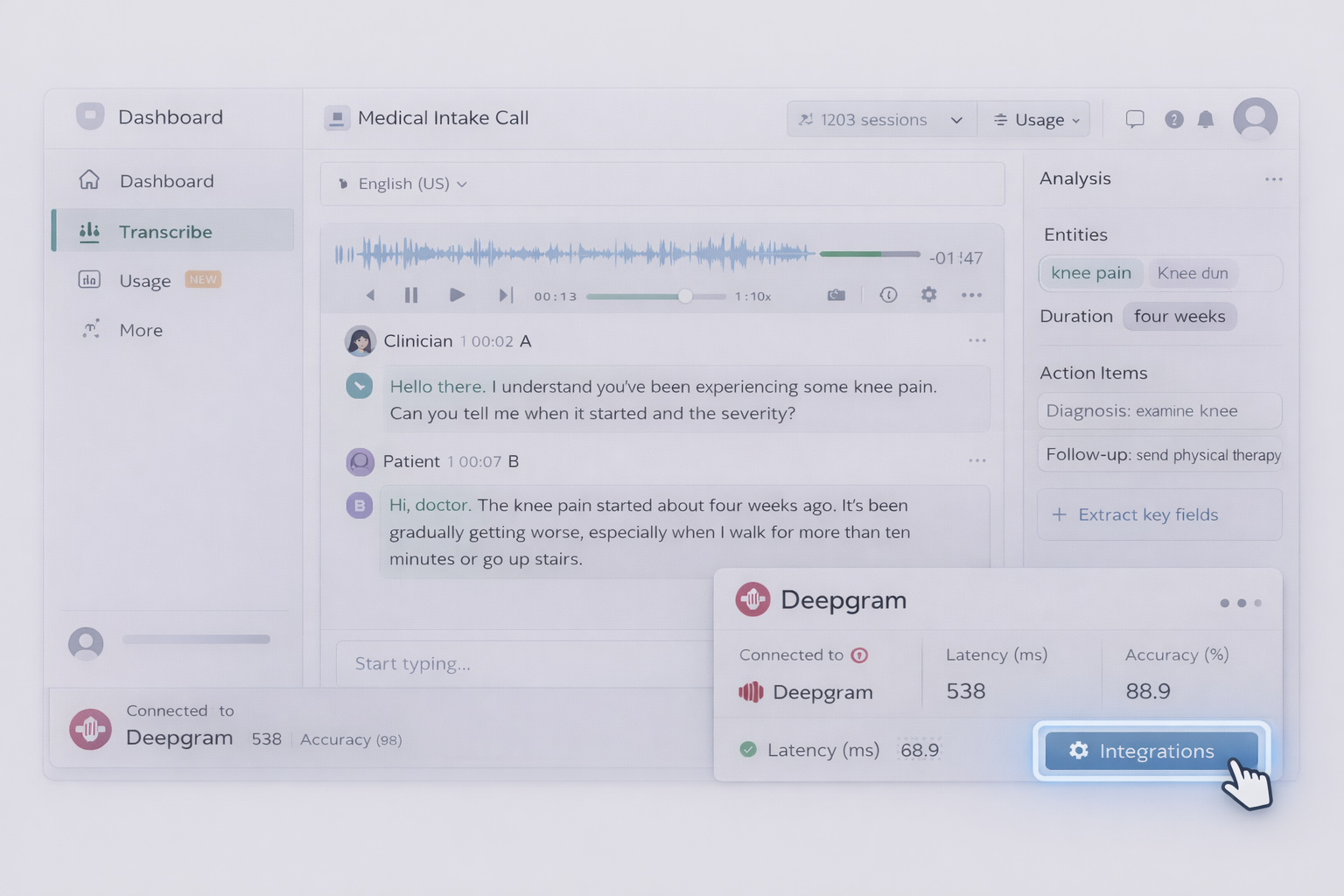
Deepgram is typically chosen by teams who care about transcription performance and flexibility, but don’t necessarily need a clinician-facing scribe UI.

Think of it as a strong STT layer that you can integrate into your own workflow. It’s often mentioned for capabilities like real-time transcription and speaker separation.

Pricing

Usually usage-based or plan-based (varies by volume and features).

Best use cases

  • Transcription-heavy workflows where you need speed and customization
  • Products that want to build their own note formatting layer

Example workflows

Workflow A: Multi-speaker capture

  • Separate clinician and patient speech
  • Tag segments
  • Feed into structured note generator

Workflow B: Contact center / intake calls

  • Transcribe intake
  • Extract key fields (symptoms, meds, allergies)
  • Create a structured intake packet

Pros

  • Strong for raw transcription tasks
  • Integrates well into engineering pipelines

Cons

  • Not purpose-built for clinical notes; you’ll do more work to reach “chart-ready” output
  • No built-in “finish the workflow” capability (EHR entry, letters)

6) Philips SpeechLive — Straightforward Cloud Dictation

Philips SpeechLive is a practical choice when you want classic dictation with cloud convenience.

It tends to fit clinics that don’t want to overhaul everything with an ambient scribe. They want a familiar dictation process, but modernized.

Pricing

2026 comparisons often cite ~$12.90/user/month (check vendor for current pricing).

Best use cases

  • General clinics with existing dictation habits
  • Teams transitioning from older recorder-based workflows

Example workflows

Workflow A: Dictate → send for transcription / review

  • Create recordings
  • Route files to admin staff
  • Convert into final notes

Workflow B: Mobile dictation

  • Dictate on the go
  • Sync back to workstation

Pros

  • Familiar workflow, lower change management
  • Cloud-based access

Cons

  • Limited “clinical intelligence” compared to AI scribes
  • Doesn’t solve downstream tasks; you still need a system for attachments, letters, portals

7) INVOX Medical — Traditional Medical Dictation with Flexible Deployment

INVOX Medical often shows up in lists for organizations that still want more classic medical dictation behavior and may care about deployment options.

This can matter for clinics with stricter IT constraints or a preference for hosted/on-prem patterns.

Pricing

Often quote-based.

Best use cases

  • Clinics wanting traditional dictation, sometimes with stricter infrastructure requirements

Example workflows

Workflow A: Standard dictation + templated phrases

  • Dictate into template-driven structures
  • Standardize common documentation patterns

Pros

  • Familiar dictation paradigm
  • Deployment flexibility can be a deciding factor

Cons

  • Typically less “modern AI scribe” capability
  • Downstream workflow automation is not the core product

8) VoiceBox MD — Budget-Friendly Medical Dictation for Solo Clinicians

VoiceBox MD is often chosen for cost sensitivity: clinicians who want medical dictation without enterprise overhead.

Pricing

Commonly referenced as starting around $49/month.

Best use cases

  • Solo practitioners
  • Small practices looking for straightforward dictation support

Example workflows

Workflow A: Dictate basic notes + quick edits

  • Convert speech to text
  • Make light corrections
  • Paste into EHR

Pros

  • Accessible pricing for smaller practices
  • Keeps the workflow simple

Cons

  • Less specialty depth than larger enterprise tools
  • Not a complete “scribe + workflow” solution

9) Otter.ai — Great General Transcription, Not a Clinical Note Engine

Otter is a strong general dictation/transcription experience. It’s popular for meetings because it’s searchable, collaborative, and quick.

But clinical documentation has higher stakes than meeting notes. You need medical vocab accuracy, structured outputs, and a clean path into EHR workflows.

Pricing

Often shown around $16.99/user/month starting (varies by plan).

Best use cases

  • Non-clinical healthcare teams (ops, training, internal meetings)
  • Drafting transcripts that will be rewritten into clinical format by humans

Pros

  • Easy to use
  • Search and organization features are strong

Cons

  • Not purpose-built for clinical notes
  • Doesn’t handle clinical formatting and coding needs by default

10) Rev.ai — Transcription API + Options for Human Review

Rev.ai appears in 2026 comparisons because it offers an API layer and can pair AI transcription with human workflows, depending on what you need.

That “human fallback” matters in medical contexts. If you’re running high-volume documentation, you may want an escape hatch when AI confidence drops.

Pricing

Often cited around $0.03/min for AI transcription (check current pricing).

Best use cases

  • Organizations building documentation pipelines
  • Teams needing flexibility between AI and human review

Example workflows

Workflow A: AI-first, human-exception

  • Transcribe with AI
  • Flag low-confidence segments
  • Send only exceptions to human review

Workflow B: Backlog cleanup

  • Process large archive of recordings
  • Produce searchable text
  • Organize for audits or training

Pros

  • Flexible architecture
  • Can reduce risk with selective human review

Cons

  • Still not “push to EHR and close tasks” by itself
  • Requires integration work

A Few Other Tools Worth Mentioning

Depending on your region and EHR environment, you may also evaluate other ambient scribes and specialty tools (especially those designed around Epic/Cerner ecosystems), plus region-specific options that focus on GDPR/NHS workflows.

Summary: What to Choose (and Why)

If you only need words on a page, plenty of tools can do that.

If you need notes that are truly usable, look toward clinician-first scribes like Freed, or mature dictation systems like Dragon Medical One, depending on your workflow and environment.

But if your real bottleneck is the invisible work—copy/paste into the EHR, attaching files, creating letters, pushing follow-ups, updating systems—then you don’t just need dictation software.

You need a system that can execute the workflow end-to-end.

That’s why Simular Pro stands out. It’s the only option on this list that’s built to operate as an autonomous computer agent across the desktop, with transparent execution and human-in-the-loop guardrails.

If you want to stop “doing the last 40%” of documentation work every night, try Simular Pro and let the work happen even when you aren’t there.