Oops! Something went wrong while submitting the form.
Autonomous AI Agents: What They Are, How They Work, and What They Can Do Today
What is an autonomous AI agent?
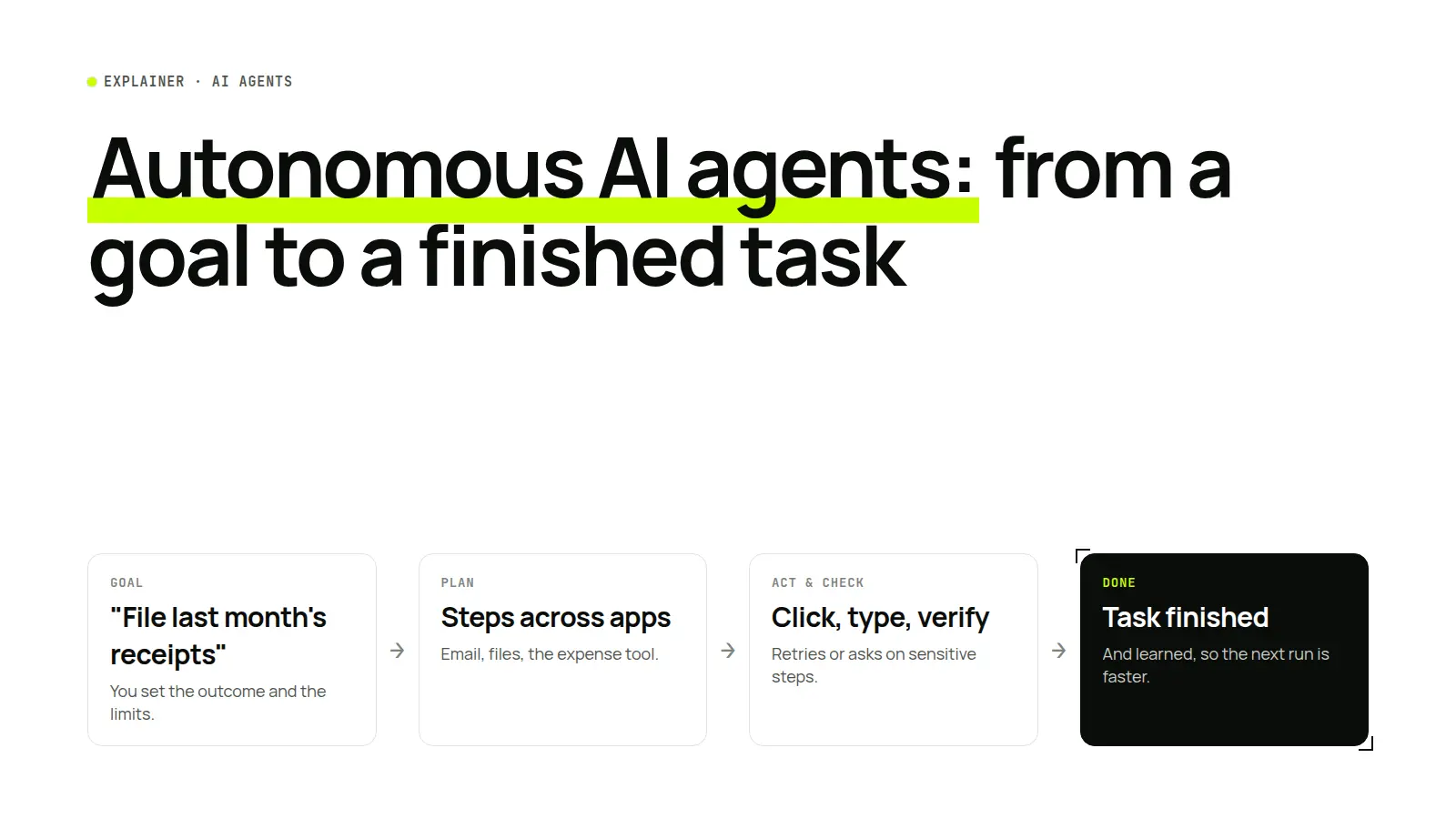
An autonomous AI agent is software that takes a goal, plans the steps, carries them out with real tools (a browser, desktop apps, files, APIs) and checks its own results, with little or no human help along the way. A chatbot answers a question; an autonomous agent finishes a job.
The word "autonomous" is about who drives the work. With a chatbot, you prompt every step: ask, read, copy, paste, ask again. With an autonomous agent, you set the goal and the limits ("file last month's receipts in the expense tool; ask me before you submit anything"), and the agent decides what to do next until the task is done or it needs you.
Three things make an agent autonomous rather than just helpful:
It owns the plan. It breaks the goal into steps itself, and changes the plan when something unexpected happens.
It acts, not just suggests. It uses tools to change things in the world: it clicks, types, downloads, uploads, runs code, sends data to an app.
It closes the loop. It looks at the result of each action, notices when something went wrong, and keeps going until the outcome matches the goal.
Autonomy is a dial, not a switch. Most useful agents today run on their own for routine steps and stop for approval on anything sensitive, such as sending, paying or deleting.
How we evaluated
This guide draws on IBM's overview of AI agents, the OSWorld benchmark and Simular's own published results and product pages; each source is linked at the end.
We explain autonomous AI agents through:
Definition: what makes an agent autonomous
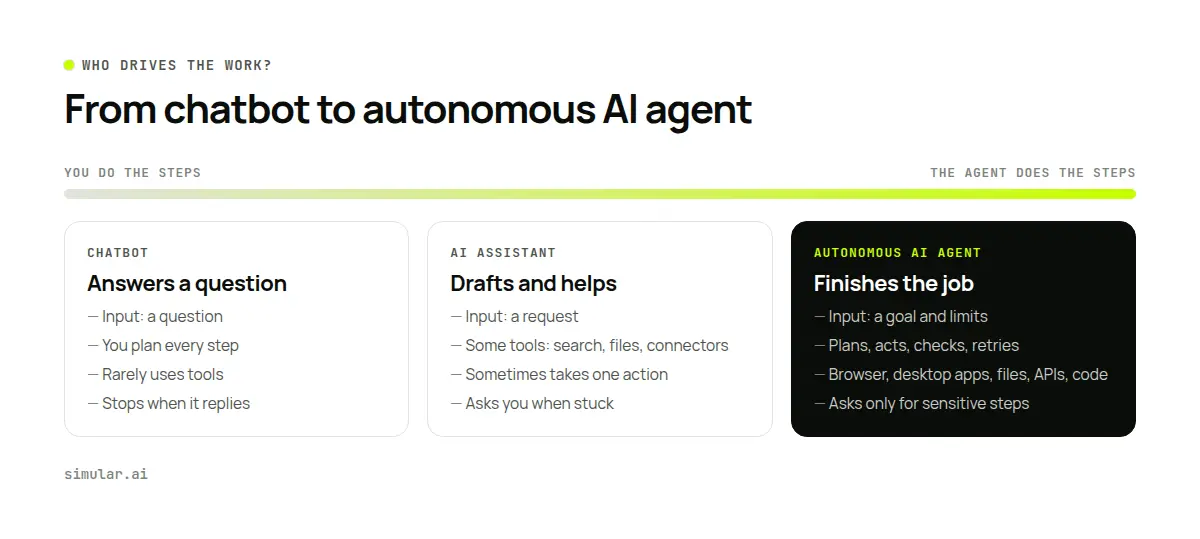
Comparison: chatbot vs AI assistant vs autonomous agent
How they work: the parts of an agent and the agent loop
Levels and types: how much autonomy, and what each kind can reach
Examples, measurement and risks, plus how to start
Comparison Summary
Chatbot
AI assistant
Autonomous AI agent
Input
A question
A request
A goal
Output
An answer
An answer or a draft, sometimes one action
A finished task
Who plans the steps
You
Mostly you
The agent
Uses tools
Rarely
Some (search, files, connectors)
Many: browser, desktop apps, files, APIs, code
Runs without you watching
No
Rarely
Yes, with approvals for sensitive steps
Handles surprises
No
Asks you
Retries, takes another route, or asks
Learns your process
No
Some memory
Can turn a solved task into a reusable routine
Typical example
A website help bot
ChatGPT, Claude or Gemini in a chat
A computer-use agent filing invoices every Monday
The lines blur: ChatGPT, Claude and Gemini all now have agent features, and an autonomous agent usually has a chat window for giving it goals. The useful question isn't the label but how much of the job the software does without you.
Why autonomous agents became practical now
The idea is old; software "agents" have been studied in AI for decades. What changed is the brain. Large language models can now read instructions in plain language, reason through multi-step problems, write code and decide which tool to use next. Add tool use (APIs, a browser, a whole computer) and memory, and the same model that drafts an email can also open the mail client, attach the file and schedule the send.
The second change is the environment. Agents used to be limited to apps with clean integrations. Computer-use agents can now operate the graphical interface of almost any software, the way a person does, so they can reach the long tail of websites and desktop apps that never had an API.
How autonomous AI agents work
The parts of an agent
Under the hood, most autonomous agents share five parts:
A model (the brain). Usually a large language model, sometimes several: a strong model for planning and smaller models for routine steps.
Tools (the hands). Ways to act: API calls, a browser, mouse and keyboard control of a desktop, a terminal, file access.
Memory. Short-term memory of the current task (what it has done, what it saw) and long-term memory of your preferences, logins and past solutions.
A planner and controller. The logic that decides the next step, tracks progress, handles errors and knows when to stop.
Guardrails. Rules about what the agent may do on its own, which steps need approval, and which accounts and data it can touch.
The agent loop
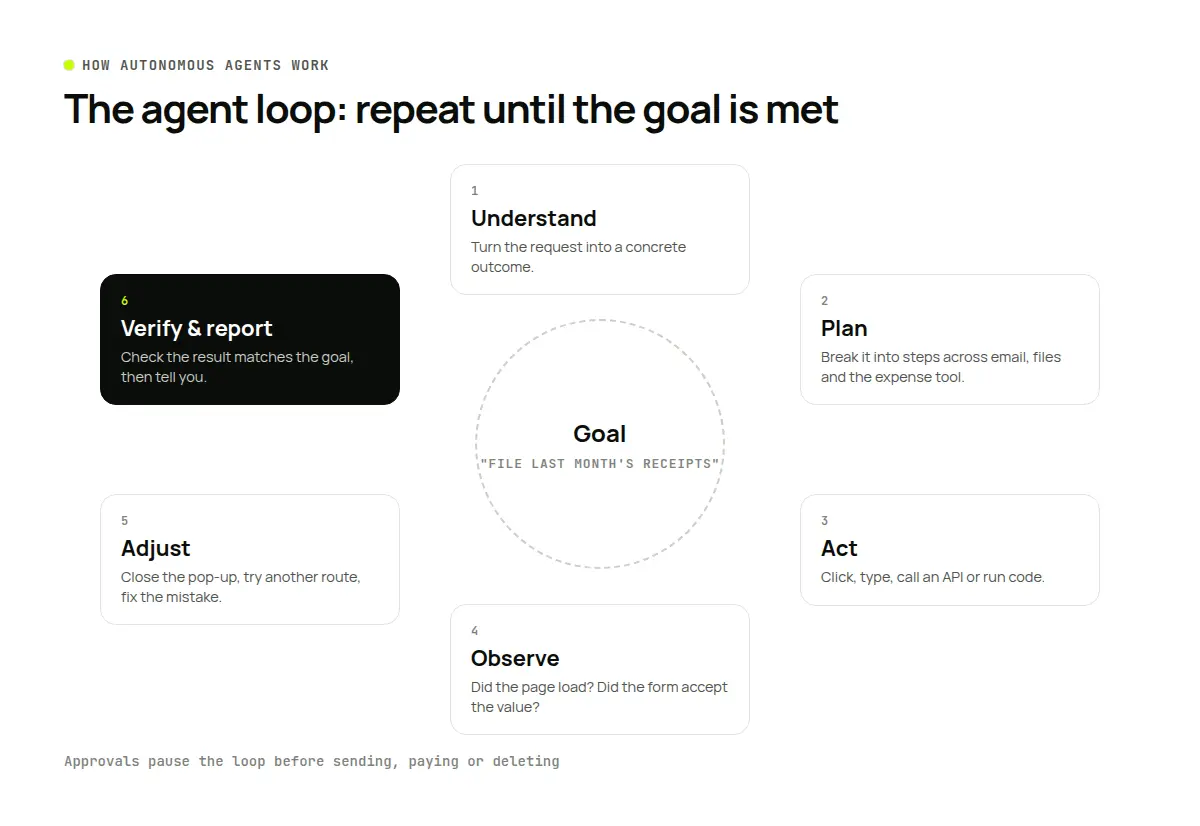
Most autonomous agents run the same loop:
Understand the goal. Turn "file last month's receipts" into a concrete outcome: every receipt from October entered in the expense tool, with the right category and amount.
Plan. Break it into steps: search email for receipts, download the attachments, read each amount and vendor, open the expense tool, enter each one.
Act. Use tools to carry out each step: click, type, call an API, run a bit of code.
Observe. Check what happened. Did the page load? Did the form accept the value? Is the total right?
Adjust. Fix mistakes or try another route: a pop-up blocked the button, so close it; the PDF is a scan, so read it as an image.
Verify and report. Confirm the end result matches the goal, then tell you what it did and anything it couldn't do.
The loop repeats for every step, which is why long tasks can take dozens or hundreds of actions.
What separates a strong agent from a demo
Anyone can record a video of an agent doing a task once. In real work, three things matter more:
Reliability. Does it finish correctly every time, not just once? A task that works 9 times out of 10 still needs a person to check every run.
Cost. How many model calls and tokens does it burn per task? Agents that take a screenshot and call a large model for every click get expensive on long jobs.
Oversight. Can you see what it did, step in when needed, and set rules about what it may do alone?
Levels of autonomy
It helps to think of autonomy in steps:
Level
What the agent does
What you do
Example
1. Suggest
Proposes the next action
Do it yourself
An assistant drafts the reply you send
2. Act with approval
Carries out each step after you confirm
Approve every step
An agent fills a form and waits for your "submit"
3. Act, ask on risk
Runs routine steps alone; stops for sensitive ones
Approve sends, payments, deletions
An agent files receipts and asks before submitting the report
4. Run on a schedule
Repeats a known task unattended
Review results
An agent pulls dashboard numbers every Monday and messages you a summary
Most teams start at level 2 for a new task and move to level 3 or 4 once the agent has done it correctly a few times.
Types of autonomous agents
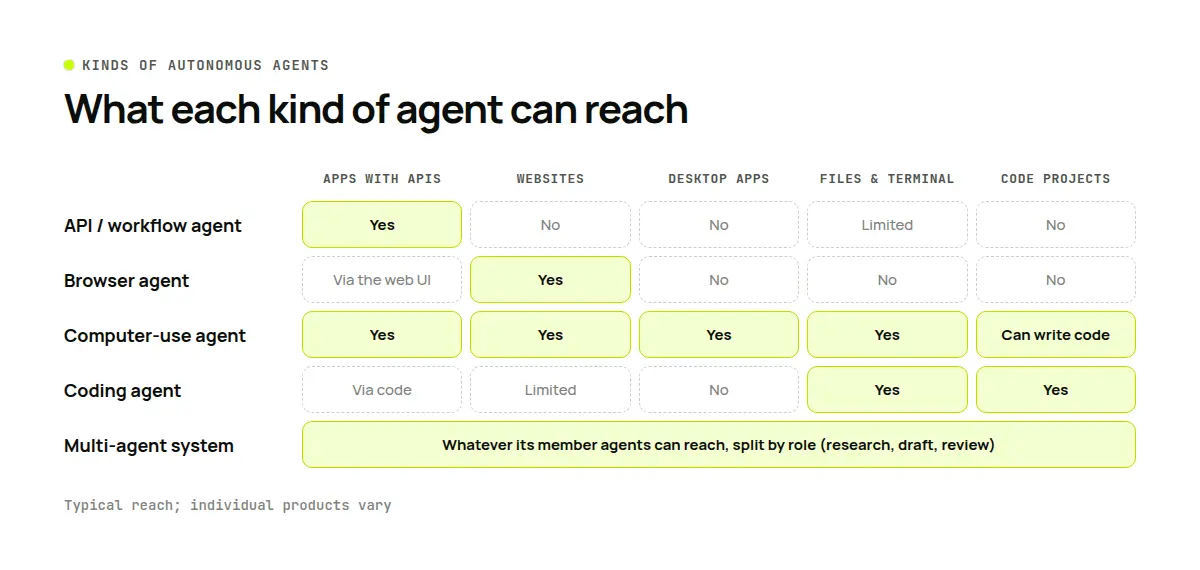
Agents are often grouped by how they act:
API and workflow agents call services that have integrations (CRM, calendar, email). They're fast and predictable, but limited to apps with an API and to steps someone has wired up.
Browser agents click through websites in a browser. They're flexible on the web, but can't reach desktop apps, local files or the terminal.
Computer-use agents operate a whole computer the way a person does: desktop apps, websites, files and the terminal, through the graphical interface. They're the most general kind and the hardest to make reliable.
Coding agents write, run and test code in a project, such as Claude Code and Codex.
Multi-agent systems split a job across several specialized agents, for example one that researches, one that writes and one that reviews.
For the classic textbook categories (simple reflex, model-based, goal-based, utility-based and learning agents), see Types of AI agents.
Autonomous AI agent examples
Here's what autonomous agents are doing in real work today, by team:
Finance and back office. Download invoices from a dozen vendor portals each month, rename and file them, read the totals and enter them in accounting software; reconcile a bank export against a spreadsheet and flag mismatches.
Sales. Research a list of target companies, find the right contact and recent news for each, and fill in a spreadsheet or CRM; log call notes against the right account.
Recruiting. Collect candidates who match a brief from several job boards, add them to a tracker, and draft first-touch messages for you to approve.
Operations. Move records between systems that don't talk to each other, including old desktop software with no API; update order statuses across portals.
Marketing. Pull last week's numbers from several dashboards, build a summary with a chart, and send it every Monday morning; check competitors' pricing pages for changes.
Personal admin. Compare prices across sites, book an appointment within your constraints, keep a shared calendar tidy, and gather documents for taxes into one folder.
Research. Visit a list of sources, extract the same fields from each and build a comparison table.
What these share: they're repetitive, they span several apps, and some of those apps have no API. That's where computer-use agents earn their keep, and where an agent that learns the task once and repeats it cheaply pays off most.
How autonomous agents are measured
The standard test for computer-use agents is OSWorld, from the XLANG Lab at the University of Hong Kong. Agents get real tasks on a real desktop (spreadsheets, browsers, file managers, office apps) and are scored on whether the end state is correct, not on how plausible their steps looked. OSWorld 2.0 (released June 2026) uses long tasks that take a skilled person more than an hour: finding information across email and files, handling changes mid-task, following written rules.
Two milestones from Simular's research:
Agent S, Simular's open-source agent, was the first to reach human-level performance on OSWorld 1.0, scoring 72.6% against a human baseline of 72.36% (Dec 2025).
Sai scored a 77.3% partial score on OSWorld 2.1 (79.4% counting repeated runs), on par with Opus 5 at 77.67%, per Simular's Oct 2, 2026 update. All trajectories are public on Hugging Face.
Benchmarks report the best of several tries on a fixed set of tasks. Real work needs the same correct result on the hundredth run, on your own apps and data, which is why reliability and cost matter as much as the headline score. When you evaluate an agent, run it on your own task several times and count how often it finishes correctly without help.
Sai: an autonomous AI agent with its own computer
Sai is Simular's autonomous computer-use agent. Simular calls it a "robosecretary": you hand it the digital chores, and it works on its own cloud computer, or on your own device (Mac mini, macOS or Windows). Sai reasons and acts inside real interfaces, clicking and typing through browsers and desktop apps the way you would.
What makes it different:
Full desktop, not just the browser. Sai works across your entire operating system: desktop apps, web browsers, file systems and terminals, and it can write code when that's the faster route. If you can click it, Sai can, including software with no API.
Its own computer, so you can close your laptop. Sai lives in its own cloud computer, so tasks don't need your machine open. Your setup, logins, preferences and context persist between sessions. Switch to your own device (BYOD) when you need to.
It learns each task. Sai's neuro-symbolic approach, from Simular's research, turns a solved task into code that replays the same way every time. The first run explores; repeats get faster and cheaper, so the hundredth invoice doesn't cost what the first one did.
Fewer model calls. Sai plans in code and takes more actions per turn, keeps prompts short with summarization and caching, and calls smaller specialist models for steps that don't need a frontier model.
You stay in charge. Set approvals for critical steps, watch it live, and get results on the go by iMessage, SMS or Telegram. Add skills for jobs you run often and share them across a team.
Where it fits best: work that comes back. A task you run every Monday, a report you rebuild every month, a process that spans several tools that don't talk to each other. Teach Sai once and it reruns on a schedule.
Pricing: Free with daily credits and a limited cloud Windows computer; Pay as you go at $50/month (50,000 credits, up to 5 cloud computers); Sai Unlimited at $500/month; Enterprise is custom. See sai.work/pricing.
Already use ChatGPT or Claude? If you'd rather keep your current AI as the brain, Simular Box gives it its own computer instead. Sai is the do-it-for-me agent; box is the computer for the AI you already use.
Risks and how to manage them
Wrong actions. An agent can click the wrong button or misread a field. Use approvals for anything that sends, buys or deletes, and start new tasks at a supervised level.
Access. Give the agent only the accounts it needs. Keep payments with a person, and prefer an agent that works on its own computer rather than your personal machine and browser profile.
Silent errors. A task that "finished" can still be wrong. Prefer agents that verify their own results, show you what they did step by step, and keep a record you can check.
Prompt injection. Web pages and documents can contain text that tries to give the agent new instructions. Good agents treat what they read as data, not orders, and still stop for approval on sensitive steps.
Cost creep. Screenshot-heavy agents burn tokens on every step. Look for agents that reuse solved tasks and use smaller models where they can.
Over-automation. Not every task should be automated. Start with repetitive, low-risk work where a mistake is easy to spot and fix.
How to start with an autonomous AI agent
Pick one repetitive task you do weekly that touches two or more apps, such as pulling numbers into a report or filing documents.
Write the goal and the rules the way you'd brief a new assistant: what "done" looks like, what to skip, and what to ask about ("only book slots after 3pm," "ask before submitting").
Run it once while watching. Correct anything it gets wrong and note where it needed you.
Add approvals for the sensitive steps, then let it repeat on a schedule.
Check results for the first few runs, then step back to spot checks.
Expand slowly. Once one task runs reliably, add the next.
More questions
How are autonomous AI agents measured?
For computer use, mainly OSWorld, which scores agents on real desktop tasks by whether the end state is correct.
Can an autonomous AI agent use my computer?
Sai can run on its own cloud computer or on your own device (Mac mini, macOS or Windows).
How much does an autonomous AI agent cost?
It varies. Sai has a free plan with daily credits, Pay as you go at $50/month and Unlimited at $500/month.