
哎哟!提交表单时出了点问题。
.svg)
.svg)
Every serious marketer reaches a moment where YouTube stops feeling like "just another channel" and starts feeling like a trading desk. Budgets move fast, CPM swings with every targeting tweak, and you’re stuck in spreadsheets trying to answer one question: "Is this actually profitable?" A YouTube ad calculator turns chaos into a model. By combining views, CPC, conversion rate and RPM/CPM, you can estimate revenue, cost-per-conversion and margin before you scale. Tools inspired by SocialBlade, Aux Mode and ROI calculators like Rows give you a consistent way to sanity‑check results instead of guessing from gut feel.
Now imagine that calculator isn’t something you open once a week, but a living system an AI computer agent checks for you every morning. The agent logs into YouTube, pulls fresh metrics, updates your calculator, flags ad sets whose RPM or cost-per-conversion drift past your thresholds, and drops a one‑page summary into your inbox or CRM. Instead of babysitting numbers, you wake up to decisions: pause, scale, or test a new creative—while the agent quietly runs the math in the background.
In this guide, you’ll walk through the top ways to build and use a YouTube ad calculator—from simple manual methods to fully automated AI agent workflows—so you can stop guessing and start scaling with confidence.
Method 1: Use a Google Sheets ROI template
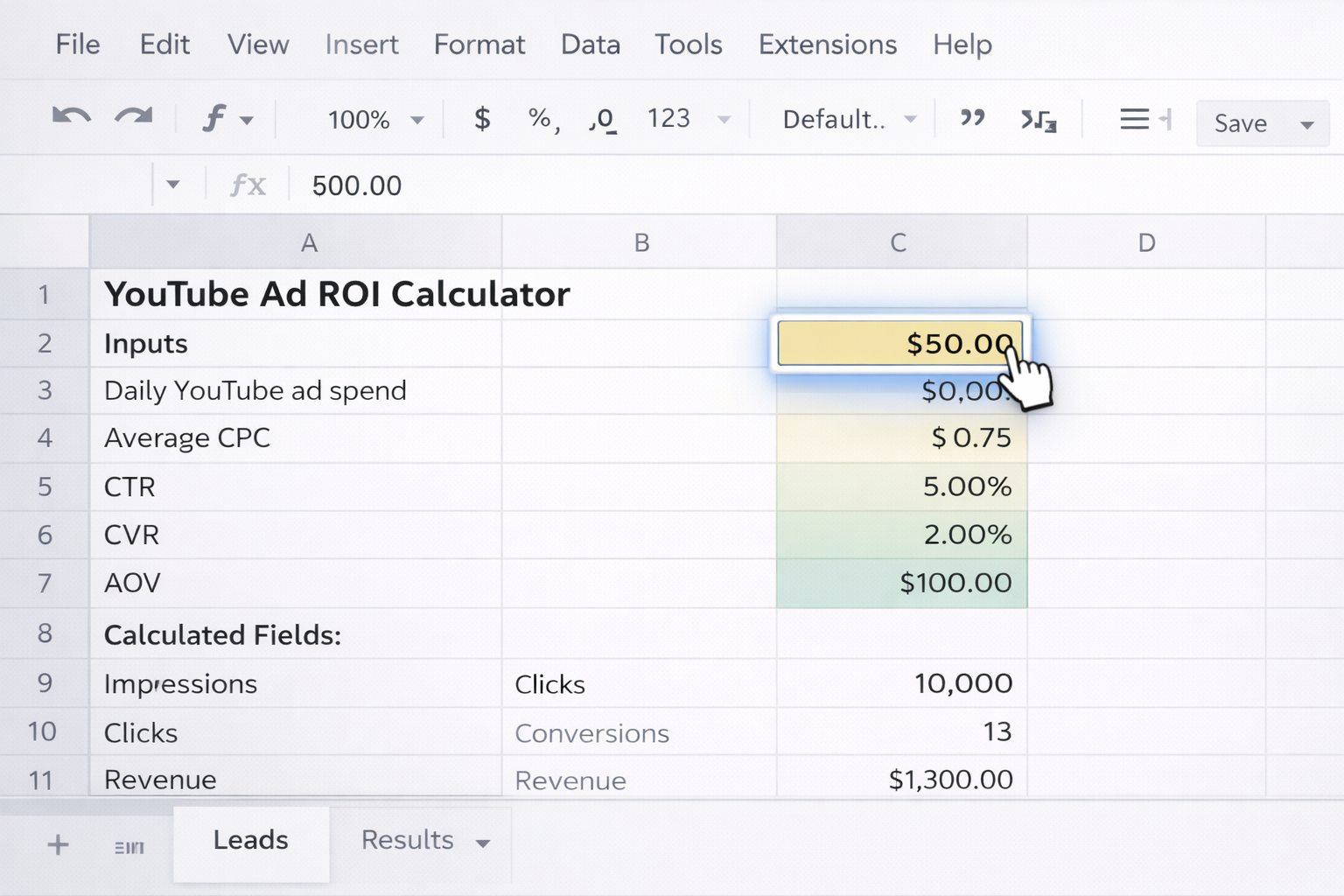
Impressions = Clicks / (CTR)Clicks = Spend / CPCConversions = Clicks * CVRRevenue = Conversions * AOVCost per conversion = Spend / ConversionsROI % = (Revenue - Spend) / Spend
Pros: Free, fully transparent, easy to customize.
Cons: Time‑consuming, error‑prone copy‑paste, no alerts.
Method 2: Build a CPM/RPM‑focused calculator
Low Earnings = Views / 1000 * Low RPMHigh Earnings = Views / 1000 * High RPM
Pros: Great for revenue projection and benchmarking.
Cons: Ignores conversion value and downstream revenue.
Method 3: Campaign planner in Excel
Pros: Powerful analysis, flexible.
Cons: Heavy manual work; becomes brittle at scale.
Method 4: Quick‑and‑dirty calculator in a slide deck
Pros: Great for leadership storytelling.
Cons: Not meant for daily decision‑making.
Manual calculators break the moment you’re running more than a few campaigns. Here’s how to automate with no‑code tools.
Method 5: Use a spreadsheet‑based ROI template with live data (Rows, Sheets + connectors)
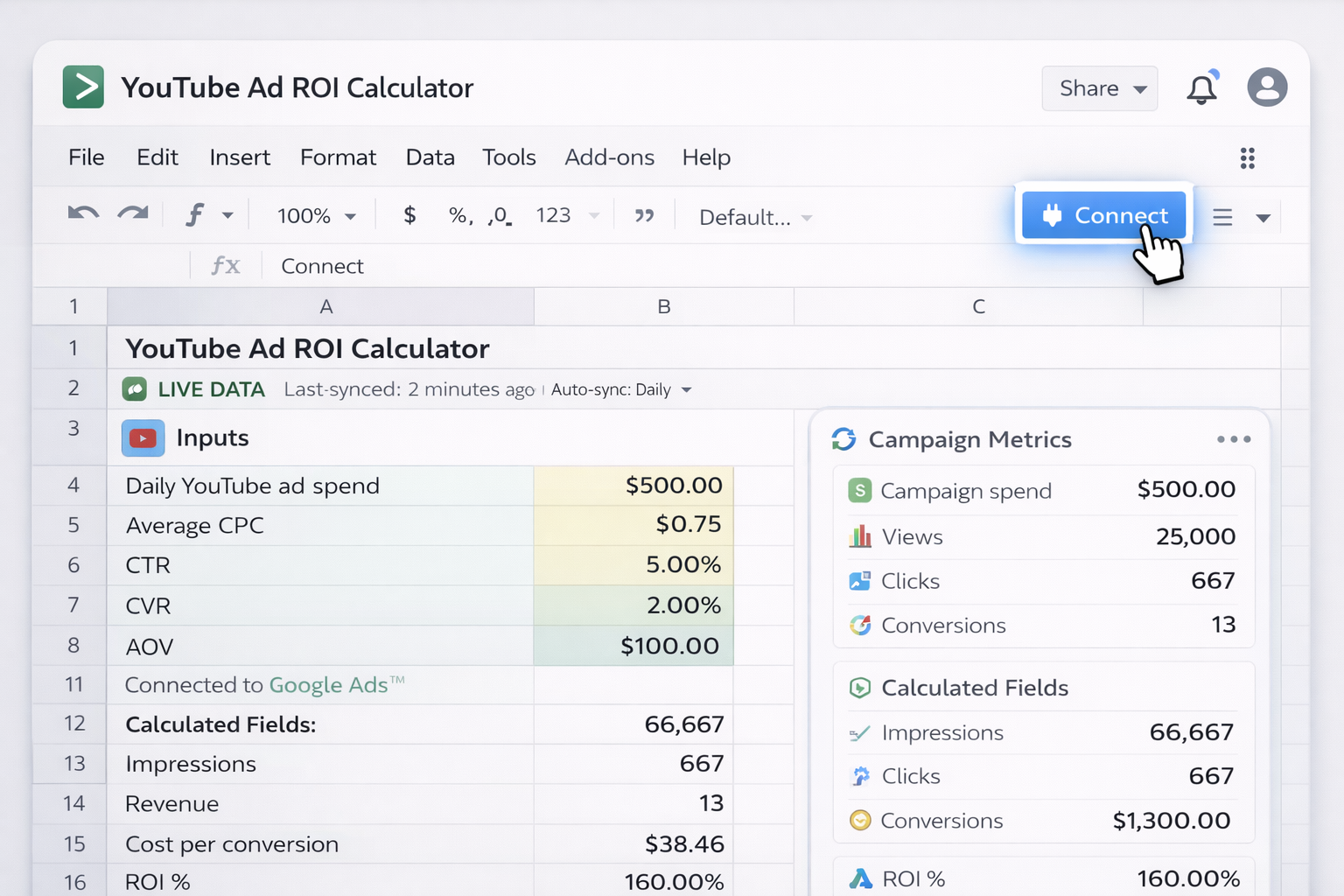
Pros: Minimal setup, automatic data sync, familiar spreadsheet UI.
Cons: Still limited by spreadsheet performance; complex multi‑account setups can get messy.
Method 6: Zapier/Make + Google Sheets pipeline
Pros: Data flows automatically; you only look at summaries.
Cons: Requires maintaining zaps/scenarios; errors can silently break the data chain.
Method 7: Embed a YouTube ROI form for non‑technical users
Pros: Sales, creators, or clients can run their own calculations safely.
Cons: Still requires someone to maintain the underlying logic.
No‑code removes some friction, but you’re still orchestrating tools. An AI computer agent like Simular Pro can operate across your full desktop, browser, and cloud stack—just like a human analyst, but on autopilot.
Method 8: Simular AI agent as your daily YouTube ad analyst
Pros: End‑to‑end automation across web + desktop; production‑grade reliability; no need for brittle one‑off scripts.
Cons: Requires initial design and testing of the workflow; best for teams ready to standardize their reporting process.
Method 9: Scenario planning and alerts with a Simular AI computer agent
Pros: Turns the calculator into a real decision engine; proactive alerts, not just passive reporting.
Cons: Needs a bit more upfront thinking about thresholds and scenarios.
Method 10: Multi‑client, multi‑channel agency cockpit
Pros: Huge time savings, consistent reporting, easy to productize as a service.
Cons: Requires careful credential management and clear client onboarding.
For YouTube’s current reporting options and metrics definitions, always refer to the official YouTube Help Center at https://support.google.com/youtube. For designing robust, cross‑tool workflows with agents, explore Simular Pro at https://www.simular.ai/simular-pro.
.svg)
.svg)


%20(2).svg)