Oops! Something went wrong while submitting the form.
Sai scores each resume on required skills, experience fit and eligibility, writes a one-line reason for every score, and separates candidates who fail a must-have from those who meet all must-haves and miss only a nice-to-have. Output is a Google Sheet for review — no candidate is rejected automatically.


The recording is a real session. The sheet on the right is what it produced.
Sai opens each profile, pulls the signal, and writes the row, live, in a real browser.
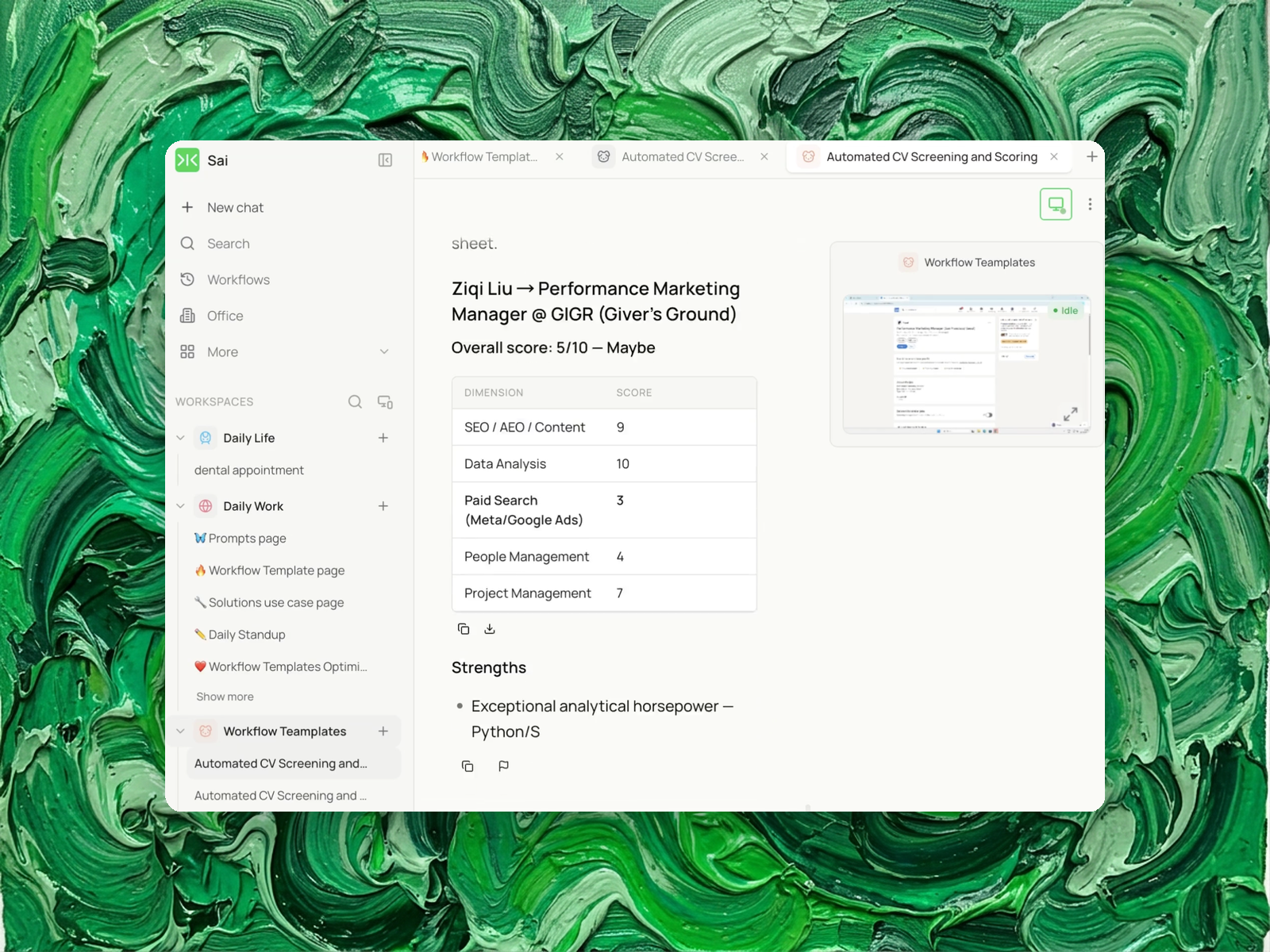
Eight columns, sorted by score, with a source link behind every claim.
The resumes (a Drive folder, or files you upload) and the job description as text or a URL. A Google Sheet if you want results written to a spreadsheet.
A Google Sheet with candidates in three groups — meets all must-haves, near-miss, misses a must-have — each with scores, the specific requirements not met, a recommendation, and a one-line reason tied to the resume.
Run it per role rather than on a schedule. For an open role receiving applications continuously, run it against each new batch using the same confirmed must-have list, so the groups stay comparable across batches.
Two categories cover most of the market.
ATS platforms — Greenhouse, Lever, Workable, Recruitee — include screening as part of a pipeline. Applications arrive, get scored or filtered, and the result attaches to the candidate record, where it can trigger the next stage.
Dedicated screening tools — Manatal, Skillate, SeekOut and similar — score and rank at larger volumes, often with sourcing and database features alongside.
Both produce the same primary artifact: candidates ordered by a score.
A score aggregates several judgments into one number, and the aggregation loses the distinction between two different kinds of shortfall.
A candidate who meets every mandatory requirement but lacks one preferred qualification is worth interviewing. A candidate who is strong across several dimensions but lacks a mandatory certification or work authorization is not — no amount of strength elsewhere substitutes for it.
These two can produce the same overall score, and in a single ranked list they appear adjacent, indistinguishable. The first is a good candidate with a small gap. The second is not a candidate for this role.
The list also hides the direction of the gap. Position 8 on a list of 20 does not indicate whether the candidate is missing a required skill, a year of experience, or a preferred tool.
Candidates are sorted into three groups before being ranked within each.
Meets all must-haves. Every mandatory requirement satisfied.
Near-miss. Every mandatory requirement satisfied, one or more preferred qualifications not. These are usually interviewable and are the group most often lost in a ranked list, because a preferred-qualification gap moves a candidate down among people who are not actually eligible.
Misses a must-have. At least one mandatory requirement not met, with the specific requirement named.
Ranking happens inside each group. The groups are not merged, because their members are not comparable on a single scale.
The grouping depends entirely on which requirements count as mandatory, and job descriptions are frequently unclear about this. "Experience with Python preferred" and "5+ years in a similar role" carry different weight, and a JD often mixes them in a single bulleted list.
The run extracts both lists from the JD and shows them for confirmation before scoring anything. Where the JD does not make the distinction clear, it says so rather than assigning one.
An incorrect must-have list produces confidently wrong groups, which is worse than no grouping.
Each score carries a one-sentence reason citing the part of the resume it is based on.
A number alone cannot be checked. A reason naming what it draws on can be verified against the document in a few seconds, which is what makes a review a review rather than a re-read.
Missing requirements are named individually rather than summarized. "Missing: AWS certification, 2 years short on team lead experience" indicates what to ask about in a screen. A score of 6 does not.
A requirement that cannot be assessed from a resume is recorded as not stated, not scored as zero.
Resumes vary in length and detail. A brief resume from a strong candidate omits things a longer one includes. Treating every omission as an absence systematically penalizes concise resumes, which correlates with writing style rather than with capability.
Recording it as not stated makes it a question for the screening call.
Protected characteristics are not inferred, and several common proxies are excluded as inputs: name, photo, school prestige, and employment gaps.
Where a resume includes a photo or date of birth — common in some regions — it is ignored and the run notes that it was.
Employment gaps are excluded specifically because they correlate with caregiving, illness and immigration status rather than with capability, and because a gap on paper is not a fact about performance.
The output is a sorted shortlist with reasons, for a person to review. No candidate is marked rejected, and nothing is sent to any candidate.
This matters beyond preference. Automated employment decision tools are regulated: New York City's Local Law 144 requires an annual bias audit and candidate notification for tools that substantially assist hiring decisions, and the EU AI Act classifies employment-related AI as high-risk. US EEOC guidance applies existing anti-discrimination law to algorithmic selection.
A tool that produces a reviewed shortlist and a tool that rejects applicants occupy different positions under those rules. This one produces the shortlist. The decisions, including every rejection, are made by a person, and the reasons in each row exist so that person can check the reasoning rather than inherit it.
Neither this template nor this page constitutes legal advice on compliance in your jurisdiction.
Automatic rejection. Nobody is filtered out. The third group is shown in full, with reasons.
ATS integration. Output is a Google Sheet. Scores are not written back to a candidate record.
Candidate communication. Nothing is sent to anyone.
High volume. It is built for batches in the tens. Thousands of applications per role is an ATS workload.
Bias auditing. It excludes several known proxies, but it does not constitute a bias audit, and running it does not satisfy any audit requirement.
Assessing anything not in the resume. It scores the document, which is a record of claims. It does not verify them.
Free your hands from the computer.
Run this Task