Oops! Something went wrong while submitting the form.
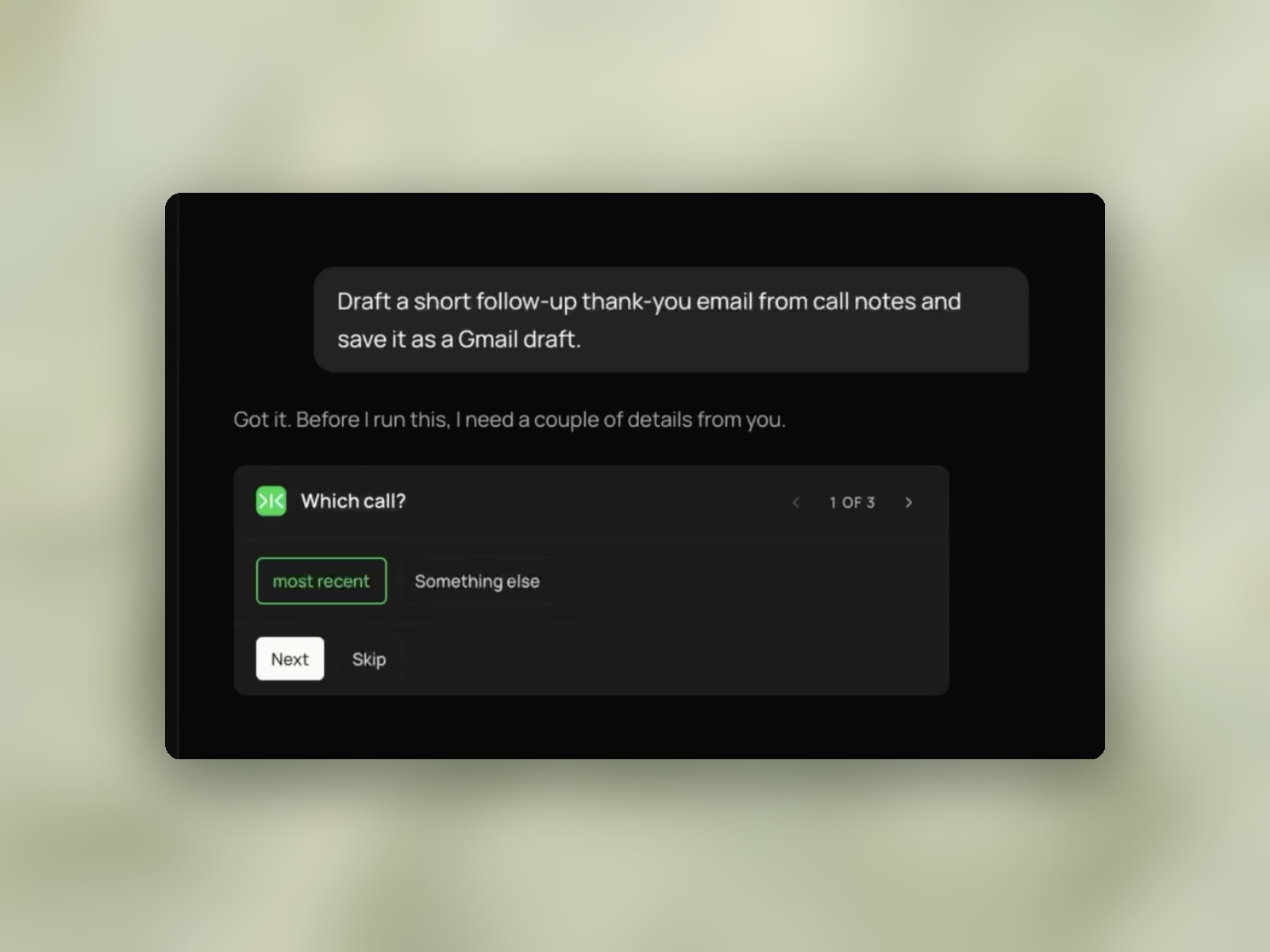
Sai reads the notes from your last call and drafts a follow-up to the attendees — thanks, two or three key points recapped in the words they used, a direct response to any concern raised, and next steps with a suggested time. Under 150 words, saved as a Gmail draft. Nothing is sent.


The recording is a real session. The sheet on the right is what it produced.
Sai opens each profile, pulls the signal, and writes the row, live, in a real browser.
Eight columns, sorted by score, with a source link behind every claim.
A call with notes or a transcript in Granola, or an attached recording in Google Calendar. Gmail access.
A Gmail draft under 150 words: a specific opening, two or three points recapped in the attendees' own phrasing, a direct response to any concern raised, and next steps with a proposed time. Plus a note on which phrases came from the notes. Nothing sent.
Attach it to a recurring client call so the draft is waiting after each one.
Searching for a post-meeting thank you letter returns collections of templates — from Indeed, HubSpot, Grammarly, Close and others. Each provides an opening, a recap sentence, a next-steps line and a sign-off, with brackets for the details.
They are free, immediate, and correct in form. For a courtesy note after an interview or an introduction, a template is a complete answer.
The brackets are where the work remains. Filling in what was discussed, which concern was raised, and what happens next requires going back through the notes and reconstructing the meeting. The template saves the typing. The reconstruction is unchanged.
Gemini in Gmail, ChatGPT, Jasper and Grammarly produce the same structure with better sentences, and will accept meeting notes as input.
Given notes, they consistently do one thing that works against the email: they rewrite the attendee's language into standard business phrasing.
A prospect who said "we're worried about the ramp time for the team" comes back as "I understand you have some concerns about implementation timelines." The second sentence is more polished and less useful. The person reading it does not recognise their own words in it, and the sentence would fit any meeting with any customer.
A follow-up email exists to demonstrate that the call was heard. The evidence for that is the other person's phrasing appearing in the recap. Smoothing it removes the evidence and leaves the structure.
This task quotes or closely paraphrases what attendees actually said, and the prompt instructs it not to normalise the wording.
The instruction has to be explicit, because normalising is the default behaviour of a language model. Left unconstrained, it produces the polished version.
Below the draft, it lists which phrases came from the notes and which were written to connect them. Before sending an email under your name, the recap is the part worth checking, and separating the sourced phrases from the connecting text makes that check quick.
The recorded draft opens:
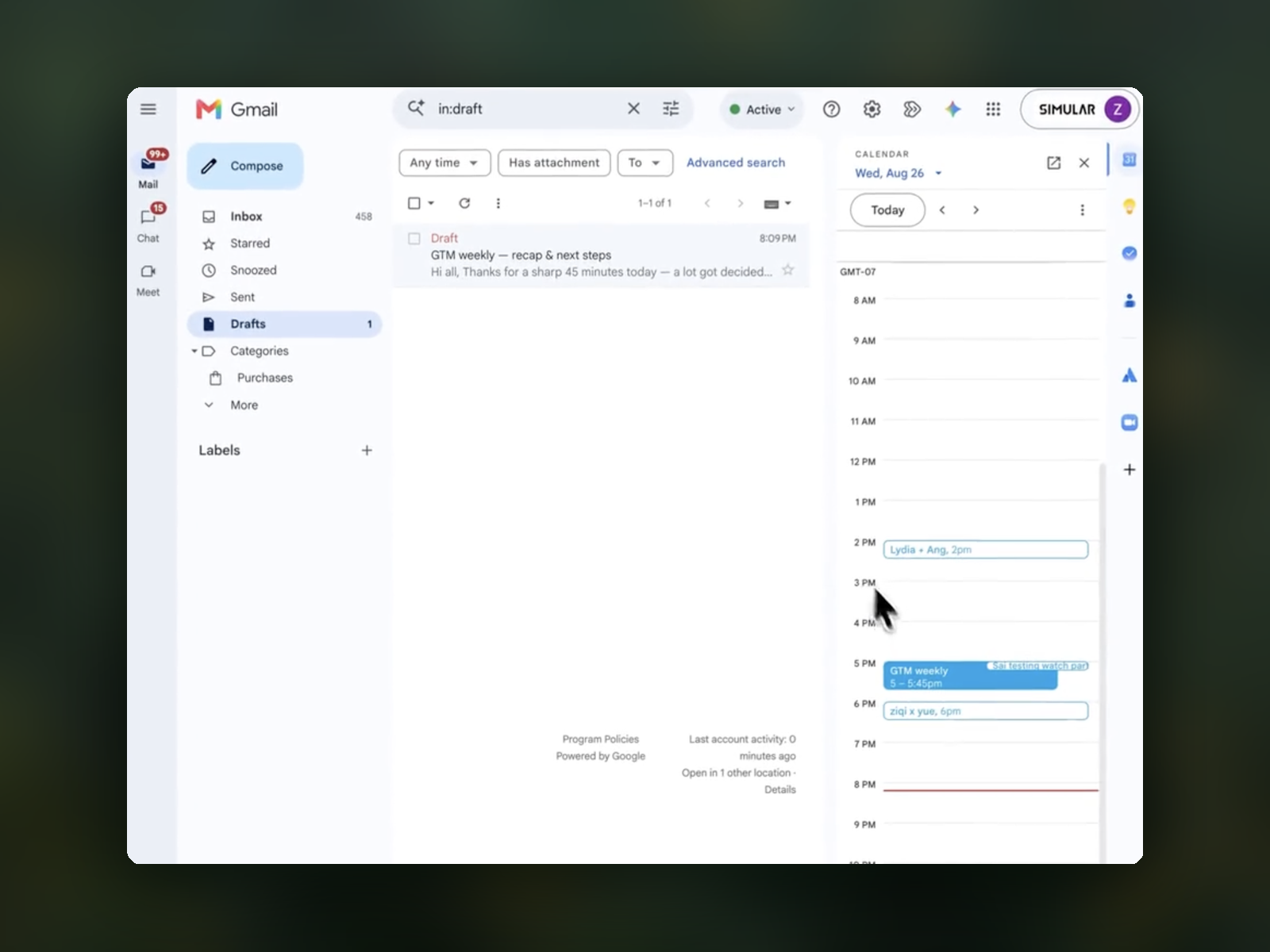
"Hi all, Thanks for a sharp 45 minutes today — a lot got decided…"
A specific duration and a specific claim about what happened. Compare with the template opening it replaces: "Thank you for taking the time to meet with me today."
The second sentence could follow any meeting. The first could only follow that one.
The prompt also blocks three phrases outright — "I hope this email finds you well", "circling back", "excited to partner". These are the clearest markers of template-generated mail, and a recipient who reads several of these a week identifies them immediately.
The attendee list comes from the calendar invite, and anyone who was invited but did not attend is flagged rather than addressed as though they were present.
Invite lists and attendance lists diverge routinely. Thanking someone for a conversation they were not in is a small error that is immediately visible to everyone who was.
The email is saved in Gmail and not sent.
In the recorded run, the draft appears in the Drafts folder with the subject "GTM weekly — recap & next steps", timestamped 8:09 PM, with the drafts count at 1 and nothing added to Sent.
The draft sits in Gmail, where it is edited and sent in the normal way. An email going to a client is worth reading once before it goes.
Sending. The draft is saved. Nothing leaves the account.
Recording or transcribing. It reads notes a notetaker produced. Without notes, there is no input.
Sales call analysis. Gong and Chorus analyse calls against a sales methodology, score them and track patterns across a team. This drafts one email from one call.
Sequences or open tracking. No follow-up cadence, no open rates, no CRM logging.
Writing without notes. If the call was not recorded, it says so rather than producing a generic thank-you.
Attach it to a recurring client call so a draft is waiting afterwards.
Since it flags which phrases came from the notes, a run over a call with thin notes produces a visibly thin recap — an accurate signal that the meeting record was insufficient, rather than a full-looking email built on very little.