Oops! Something went wrong while submitting the form.
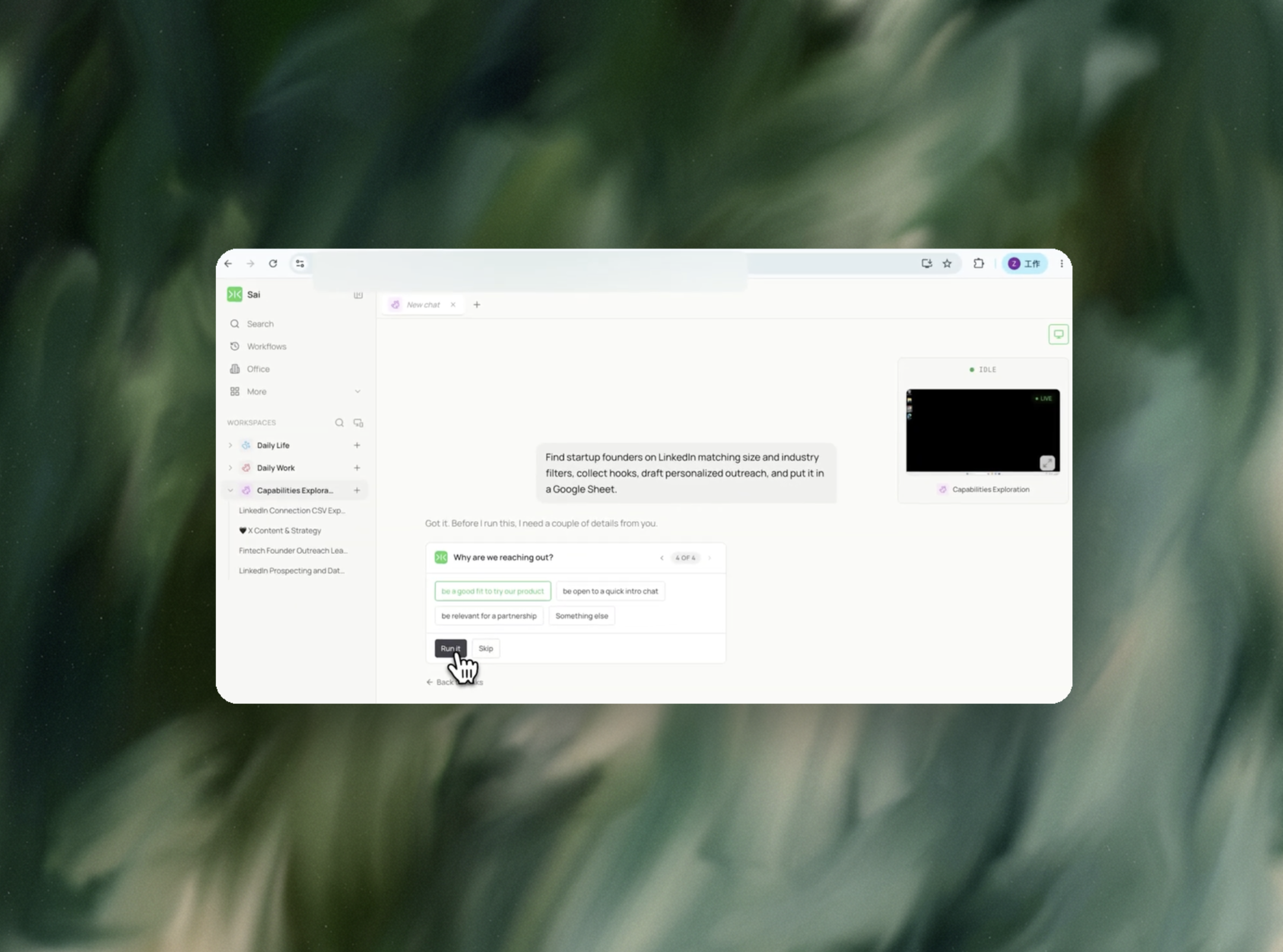
Sai does the part that actually takes time - finding the right people, reading each profile, and writing a message that references something real. The drafts land in a Google Sheet. You send them yourself, from your own inbox.

The recording is a real session. The sheet on the right is what it produced.
Sai opens each profile, pulls the signal, and writes the row, live, in a real browser.
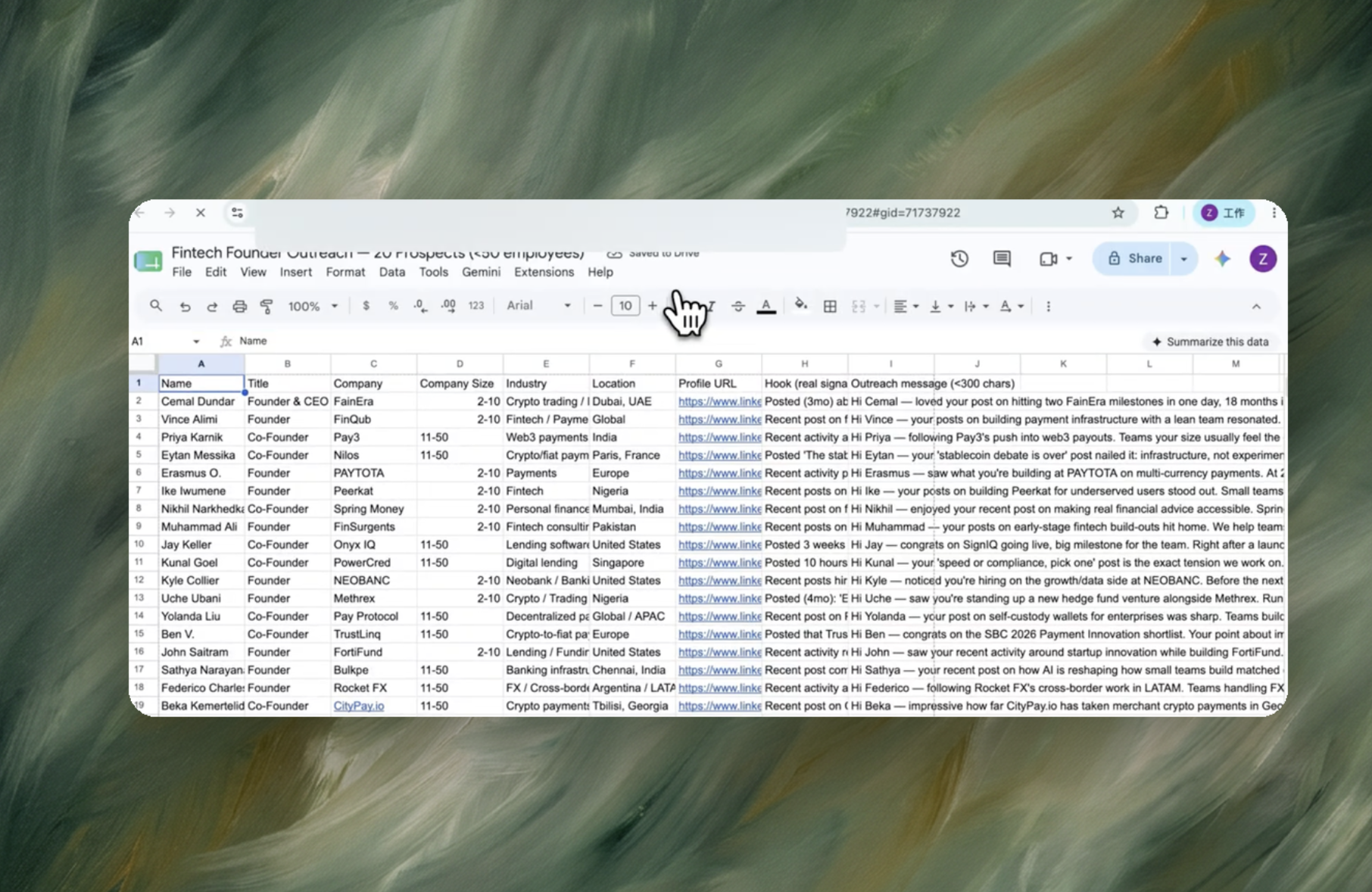
Eight columns, sorted by score, with a source link behind every claim.
Your ICP in plain words - company size, industry, and what makes someone worth messaging. A LinkedIn account you're already signed into.
A Google Sheet with one row per prospect: name, title, company, size, industry, location, profile URL, the specific hook Sai found, and a message under 300 characters written around that hook.
About 12 minutes for 20 prospects.
Re-run weekly and Sai drafts only for people who weren't in last week's sheet.
Automating LinkedIn messaging means running the repeatable part of outreach — opening each profile, reading the recent activity, and writing a message specific to that person — without a human repeating those steps by hand for every contact. The part that is genuinely repetitive is research and drafting: same sequence of actions, different person each time. LinkedIn's own User Agreement (section 8.2) prohibits software that automates account activity such as connecting and messaging, and LinkedIn enforces weekly invitation and messaging caps at the account level. So workflow automation that is safe here stops short of the send: an automated run produces reviewed, ready-to-send drafts, and the account owner presses send. That boundary is what separates a research-and-drafting workflow from a bulk sender.
Founders doing their own sales, recruiters sourcing 20–50 candidates a week, and BD or partnerships leads working a named-account list. The shared situation: a list of people that needs individual attention, a message quality bar that generic templates fail, and no headcount to spend two to three minutes per profile. At 20 contacts that is roughly an hour of manual work per batch, repeated every week — a recurring task with a fixed shape, which is exactly the profile that batch processing handles well and a human handles expensively.
Expandi, Dripify and HeyReach are genuinely stronger at cadence management, multi-step follow-up and team-level reporting. Their trade-off is that personalization is merge fields over a shared template, and the sending happens from the account they are connected to. This workflow makes the opposite trade: no sending, and the personalization is written from what is actually on each profile.
Restrictions are triggered by automated activity on the account — invitations, messages, profile views and follows sent at machine rate. LinkedIn caps invitations at roughly 100 per week per account and applies commercial-use limits to search. A workflow that reads public profile pages and writes drafts into a document does not send anything from the account, so it does not touch those send-side thresholds. The risk moves back to the account owner, at human pace, on the messages they choose to send.
Outreach drafting fails in a specific way: the run works on profile one, then silently degrades — a wrong company on profile nine, a hallucinated funding round on profile fourteen. Reliability, not speed, is the property that decides whether a batch is usable. Sai is an autonomous computer rather than a chatbot or a fixed RPA script: it operates the browser the way a person does, so it works on the live page instead of a scraped snapshot, and each step is checked against what is actually on screen before it moves on. Every draft in the output carries the profile URL and the specific fact it was built from, so verification is a glance rather than a re-read.
The saving is not a cheaper message; it is removing the per-contact human minute. Manual research and drafting runs two to three minutes per contact, so a weekly batch of 20 costs about an hour, or roughly four hours a month of founder or recruiter time. Running the same work as batch processing turns that into one review pass over 20 finished drafts. Compared with a per-seat sequencer subscription, there is no floor cost for a month in which you send nothing, because the cost is per run, not per seat.
Outreach is a recurring task, not a one-off, and the value compounds when the same run happens on a schedule. This template can be set to run weekly against a saved LinkedIn search or an updated list, so a fresh set of drafts is waiting at the start of the week. Each run is independent — a failure in one week's batch does not carry state into the next.