
Présentation de SimuLang : Playwright pour l'ensemble du bureau
par Ang Li • Palo Alto, Californie • 23 avril 2026Jamie Lim
Simulang est un langage de script pour automatiser les navigateurs, les applications natives et les workflows au niveau du système d'exploitation — conçu pour être écrit par des agents IA. Nous venons d'ouvrir le code source de Simulang. Vous pouvez l'installer maintenant avec une seule commande :
The computer you don't sit at
At Simular, we build AI. But that isn't the main point. The point is freeing people from their devices.
There are two facets to that freedom. One is your time: the hours, the attention, the life that gets handed back to you. The other is your hands: being somewhere and doing something, instead of staying anchored to a keyboard.
This summer, my bottleneck wasn't how smart Sai is — it's that you had to be at a computer to use the "autonomous computer". Sai can already do a full day's work on your machine, but every new instruction or follow-up meant returning to a keyboard (or digging your phone out of your pocket) just to say what's next.
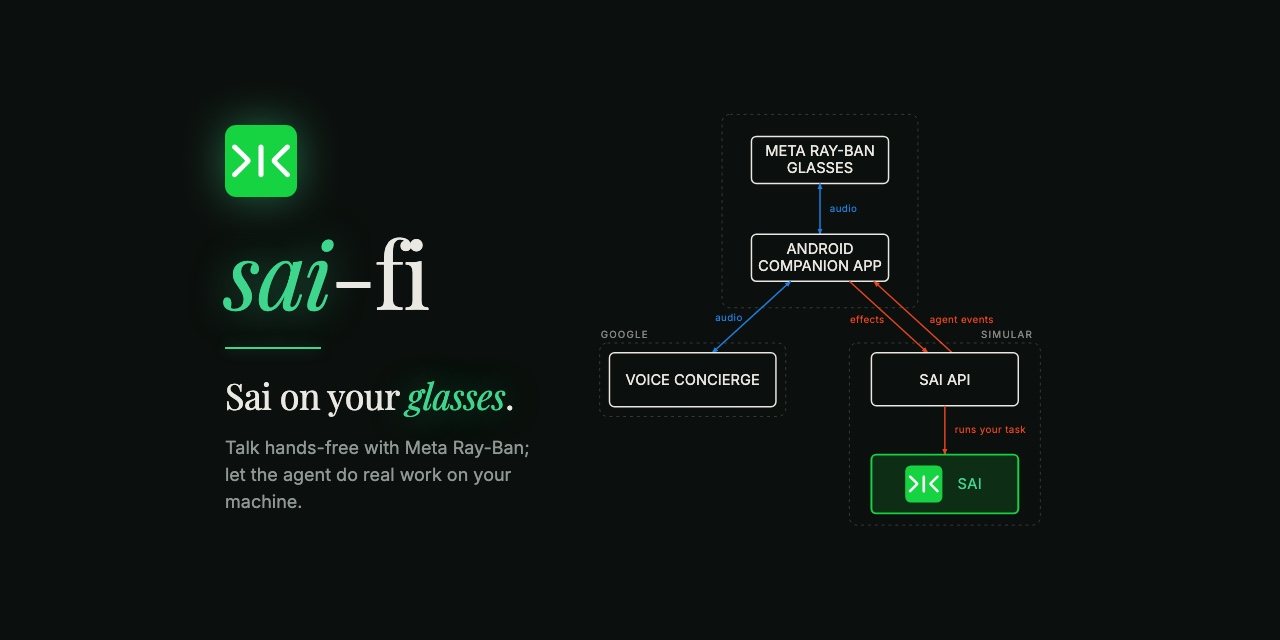
So my prototype turns Sai into a voice agent for AI glasses — a pair of Meta Ray-Ban glasses, driven entirely by voice. It's a hands-free concierge you talk to, rather than a chat box you type into. You tap to start a call, and within a couple of seconds Sai greets you first, ready to be of service. We call it Sai-Fi.
A voice interface for our computer-use agent
This isn't a voice assistant. A voice assistant answers questions; Sai does actual work. Read my unread messages and tell me what needs me. Draft and send a reply to my boss, grounded in the doc I was editing earlier. Put a meeting on my calendar. Now, you can hand these tasks off anytime, anywhere: hands full of cake batter, or sitting on a kayak in the middle of a lake.
There's another part that's easy to miss behind the hardware: the glasses aren't really the point either. What makes this work is the API that exposes Sai (the layer allowing any app to talk to Sai in a common language) and the voice concierge (the layer that makes conversation flow smoothly). The glasses are just the newest surface; with the API, the medium could be almost anything, including things that don't even exist yet.
The voice concierge currently lives inside the Android app powering the glasses, and it was the trickiest part by far — holding a conversation gracefully is much harder than shuttling text back and forth. To reduce latency, what you say goes straight to the realtime voice model first. And because it stays responsive, you can interrupt or add instructions even while a long task runs, without having to talk over incessant narration (more on all this later).
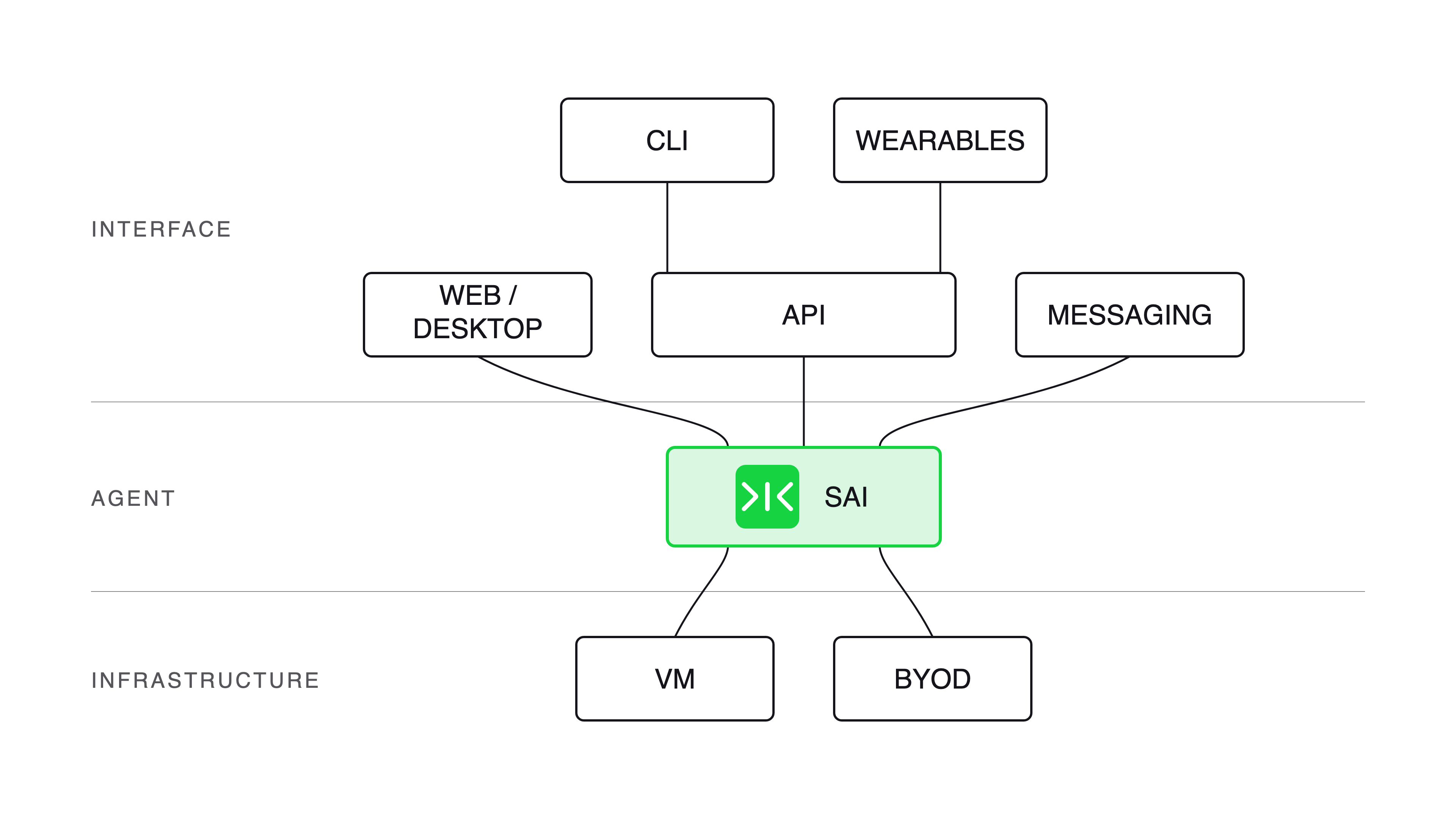
The three layers of Sai — the AI agent, the computer it runs on, and the interface layer, where the Sai API fans out to a CLI, AI glasses, and other voice/API surfaces.
Why, then, prototype with glasses?
We figured glasses are a common, natural, minimally invasive accessory: a necklace would be too heavy, a headband uncomfortable, and a watch or ring sits too far from your mouth to listen from or talk to comfortably. Many smart glasses also carry a camera, so Sai can see what you see: hold up an object, ask "what is this?", and the camera fires. And the Meta Ray-Ban Display in particular leaves room for a heads-up display down the line, so you could read minor progress updates from Sai or even see what Sai is doing on-screen — not available today, but there is potential.
The glasses are the frame I've chosen to show all of this through. The rest of this post is thus framed in terms of the glasses prototype.
A day with the glasses
Instead of heading to the office for a full day of sitting at your desk, you could be spending a fun-filled day exploring Gardens by the Bay (or getting active, or being with people who matter…) while still getting work done with Sai-Fi.
One call, start to finish
You tap Start call, and Sai greets you first — no dead air, no "hello? can you hear me?"
You ask for something: "Check my unread emails and Slack." You get one short acknowledgment, and then silence while Sai works, and then the answer. No progress narration, unless you ask for it. Just the result when there is one.
Halfway through Sai's spoken response you think of something and cut in. Sai stops — mid-word, not at the end of the sentence — and responds to what you just said. The ability to interrupt in the middle of a conversation makes the whole experience feel alive rather than like leaving a voicemail.
While Sai is still working on the first thing, you add a second task: "Also, book a table for tonight." Sai (or more precisely, the voice concierge) confirms details and tells you the booking will happen after the current task — and then it does. If you lose track and ask "what's going on?", Sai can update you on the progress, with the tasks separated cleanly: one running, one waiting.
Getting home after a day of enjoyment, no one wants to handle boring admin chores. You hold up a letter that came in the mail: "Copy the appointment number from this letter and use it to fill out the online form." The camera fires, and the photo rides along with the task you asked for.
When you are done, you just say so — "thanks, you can hang up now." Sai says goodbye while wrapping up any running tasks in the background, which you can check from the desktop app or browser after.
The menu — what you can actually do
- Hand off real work to Sai: triage email and Slack, draft and send replies, book things, manage your calendar, and ask about whatever is on your screen or in front of you.
- Capture what you are seeing: hold something up and ask; the camera captures it and attaches it to your request.
- The controls are four buttons on the phone and one gesture on the glasses:
Button
What it does
Mute Sai (or a temple tap on the glasses).
Silences Sai's voice. The mic stays live — Sai keeps listening and working. Any task that finishes or any audio overheard while muted is held, to be offered when you unmute Sai.
Pause call
Drops your mic entirely. This actually stops audio capture, but you can resume the concierge session when you're ready.
Capture view
A manual photo trigger, if you want a specific shot attached without prompting for the photo via voice.
End call (or a verbal command)
Completely ends the voice concierge session.
Debugging and demystifying
I initially thought this project would just be about creating an API for message-sending to and from Sai, then wiring it up to audio from the glasses. It turns out the bigger challenge was getting an agent to hold a conversation that was tolerable and made sense.
And the reason that's hard is that Sai is busy. Your typical voice assistant answers you in two seconds and then goes away. This one is off doing twenty minutes of real work on your machine while you might still be talking to it — so it has to stay coherent the whole time it's working, not just at the start and the end.
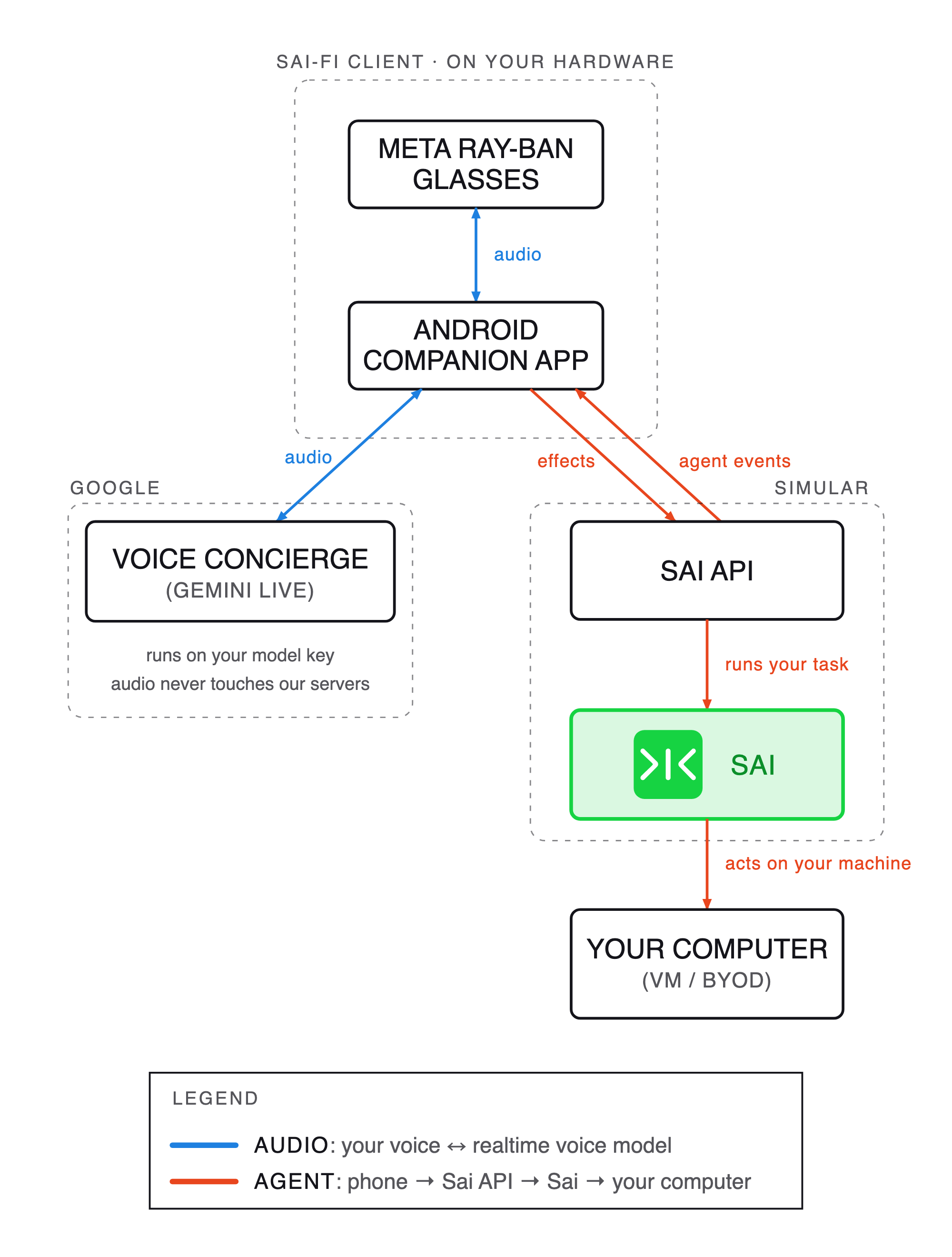
Sai-Fi system architecture — a voice agent for Meta Ray-Ban AI glasses. The audio path (glasses → phone → realtime voice model, Gemini Live) is kept separate from the agent path (phone → Sai API → the user's computer), the two meeting only through structured effects and agent events.
Two links, one call
The audio and the agent travel on separate paths. Your voice goes straight from the phone to the realtime voice model — in our case Gemini Live — and our servers won't see a single frame of audio. The agent runs on a separate connection to us. The two paths meet only as structured effects and agent events. This keeps the conversation feeling instant (no audio detour through our infrastructure), and also keeps it safe: the model talks to the user naturally, while only the server can act.
The credentials follow the same split. The voice half runs on your model key, held by the app, and you pay Google (or your preferred realtime audio model provider) directly for what you use; we are not in that loop at all, and there is no server-minted token to deal with. The agent half authenticates separately, against your signed-in Sai identity, and that is the only path that can reach your machine and your account.
An open conversation, a closed set of verbs
The user and the model can say anything. But the model's actions are constrained to a small, fixed set of validated actions: forward a task, ask a question, approve, deny, choose an option, queue, and so on. Moreover, irreversible actions are re-checked on the server no matter what the client claims.
I originally started by trying to classify the user's intent into an enum (task | steer | context), but after some testing, I realized every new situation felt like a new category and the classifier only got worse as it grew. The fix was to flip this around, letting the conversation be open and bounding the set of functions the model can trigger instead. Now, a model that is wrong or jailbroken still won't be able to reach past the allowed actions. This was a security architecture problem in conversation-design's clothing.
That closed set of actions is also where trust lives. The irreversible verbs never fire without an explicit confirmation, read back to you first — who a message is going to, what it says — and anything involving a login or a connected account can't be done by voice at all: you shouldn't be spelling your password aloud on a train, so Sai sends you back to the app. If something is going to act on your real accounts, the trust has to be structural, not vibes.
Interruptibility (barge-in) beats audio quality
Early on, Sai sounded wonderful through the glasses: rich and clear. I could hold a normal conversation if I listened to Sai speak in full before responding. But then I tried to interrupt Sai and simply couldn't, because the microphone was off while Sai spoke. It turns out the glasses, like most other Bluetooth audio devices, can either play high-fidelity audio (the A2DP profile) or keep the microphone open at lower quality (the hands-free HFP/SCO profile), but not both at once.
We had to choose our fighter: beautiful-sounding Sai or interruptible Sai. The choice is clear when you realize that once you're actually in a conversation, you stop noticing audio quality pretty quickly. What you never stop noticing is having your words completely ignored. We even briefly considered some push-to-talk sort of idea, but really, for hands-free voice interaction, being able to barge in naturally beats nice audio quality by far.
"Sai won't stop talking" was actually three separate bugs
Even after fixing my decision above, my most common complaint in testing was four words long: "Sai doesn't stop talking." It felt like one bug. In reality, it was three different bugs from three different places.
The first was the model's own voice detection being too insensitive: it wouldn't register that you'd started speaking until you were well into a sentence, so the interruption landed late and Sai had basically finished by then.
The second was in our own code: we were reading from the network and writing to the speaker on the same thread, but writing to a speaker blocks once its buffer is full. The fix was to split those two jobs, so the reader is always free to notice the user.
The third was the network: we'd throw away the audio we no longer needed, but some of it was already in flight and landed a moment later, so Sai kept talking anyway. The fix was to ignore anything arriving right after you cut in, which was safe because the next real reply doesn't start for over a second.
Indeed, a complaint phrased in user language doesn't necessarily map to only one cause. The method I used to help track this was to add a test to catch each specific bug I fixed, and not just rely on fixing things by ear.
The silence is deliberate
On a screen, a spinner tells you something is happening and you wait patiently. In your ear, three seconds of nothing feels like the thing is broken, and you start wondering if something failed silently. The obvious fix is to have Sai fill the gap — "I'm still working on that…". I built it, but it made everything worse: the filler collided with Sai's real answers, or it interrupted my train of thought only to tell me it wasn't done with the assigned task. In the end, we settled on one acknowledgment, silence (unless asked about progress), then the result. The quiet is the feature.
These days, a coding agent can help you realize almost any idea in a couple of minutes, but no agent can tell you whether it's really the right thing to build.
Testing a conversation
You cannot unit-test a conversation, but you can test what it does. So there are over 60 golden scenarios asserting the effects and resulting state — never the phrasing — plus an offline critic that grades real transcripts against rules like "don't fabricate an ETA" and "abort is not completion." The rule I held myself to: a bug I'd fixed by ear didn't count as fixed until there was also a test to catch it coming back.
The door is open
There's no "download it now" button for this yet. But there are ways in, for anyone who wants to build on it.
My code for the Sai-Fi Android app — the companion to the Meta glasses — is open-sourced on GitHub. To run it, you'll need some setup with Meta's Wearables Device Access Toolkit (DAT) on your glasses (enabling developer mode and the like), plus your own model key for the voice half — the app talks to the model directly, so that half is between you and Google, and it never touches us. Fair warning that the key is compiled into your build: fine for a binary you run yourself, not fine for one you hand out. Or fork the codebase and wire Sai up to whatever other hardware you like. It's meant to be a reference you can build from: a different device, a different voice, your own frontend, all using the same agent.
The Sai agent also has a documented API. (By the way, if you want to play with the API directly, there's a CLI for exactly that — npm install -g @simular-ai/sai-cli and you'll be talking to the same text concierge as you do from Telegram or iMessage, but via terminal.)The glasses are one implementation of a protocol; the interesting question is what someone else could build with it. The conversational layer was designed to be device-agnostic before the glasses existed, and the requirements for a new surface (or Sai-rface, if I may) are small: a microphone, a speaker, a connection.That could be an earpiece. A car. A small headless box on a workbench or kitchen counter. Anywhere hands-busy and screen-absent, where typing was never going to happen. The agent was always ready to work somewhere other than a desk. It just needed a door.
What isn't solved yet
Every prototype has rough edges, and there's one here I'd rather name plainly than bury: privacy. During a call, the microphone streams continuously to a cloud model — audio leaves the device, including the voices of people around you who never agreed to any of this. Mute silences Sai; it does not close the microphone, so it is not a privacy control. Pause does close the microphone, but it's all-or-nothing. And there is no established indicator for continuous audio the way there is a light indicator for the camera, which is a real gap. At least for now, treat this as a lab prototype, not something to wear into someone else's meeting.
Meta's Wearables Device Access Toolkit (DAT) exposes only one temple gesture that a third-party app can actually use, which is the temple tap. This meant mute and pause were fighting to own one gesture. I ended up choosing to bind the temple tap to mute, since that's the one you're likely to reach for mid-conversation (for Sai to retain context without interrupting a conversation with someone else). Unfortunately, this means the pause function moved to phone-only, so the real privacy control isn't available on the glasses.
That said, the parts that matter for trust are solid: your work happens on your own machine with your own accounts, anything irreversible is gated behind an explicit approval, and credentials are never handled by voice.
Giving people their time back
I wasn't trying to prove that Sai is clever. I've proven that work can happen while you're doing something else — on a rock wall, in the car, hands nowhere near a keyboard.
Sai frees your hands and your time.
The agent doesn't care that you're not at a computer. Finally, neither does the interface.
And the next interface won't be mine to build. If you're already putting AI onto wearables and you've settled the hard part of the hardware, what you're missing is an agent that does real work on a real machine. Now, you can take it and point it at your device.
So: why type from your desk, when you can work from anywhere?
Construire des ordinateurs autonomes ne signifie pas remplacer les humains. Cela signifie coopération.
Libérez vos mains de l'ordinateur. Téléchargez Simular dès aujourd'hui gratuitement.
