Hoppla! Beim Absenden des Formulars ist etwas schief gelaufen.
So nutzen Sie GoHighLevel: Der komplette Anfängerleitfaden (2026)
Learn how to use GoHighLevel in 2026 — from account setup and CRM pipelines to workflow automation and AI features. Covers GoHighLevel pricing, login, core features, hidden costs, and how to automate GHL tasks with AI agents.
Import leads from anywhere into GHL automatically.
Sai collects contacts from LinkedIn, Google Sheets, web forms, and other sources, deduplicates and cleans the data, then pushes it directly into your GoHighLevel CRM — no CSV exports, no manual formatting, no Zapier middleware.
Build and monitor workflows without the learning curve.
Describe what you want in plain language — "send a follow-up SMS 30 minutes after a missed call, then create a task for my sales team" — and Sai assembles the workflow inside GoHighLevel for you, pulling from industry best practices.
Generate cross-platform client reports on autopilot.
Sai pulls campaign metrics from your GHL sub-accounts, Google Analytics, and ad platforms, then compiles them into formatted reports and delivers them to clients on a recurring schedule — replacing 4+ hours of manual reporting per week.
GoHighLevel (GHL) is an all-in-one marketing and CRM platform built for agencies and small businesses that want to replace multiple software subscriptions with a single dashboard. It combines CRM, funnels, email and SMS marketing, calendar booking, pipeline management, AI agents, and more — starting at $97 per month with a 14-day free trial.
TL;DR
GoHighLevel consolidates 10+ marketing tools into one platform at $97-497/month
Best suited for agencies, freelance marketers, and service-based businesses
Setup takes 1-2 hours using the Launchpad onboarding wizard
Core strength is workflow automation combined with multi-channel communication
The learning curve is real — plan for 2-4 weeks to feel comfortable
AI features (Voice AI, Conversation AI, Content AI) are improving but still basic compared to dedicated AI tools
What Is GoHighLevel and Who Is It For?
GoHighLevel is a marketing platform designed primarily for agencies that manage multiple clients, though it has expanded to serve individual businesses as well. It was founded in 2018 by Shaun Clark with the goal of giving agencies a single platform to run client campaigns, manage leads, and automate follow-ups.
The platform serves three main user segments:
Marketing agencies — The original target audience. GHL lets agencies create separate "sub-accounts" for each client, white-label the platform under their own brand, and manage everything from one dashboard. The Agency Pro plan ($497/mo) enables full SaaS mode where agencies can resell the platform.
Service-based businesses — Dentists, chiropractors, real estate agents, coaches, consultants, and other local or service businesses that need appointment booking, lead follow-up, and reputation management.
Freelance marketers and solopreneurs — Individuals running their own marketing who want CRM, funnels, and email in one place without paying $500+ per month across separate tools.
As one GHL Certified Admin and 15-year agency owner put it on Reddit: "Think of GoHighLevel as a Swiss army knife. It can do lots of things, but isn't necessarily the best tool for any one of them." The value is in consolidation, not specialization.
What Does GoHighLevel Pricing Look Like in 2026?
GoHighLevel offers three main pricing tiers plus an enterprise option. All plans include a 14-day free trial with no credit card required.
Starter — $97/month
3 Sub-Accounts
Unlimited Contacts
Unlimited Users
All core features including CRM, funnels, email/SMS, calendars, workflows, AI tools
24/7 support
Unlimited — $297/month
Everything in Starter
Unlimited Sub-Accounts
User and Agent Reporting
Rebill Phone and Email costs to clients
Basic API Access
Agency Pro — $497/month
Everything in Unlimited
SaaS Mode (resell GoHighLevel as your own platform)
The core features list across all plans is extensive: Conversation AI, Voice AI, Content AI, Funnel AI, Reviews AI, Website and Funnel Builder, CRM and Pipelines, Email and SMS Marketing, Workflow Automation, Booking Calendars, Ad Manager, Payments and Invoicing, Courses, Communities, and more.
One important note from experienced users: the true cost often exceeds the base price. You will likely need to budget for add-ons like additional phone numbers, premium AI usage, Twilio/Mailgun integration costs, and potentially setup assistance. A CRM implementation consultant noted on Reddit: "I contracted for a business that was paying 4x GoHighLevel's monthly on MailChimp alone" — suggesting the value is still strong even with add-ons.
Setting up GoHighLevel for the first time involves six key steps. The platform has improved its onboarding significantly with the Launchpad feature, which walks new users through initial configuration.
Step 1: Create Your Account and Access the Launchpad
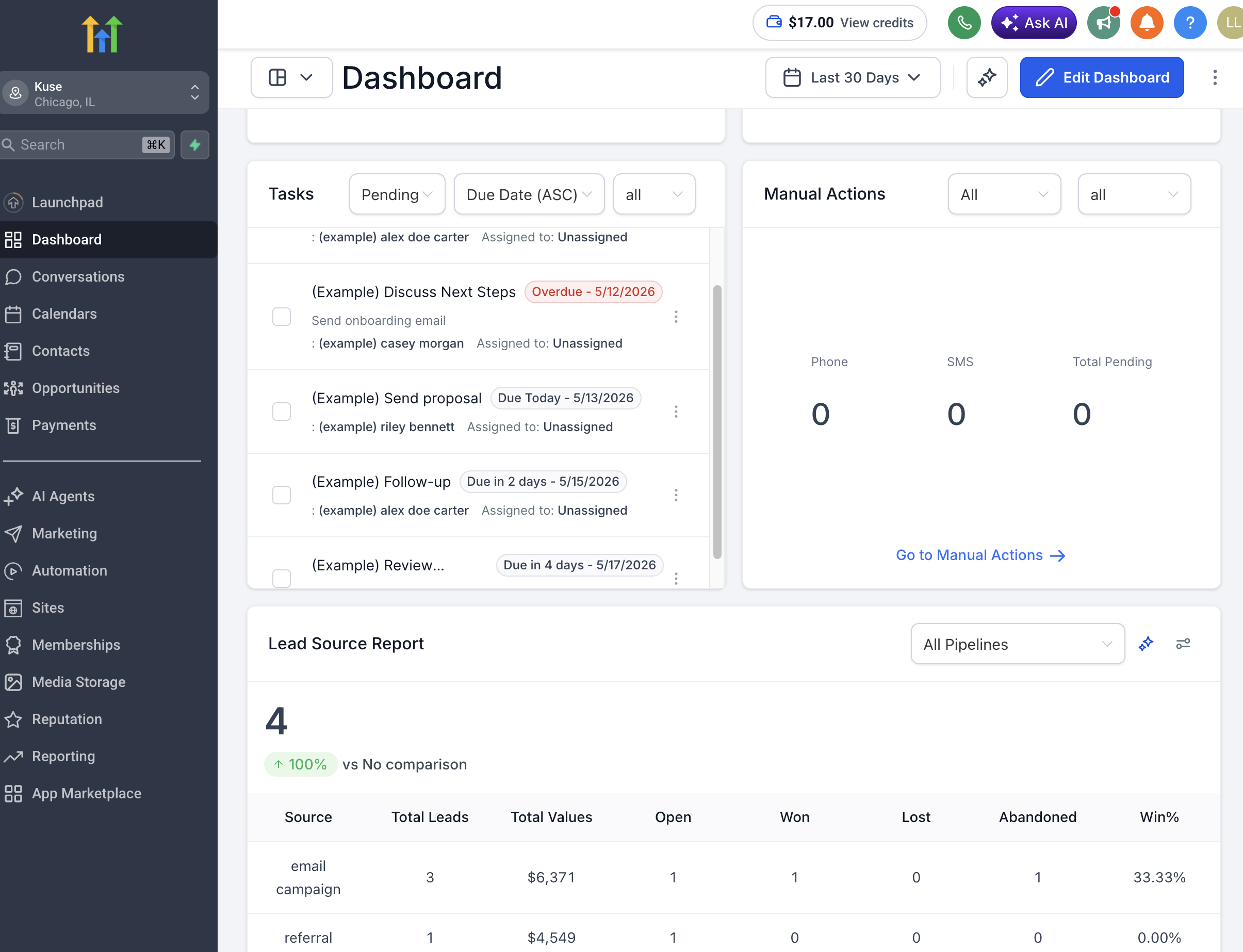
Sign up at gohighlevel.com for the 14-day free trial. After login, you will see the Launchpad — GoHighLevel's guided setup wizard. The Launchpad walks you through connecting your essential tools: social media accounts, Google Business Profile, Stripe for payments, and your domain.
Complete each Launchpad step before moving on. Skipping steps often leads to configuration headaches later.
Step 2: Understand the Account Structure
GoHighLevel uses a two-level structure:
Agency Level — Your master dashboard. This is where you manage billing, user permissions, and global settings. Think of this as your agency's command center.
Sub-Accounts — Individual workspaces for each client (or each business unit if you are a single business). Each sub-account has its own CRM, pipelines, workflows, funnels, and communication channels.
On the Starter plan, you get 3 sub-accounts. On Unlimited and above, you get unlimited sub-accounts. If you are a single business, you will typically use just one sub-account.
Step 3: Configure Your CRM and Pipelines
Navigate to the CRM section within your sub-account. GoHighLevel's CRM uses a pipeline-based structure similar to tools like Pipedrive.
Set up your pipeline stages. For a typical service business, this might look like: New Lead, Contacted, Appointment Scheduled, Proposal Sent, Won, Lost.
Import your contacts. You can import via CSV, connect to Google Contacts, or manually add leads. GoHighLevel supports unlimited contacts on all plans.
Create custom fields. Add fields specific to your business — lead source, service type, estimated deal value, or any custom data points you need to track.
Step 4: Build Your First Workflow Automation
Workflows are the backbone of GoHighLevel. They replace the need for separate automation tools like Zapier or ActiveCampaign.
Navigate to Automation > Workflows. Start with a simple automation:
Example: New Lead Follow-Up
Trigger: New contact created (or form submission)
Action 1: Send an SMS within 1 minute ("Thanks for reaching out! We will call you shortly.")
Action 2: Send an email with more details about your service
Action 3: Add a 30-minute delay, then send a follow-up if no response
Action 4: Create a task for your sales team to call the lead
The visual workflow builder is drag-and-drop. Each step can include conditions (if/then logic), delays, and multiple communication channels.
Step 5: Set Up Your Communication Channels
GoHighLevel supports multi-channel communication from a single inbox:
Email — Connect your email domain or use GHL's built-in email system (powered by Mailgun or SMTP). Verify your sending domain to avoid spam filters.
SMS — Connect a Twilio account or use GHL's LC Phone system. Note that SMS costs are separate from your subscription — you pay per message sent.
Phone — Set up inbound and outbound calling through the platform. GoHighLevel offers built-in VoIP.
Social Media — Connect Facebook, Instagram, and Google Business Profile to manage messages from one inbox (Conversations tab).
Voice AI — GoHighLevel's Voice AI agent can handle inbound calls, answer FAQs, and route callers. One user reported their "Voice AI answers the phone for us 24/7 and gets 90% of clients to the right place."
Step 6: Create a Funnel or Website
Navigate to Sites > Funnels to build your first landing page or sales funnel.
GoHighLevel's funnel builder is a drag-and-drop editor. It is not as sophisticated as Webflow or even ClickFunnels in terms of design flexibility, but it is functional enough for lead capture pages, appointment booking pages, and simple sales funnels.
Pro tip: Start with a template. GoHighLevel has a template library with pre-built funnels for common use cases (lead gen, appointment booking, webinar registration). Customize from there rather than building from scratch.
What Are GoHighLevel's Core Features and How Do They Work?
CRM and Pipeline Management
GoHighLevel's CRM is functional but basic compared to dedicated CRM platforms. It handles contact management, deal pipelines, and basic reporting well. Where it falls short is advanced CRM features — custom objects, complex reporting, and deep integration ecosystems that platforms like Salesforce or HubSpot offer.
For small businesses and agencies managing fewer than 10,000 contacts, it works well. For larger operations, you may outgrow it.
Workflow Automation
This is GoHighLevel's strongest feature. The workflow builder supports:
Multi-step automations with conditional logic
Triggers from forms, calendars, pipeline changes, tags, and more
Actions across email, SMS, phone, webhook, and internal notifications
Wait conditions based on time, contact activity, or custom events
You can automate virtually any repetitive process: lead nurture sequences, appointment reminders, review requests, re-engagement campaigns, and onboarding flows.
Calendar and Appointment Scheduling
Built-in scheduling that replaces Calendly or Acuity. Supports round-robin booking, group events, service-based calendars, and availability management. Integrates directly with your pipelines and workflows — so a booked appointment can automatically update the pipeline stage and trigger follow-up sequences.
Email and SMS Marketing
Send broadcast campaigns or create automated sequences. The email builder is template-based with a drag-and-drop editor. SMS marketing is supported via Twilio or LC Phone integration.
Note: deliverability depends heavily on your domain reputation and list hygiene. GoHighLevel provides the tools, but email deliverability is your responsibility to maintain.
Funnel and Website Builder
A drag-and-drop builder for landing pages, multi-step funnels, and basic websites. Includes split-testing for funnels. Not as design-forward as Webflow or Squarespace, but adequate for conversion-focused pages.
Reputation and Reviews Management
Automate review requests via SMS or email after a customer interaction. Monitor reviews across Google and Facebook from one dashboard. This feature alone replaces tools like Podium or Birdeye for basic use cases.
AI Features (2026)
GoHighLevel has added several AI features:
Conversation AI — Chatbot that can respond to leads via chat and SMS
Voice AI — Phone-based AI agent for inbound call handling
Content AI — Generate email copy, SMS messages, and social posts
Funnel AI — Generate funnel pages from prompts
Reviews AI — Draft review responses automatically
These AI features are functional but limited compared to dedicated AI tools. They handle basic tasks well but lack the depth and customization that specialized AI platforms offer.
What Are the Common Stability and Efficiency Concerns with GoHighLevel?
GoHighLevel users frequently report several pain points. Being aware of these upfront helps you plan accordingly.
The Learning Curve Is Steep
Multiple users and reviewers confirm that GoHighLevel takes time to learn. The platform has so many features that knowing where to start can be overwhelming. Plan for 2-4 weeks of active use before feeling comfortable, or budget for setup assistance.
As one Reddit user noted: "You have to separate the 'experts' from the 'affiliate hype people.' GHL works best when you are aware of the service that you are buying."
Interface Feels Dated
While GoHighLevel has improved its UI over time, it still feels less polished than competitors like HubSpot or ActiveCampaign. Navigation can be confusing with features spread across Agency and Sub-Account levels.
Feature Stability
Some users report bugs and inconsistent behavior, particularly with newer features. The platform ships updates frequently — which means new capabilities but also occasional instability. Community forums and the GHL Facebook group are useful for workarounds.
Support Quality Varies
GoHighLevel offers 24/7 support, but quality is inconsistent. Tier 1 support handles basic questions well. More complex technical issues may require escalation, which can take time. The community (Facebook group, subreddit) is often faster for solutions.
Hidden Costs
The $97/month base price is real, but expect additional costs:
Twilio/SMS costs: $0.01-0.05 per message
Additional phone numbers: $1-2/month each
Premium AI usage: varies based on volume
Mailgun for email: starts at $35/month for higher volumes
Setup/consulting help: $97 to $10,000+ depending on complexity
How Can You Automate GoHighLevel Tasks with AI Agents?
While GoHighLevel's built-in AI features handle basic tasks, the platform's real power multiplies when paired with an external AI agent that can operate across your entire tech stack — not just within GHL.
This is where tools like Sai by Simular come in. Sai is an AI agent with its own secure desktop Workspace that can operate any software the same way you would — through the actual interface, not just APIs.
Lead Data Pipeline Automation
Instead of manually importing leads from LinkedIn, web forms, and Google Sheets into GoHighLevel, Sai automates the entire pipeline: collect from sources, deduplicate and clean data, format for GHL's import requirements, and push directly into your CRM — all without touching an API.
Workflow Building Assistance
Sai can research best practices for your specific industry, draft workflow logic, and help you build automations faster. Instead of spending hours figuring out conditional logic, describe what you want in plain language and let Sai assemble the workflow.
Campaign Performance Monitoring
Set up recurring workflows where Sai pulls data from GoHighLevel, Google Analytics, and your ad platforms, then generates consolidated performance reports — automatically, on a schedule you define.
Client Reporting
For agencies, Sai can automate the entire client reporting cycle: pull metrics from GHL sub-accounts, combine with external data sources, generate formatted reports, and deliver them to clients — turning a weekly 4-hour task into a 10-minute review.
Stop doing repetitive tasks. Let Sai handle them for you.
Sai is your AI computer use agent — it operates your apps, automates your workflows, and gets work done while you focus on what matters.

.svg)

.svg)