
Oops! Something went wrong while submitting the form.
Perplexity vs Claude is less a head-to-head than a split of jobs. Perplexity finds: it's an answer engine that searches the live web for every question and cites where each fact came from. Claude makes: it's an assistant that reads what you give it (up to 1M tokens), then writes, analyzes and codes. Both main plans cost about $20 a month, and plenty of people pay for both: Perplexity to find out what's true right now, Claude to turn it into something finished.
The short answer: pick Perplexity if most of your AI time is looking things up and you want a source behind every sentence. Pick Claude if most of your AI time is writing, working through long documents or code. If you want the AI to then go and act on the result (update the sheet, file the reports, fill in the CRM), add Simular Box to Claude.
Plans, models and features come from Perplexity's help center and Anthropic's pricing pages and model docs; each source is linked at the end. Perplexity's consumer Pro price comes from a third-party pricing guide because Perplexity's own plan pages don't list it. We didn't run our own benchmark tests, so we compare what each company publishes.
We compared Perplexity and Claude on:
| Perplexity | Claude | |
|---|---|---|
| What it is | An answer engine: search first, then an AI writes a cited answer | An AI assistant built on Anthropic's own models |
| Starts from | The live web, every time | Your prompt and the material you bring (files, connectors, projects) |
| Citations | Numbered sources on every answer | When it searches the web or reads your files |
| Models | Pick from several labs on Pro (GPT-6.2 Sol, Claude Sonnet 5.5, Gemini 4 Neon and more), or let "Best" choose | Claude Haiku, Sonnet and Opus 5.5, plus Fable 5.2 |
| Long material | File and photo uploads (PDFs, CSVs, audio, video, images) | Up to 1M tokens of context on every current model |
| Deep reports | Research mode: dozens of searches, hundreds of sources, a report in a few minutes | Research mode on Pro and up |
| Making things | Create files and apps (reports, spreadsheets, dashboards, simple web apps) | Artifacts, Claude Docs, Slides and Design; Claude Data and Sheets (beta) on paid plans |
| Coding | Not its focus | Claude Code on every paid plan |
| Agents | Perplexity Computer (cloud worker with connectors and schedules); Comet browser assistant | Claude in Chrome; hand off and schedule tasks; Claude Code |
| Main paid plan | Pro, about $20/month | Pro, $20/month ($17 billed yearly) |
The biggest difference is where an answer starts. Perplexity starts from the web; Claude starts from you.
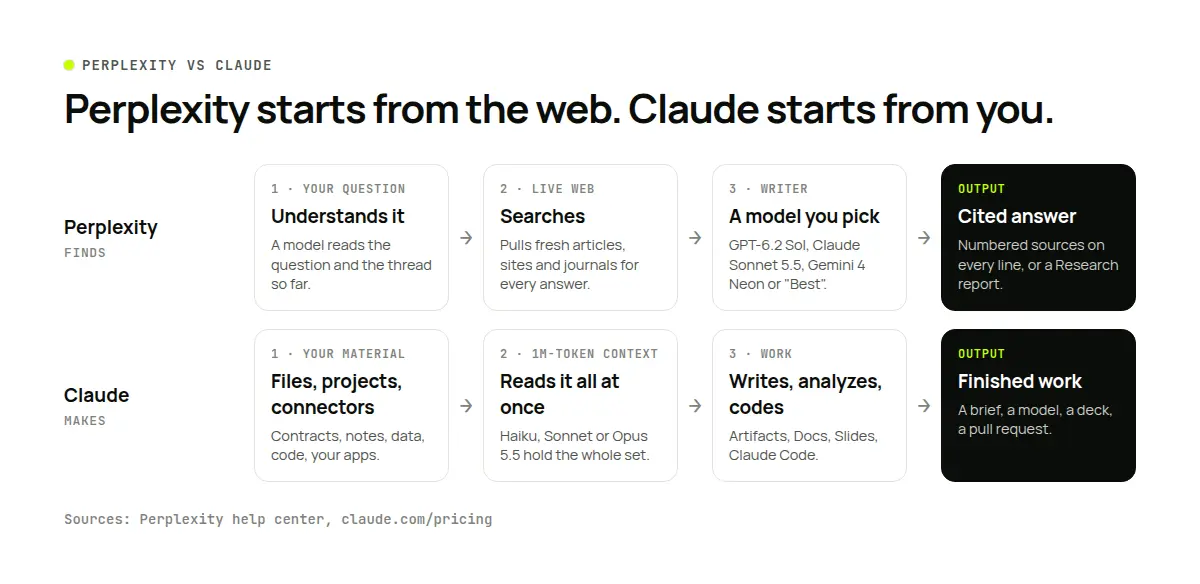
Perplexity calls itself an answer engine. Every question goes through the same three steps:
That last step is why people trust Perplexity for facts that change: prices, specs, news, laws, schedules. You can open each source and check it in one click.
The writer on top of the search. Perplexity doesn't train one model of its own for answers. On Pro you pick which model writes the reply, from several labs: GPT-6.2 Sol, Claude Sonnet 5.5 and Gemini 4 Neon for detailed answers, and Claude Sonnet 5.5 with Thinking or Grok 4.7 for harder analytical questions. Max adds GPT-6.2 Astra and Claude Opus 5.5. If you don't want to choose, the default Best mode picks a suitable model for each question and has no quota. So yes, Perplexity can use Claude, but as the writer on top of Perplexity's own search, not as the full Claude app.
The modes you'll actually use:
Beyond search. Perplexity now also offers Computer, which it describes as an independent digital worker: it researches, builds documents and apps, manages email through connectors (Gmail, Outlook, Slack, Notion, GitHub and others), and runs tasks on a schedule in a secure cloud sandbox. Computer uses credits; Max includes 10,000 credits a month, while consumer Pro has no monthly credits included. Ordinary searches stay unlimited and don't use credits. Perplexity also makes Comet, a Chromium-based browser with an assistant panel that can summarize pages and act on websites.

Claude is Anthropic's assistant on the web, desktop and mobile. It runs Anthropic's own models, all with a 1M-token context window and up to 128K tokens of output per reply:
| Model | Best at | In the Claude app |
|---|---|---|
| Haiku 5.5 | Fast, high-volume tasks | Free and up |
| Sonnet 5.5 | The best mix of speed and intelligence | Free and up |
| Opus 5.5 | Long-running agentic coding and knowledge work | Pro and up |
| Fable 5.2 | Demanding reasoning, long-horizon agent work | Pro via usage credits; Max (up to half the weekly limit) and Ultra |
Claude can search the web too, but its center of gravity is the material you bring and the work you produce from it:
Perplexity is the default for questions about the world right now. Because every answer starts from a fresh search, it's strong on anything that changes: today's prices, a product's current specs, the latest version of a rule, what a company announced this week. Citations on every line make it easy to check a claim before you repeat it. Pro gives you many more citations per answer, which helps when you need to show your work.
Claude is stronger when the sources are yours. Upload twenty interview transcripts, three contracts or last quarter's reports, and Claude can hold all of it in context and answer across it: where do these documents disagree, which clauses differ, what themes come up most. It can search the web as well, but its edge is depth on a fixed set of material rather than breadth across the live web.
Claude is the usual pick for writing that has to sound like a person. Drafts, rewrites, tone matching, long reports and newsletters are its home ground, and Claude Docs keeps a document you can keep working on. It can take your notes, a style sample and the facts you found, and produce a finished piece.
Perplexity writes good summaries of what it found. For a cited briefing ("summarize what changed in EU AI rules this year, with sources"), its output is often ready to paste. For anything longer or more personal, most people move the findings into Claude.
Perplexity accepts uploads and can answer questions about them alongside the web. Claude's 1M-token context is built for the opposite case: you bring a lot of material and want it read as a whole. If your job involves 200-page PDFs, data exports or a folder of documents, Claude is the better fit.
This one is clear: Claude. Every paid Claude plan includes Claude Code, Anthropic's coding agent for your terminal and project folder, and the Opus model is aimed at long coding sessions. Perplexity can answer programming questions with sources (useful for "what changed in this library's latest release"), but it isn't a coding environment.
Both now go beyond answers:
What neither gives you on its own is a desktop that belongs to the AI, with apps, files and logins that stay put between sessions and can be shared with your other AI tools. That's the gap Simular Box fills for Claude (more below).
| You want to… | Ask | Why |
|---|---|---|
| Check a fact or a recent number | Perplexity | Live search with citations on every line |
| Compare products on current specs and prices | Perplexity | Pulls from many sites at once |
| Catch up on news since last week | Perplexity | Search-first, fresh by design |
| Get a cited market or policy brief | Perplexity (Research) | Dozens of searches, hundreds of sources |
| Find the original study behind a statistic | Perplexity | Links you straight to sources |
| Summarize a 200-page PDF | Claude | 1M-token context holds it |
| Rewrite a draft in your voice | Claude | Stronger long-form writing |
| Compare three contracts you uploaded | Claude | Works from your sources, not the web |
| Turn notes into a slide deck or doc | Claude | Slides, Docs and artifacts |
| Fix a bug or build a feature | Claude | Claude Code on Pro |
| Turn research into a finished deliverable | Perplexity, then Claude | Find, then make |
| Act on the result in your apps | Claude + Simular Box | A computer to carry it out |
| Perplexity | Claude | |
|---|---|---|
| Free | Basic search, 3 Pro searches a day, 1 Research query a month | Sonnet and Haiku with 5-hour and weekly limits; web search, files, connectors, artifacts, memory, Claude Design, Slides and Docs, up to five projects |
| Main plan | Pro, about $20/month (Education Pro $10) | Pro, $20/month or $17/month billed yearly |
| What the main plan adds | Pro Search, model picker, more citations per answer, more uploads, extended Research, Create files and apps, better image and limited video generation | At least five times Free's usage per 5-hour window, Opus, Research, Claude Code, Claude in Chrome, Microsoft 365, hand-off and scheduled tasks, unlimited projects |
| Top plans | Max, $200/month or $2,000/year: advanced models (GPT-6.2 Astra, Claude Opus 5.5), 10,000 Computer credits a month | Max $100 (5x Pro usage, Fable for up to half the weekly limit, $100/month API credits); Ultra $200 (10x weekly usage, no 5-hour limit, $200/month API credits) |
| How usage is metered | Pro searches and Research have plan limits; Computer tasks use credits | One pool that resets every 5 hours, plus a weekly cap on paid plans |
What the numbers mean in practice. On Perplexity, ordinary searching is effectively unlimited on paid plans; what you budget is Research runs and Computer credits. On Claude, long files and long chats use your 5-hour budget faster, so heavy document work is where Pro or Max earns its price.
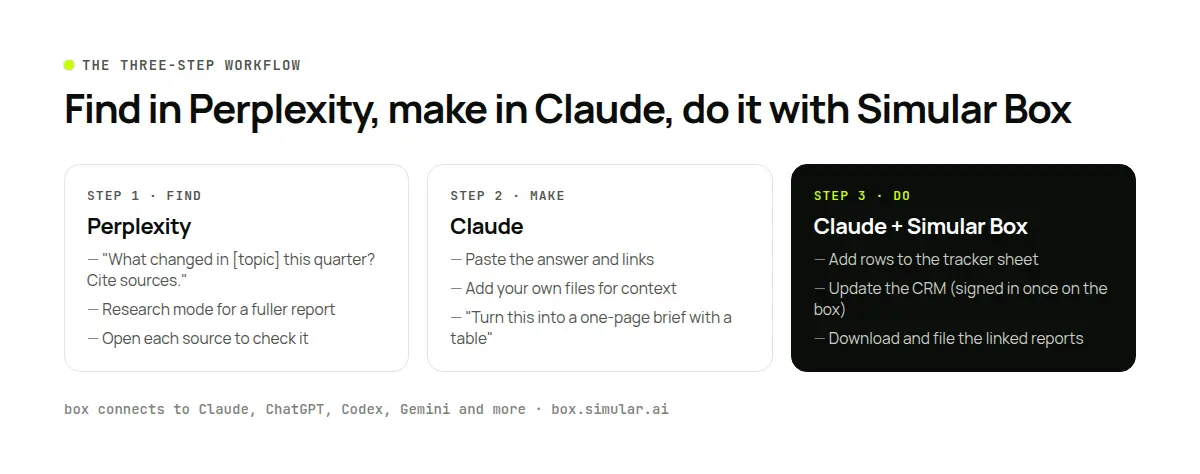
Simular Box gives the AI you already use its own computer, so it can actually get things done instead of just answering. It's a cloud desktop with Chrome, desktop apps, files and a terminal. box connects to Claude (Perplexity isn't on box's list of supported apps), so it turns the "make" half of this pair into "make and do."
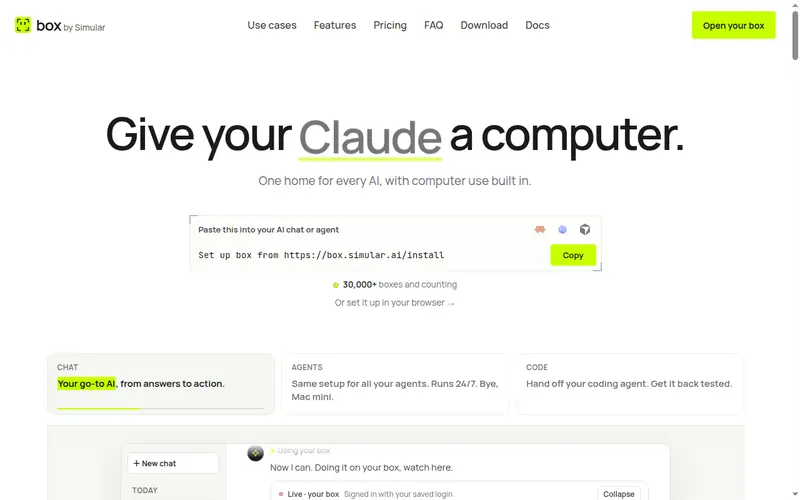
With box connected, step 3 of the workflow becomes one more message to Claude:
| Claude alone | Claude + Simular Box |
|---|---|
| Writes the plan | Carries it out on its own desktop: browser, apps, files |
| Browser tasks in your Chrome, while you watch | A separate cloud desktop that keeps working after you close the chat |
| A screenshot and a model turn per click | box finds buttons and fields and runs a whole plan of clicks in one call, screenshotting only when needed. Fewer turns, fewer tokens |
| Computer work uses your Claude limits | Computer-use steps run on box's small models, billed by usage; Claude's own usage isn't billed by box |
| Stops when you hit a usage limit | Every agent, one computer: ChatGPT, Codex or Gemini CLI can pick up the same box (agents take turns) |
| Text replies | The box's desktop, live in the reply; tap Take control to step in |
In the Claude desktop app the live view shows in Chat and Code; on the web and iPhone it shows in the reply too. See give your AI chatbot a live cloud desktop.
box gives Claude Code a real browser and desktop to test what it builds, for example checking a web app on two phone screen sizes and proving the fix on screen. See Claude Code visual QA and box + Claude Code.
Connecting box to Claude takes no code; setup steps are in the box docs. Claude Free allows one custom connector. box has a free plan with 5,000 credits to start; pay as you go from $5 (200 credits per box-hour, $0.20 an hour); S $19 a month; M $39 a month.
box's own agent never enters payment details; that step comes back to you.
Yes, with basic search, 3 Pro searches a day and 1 Research query a month.
Claude. Claude Code comes with every paid Claude plan.
With Simular Box connected, yes: paste the findings into Claude and ask it to update your sheet, CRM or folders on its own cloud desktop.
Checked Nov 25, 2026: How does Perplexity work?, What is Perplexity Pro?, What is Computer?, Perplexity Max, Perplexity pricing guide (eesel, Jun 2026), Claude pricing, Claude models overview, box live desktop use case, Simular Box.