
Oops! Something went wrong while submitting the form.
The short answer: ChatGPT is the broader all-in-one assistant: image creation, voice with video, custom GPTs, plugins, an $8 Go tier and unlimited everyday chats on the free plan. Claude is the deeper workspace for long documents, careful writing and coding: every current Claude model reads up to 1M tokens, and Claude Code comes with every paid plan. The main paid plans cost the same, $20 a month. Neither app, on its own, gives the AI a computer that keeps working after you close the chat; Simular Box adds that to both.
Everything below comes from OpenAI's and Anthropic's own pricing pages, help centers and model documentation; each source is linked at the end. We didn't run our own benchmark tests, so we compare what each company publishes rather than scoring answers.
We compared Claude and ChatGPT on:
| ChatGPT | Claude | |
|---|---|---|
| Made by | OpenAI | Anthropic |
| Free plan | Unlimited everyday text chats; limited uploads, images, voice, deep research, memory, Codex and ChatGPT Work | Limited usage every 5 hours and every week; web search, files, code execution, memory, connectors, artifacts, Claude Design, Slides and Docs |
| Paid plans | Go $8 · Plus $20 · Pro $100 / $200 / $500 | Pro $20 ($17 billed yearly) · Max $100 · Ultra $200 |
| Model families | GPT-5.6 (Luna, Terra, Sol), GPT-6 (Sol, Astra), GPT-6.1, GPT-6.2 | Claude Haiku 5.5, Sonnet 5.5, Opus 5.5, Fable 5.2 |
| Context in the app | Free 27K; Go and Plus 54K (Instant) / 256K (reasoning); Pro 128K / 400K | Up to 1M tokens (varies by model) |
| Coding agent | Codex | Claude Code (all paid plans) |
| Working on a computer | ChatGPT Work, built-in browser, Dot (Pro) | Claude in Chrome, hand off and schedule tasks |
| Images and voice | Image generation, voice, voice with video | Voice mode; no image-generation model |
| Office apps | Excel, Word, PowerPoint and Google Sheets extensions | Claude for Microsoft 365 and Outlook (paid plans) |
| Ads | May appear on Free and Go | None |
ChatGPT is OpenAI's AI assistant on the web, desktop and mobile. It's built to be the one app for most everyday AI jobs: answering questions, writing, image creation, voice conversations, data analysis, research reports and, increasingly, getting things done through ChatGPT Work and Codex.
Its strengths are breadth and choice. ChatGPT offers several model sizes and thinking levels, a plugin catalog, custom GPTs for repeat jobs, projects to keep files and chats together, scheduled tasks, and newer features such as Sites, Study mode, Health and Finances. With GPT-6, its "Intelligent UI" can answer with text, visuals and interactive elements in one reply.
Claude is Anthropic's AI assistant on the web, desktop and mobile. It's known for long-form writing, careful reasoning over long documents, and coding. Every current Claude model has a context window of up to 1M tokens and can write up to 128K tokens in one reply.
Claude's own tools lean toward documents and work output: artifacts (documents and small apps built in the chat), Claude Docs, Slides and Design on every plan, Claude Data plus Sheets and Whiteboards (beta) on paid plans, Claude Code for software work, and Claude in Chrome and Microsoft 365 for work in your other apps.
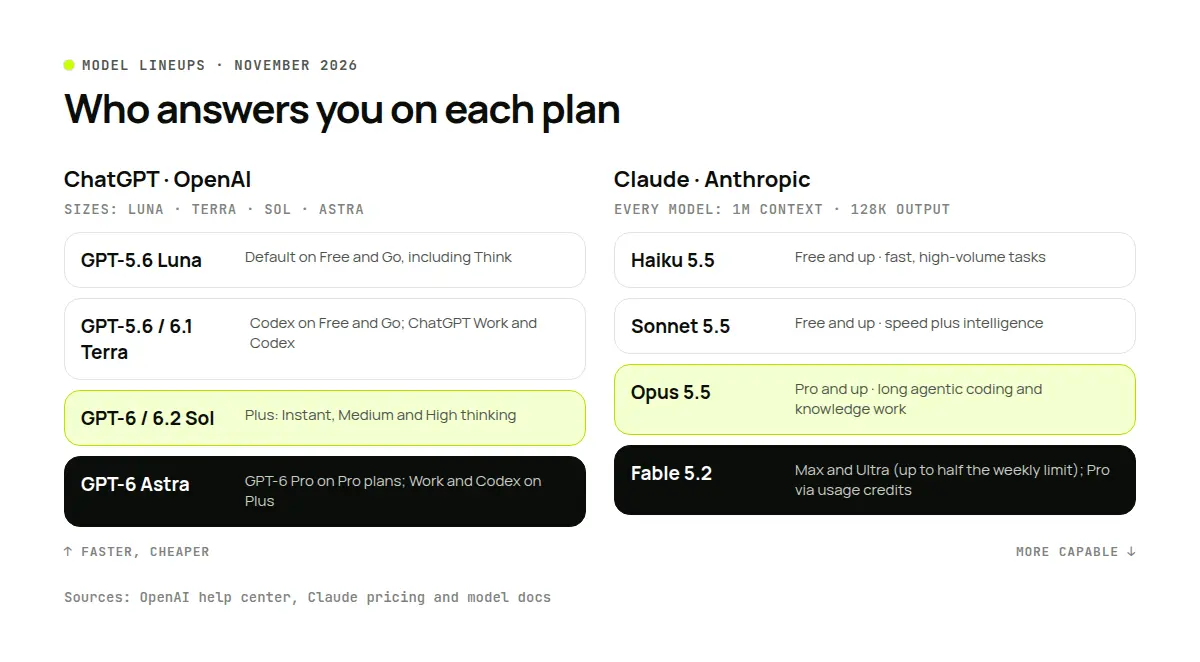
Both apps are front doors to a family of models. Which one answers you depends on your plan and the effort you pick.
OpenAI names models by generation (GPT-5.6, GPT-6, GPT-6.1, GPT-6.2) and by size, from the fastest to the most capable: Luna, Terra, Sol, Astra.
| Model | Anthropic's description | Context | Max output | API price (in / out per 1M tokens) |
|---|---|---|---|---|
| Claude Haiku 5.5 | High-volume, latency-sensitive tasks | 1M | 128K | from $0.10 / $0.50 |
| Claude Sonnet 5.5 | Best combination of speed and intelligence | 1M | 128K | $2 / $10 |
| Claude Opus 5.5 | Long-running agentic coding and knowledge work | 1M | 128K | $4 / $20 |
| Claude Fable 5.2 | Demanding reasoning and long-horizon agentic work | 1M | 128K | $8 / $40 |
In the app, Free includes Sonnet and Haiku. Pro adds Opus, and Fable paid with usage credits. Max and Ultra include Fable for up to half of the weekly limit.
For builders, OpenAI's GPT-6.2 Astra costs $8 / $40 per 1M tokens (in / out), the same as Claude Fable 5.2. GPT-6.2 Sol costs $2 / $10, the same as Claude Sonnet 5.5. At the small end, GPT-6 Luna costs $0.10 / $0.50, the same as Claude Haiku 5.5's starting price.
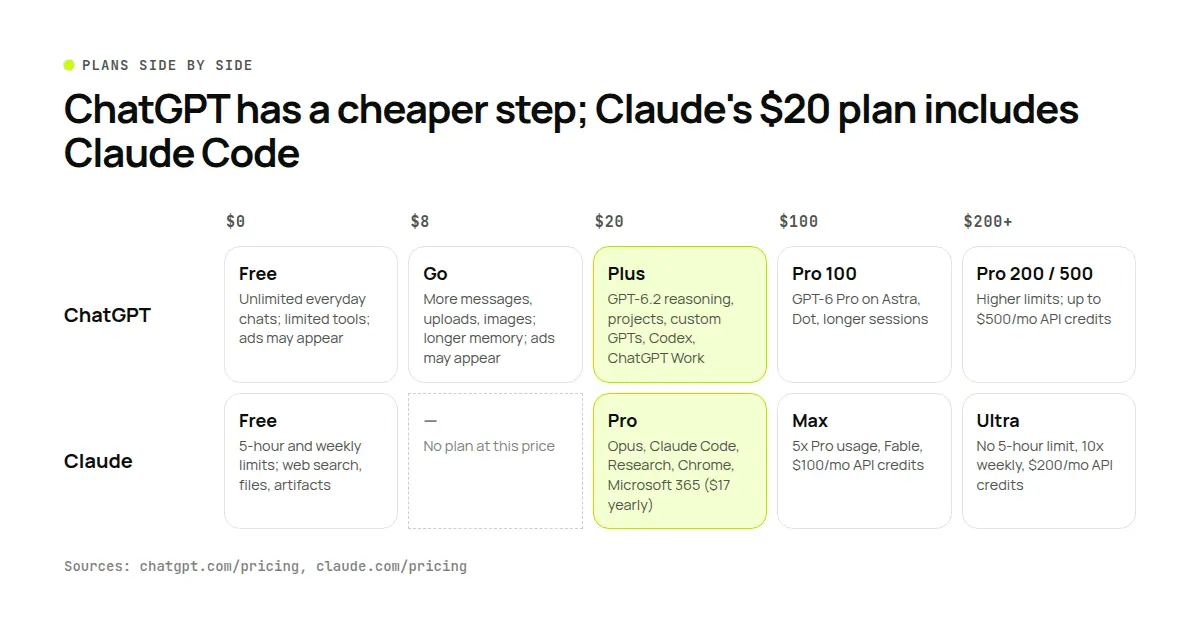
ChatGPT Free gives unlimited everyday text chats, with limits on uploads, image creation, voice chats, deep research, memory and context, Codex, and ChatGPT Work on desktop. Ads may appear.
Claude Free gives a usage budget that resets every 5 hours and every week. Inside it you get web search, file creation and code execution, memory, connectors to your apps, artifacts, Claude Design, Slides and Docs, voice mode, skills, and up to five projects. There's no Research mode, Claude Code or Claude in Chrome on Free.
Go adds more messages with tools, more uploads, more image creation, more voice chats and longer memory. It runs on GPT-5.6 Luna and may show ads.
ChatGPT Plus adds GPT-6.2 reasoning, expanded messages and uploads, more complex image creation, expanded deep research, memory and context, projects, scheduled tasks and custom GPTs, expanded Codex, ChatGPT Work on desktop, web and mobile, early access to new features, and no ads.
Claude Pro ($20 monthly or $17 a month billed yearly) adds at least five times Free's usage per 5-hour window, a weekly limit, Opus, Fable via usage credits, Research, hand-off and scheduled tasks, Claude Data plus Sheets and Whiteboards (beta), Claude Code, Claude Science, unlimited projects, and Claude in Chrome, Microsoft 365 and Outlook.
ChatGPT Pro comes in three usage tiers ($100, $200, $500). It adds Pro reasoning on GPT-6 Astra, longer Codex and ChatGPT Work sessions, Dot (an always-on agent), unlimited and faster image creation, maximum deep research, memory and context, and up to $500 a month in API credits on the top tier.
Claude Max ($100) gives five times Pro's usage every 5 hours and every week, Fable for up to half the weekly limit, $100 a month in API credits, early access to features and priority at busy times. Claude Ultra ($200) removes the 5-hour limit for verified accounts, gives ten times Pro's weekly usage and $200 a month in API credits.
ChatGPT gives Free and Go unlimited everyday text chats, with separate limits on uploads, images, voice and other tools. Thinking modes have their own allowances; when you hit one, ChatGPT may continue with another model until it resets.
Claude meters everything (chat, files, Claude Code) from one pool that resets every 5 hours, with a weekly cap on paid plans. How fast you use it depends on the model, chat length and file size. Paid users can switch on usage credits to keep going at standard API rates.
In practice: heavy casual chatting fits ChatGPT's model better; long, file-heavy sessions fit Claude's bigger context, but burn through its budget faster.
Context is how much the AI keeps in view at once. Claude's models read up to 1M tokens, which is enough for a long contract set, a book-length manuscript or a mid-size codebase in one chat. ChatGPT Plus reads 54K tokens in Instant mode and 256K in reasoning mode; Pro raises that to 128K and 400K. If you regularly paste in long files, this is the single biggest practical difference.
Claude is the common choice for writing that has to sound like a person: drafts, edits, tone matching and long reports, plus Claude Docs for documents you keep working on. ChatGPT is quick for short copy and can create the image for a post in the same chat; Canvas-style editing and custom GPTs help with repeat writing jobs like newsletters.
Both search the web on every plan. ChatGPT includes deep research on every plan (limited on Free, maximum on Pro), plus apps for deep research and interactive tables and charts. Claude's Research mode starts on Pro; on any plan, Claude is strongest when you bring the sources and ask it to compare them.
Both companies ship a full coding agent with their paid plans. Claude Code works in your terminal and project folder and shares your Claude plan's usage. Codex runs on GPT-5.6 Terra for Free and Go, with Sol, Terra, Luna and GPT-6 Astra on Plus; OpenAI says it can run many agents in parallel and keep working in the cloud after you close your laptop. Claude's 1M context helps on large codebases; Codex's model choice helps when you want speed on one task and depth on the next.
ChatGPT generates and edits images (unlimited and faster on Pro), and offers voice and voice with video. Claude has voice mode and can build visual designs with Claude Design, but has no image-generation model. If images are part of your daily work, ChatGPT covers it in one app.
Claude Pro adds Claude for Microsoft 365 and Outlook, plus Claude Data and Sheets (beta) for working with spreadsheets. ChatGPT offers extensions for Excel, Word, PowerPoint and Google Sheets, data analysis, and Sites for publishing simple pages.
ChatGPT retired its old agent mode in favor of ChatGPT Work with a cloud browser, a built-in browser, and Dot, an always-on agent on Pro. Claude offers Claude in Chrome for browser tasks in your own Chrome and hand off and schedule tasks on paid plans. Both mostly act in a browser, and each step usually costs a screenshot and another model turn from your plan.
ChatGPT has memory with past chats, projects, custom GPTs, skills and a plugin catalog you can browse, build and share. Claude has memory, projects (five on Free, unlimited on paid), skills, connectors and desktop extensions.
Claude's pricing page lists model training as opt-out on Free, Pro, Max and Ultra, and Claude shows no ads. On ChatGPT, ads may appear on Free and Go (none on Plus and above), and the logged-out app notes that chats may be reviewed and used to improve OpenAI's models. Check each app's data controls before you share sensitive files.
| If you are… | Lean toward | Why |
|---|---|---|
| A student or casual user | ChatGPT | Unlimited everyday chats on Free, cheap Go tier, study mode, images |
| A writer, editor or marketer | Claude | Long-form writing quality, Docs, 1M context for source material |
| A developer | Either | Claude Code vs Codex; Claude for big codebases, Codex for model choice |
| An analyst working with long files | Claude | Reads the whole file set at once |
| A creator who needs images and voice | ChatGPT | Image generation, voice with video |
| Someone who wants tasks done on a computer | Either + Simular Box | A cloud desktop both can use |
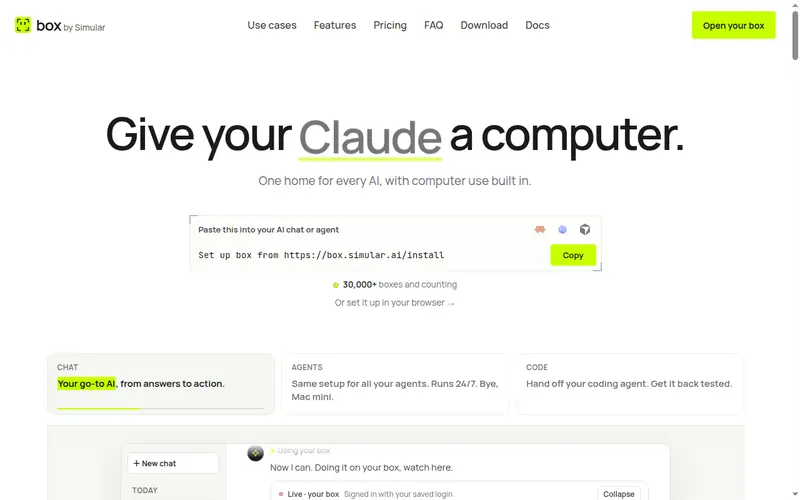
Simular Box gives the AI you already use its own computer, so it can actually get things done instead of just answering. It's a cloud desktop with Chrome, desktop apps, files and a terminal. You keep Claude or ChatGPT as the brain; box is where the work happens. Because both can connect to the same box, Claude vs ChatGPT stops being an either-or choice.
| Claude or ChatGPT alone | With box by Simular | |
|---|---|---|
| Where it works | Inside the chat, or a browser session | A full cloud desktop: Chrome, apps, files and a terminal |
| Logins | Not kept between tools | Chrome on the box stays signed in, for every agent you connect |
| Seeing the work | Text replies | The box's desktop, live in the reply; tap Take control to step in |
| Switching AI | Start over, re-explain, re-upload | Same box, same files, same logins: say "carry on" |
| Clicks and tokens | A screenshot and a model turn per click | box finds buttons and fields and runs a whole plan of clicks in one call, screenshotting only when needed. Fewer turns, fewer tokens, and smaller models can finish the job |
| Billing | Computer work uses your plan's limits | Computer-use steps run on box's small models, billed by usage; Claude's or ChatGPT's own calls aren't billed by box |
| Work in progress | Stops with the session | Hand off a task and take it back later; files saved every few minutes |
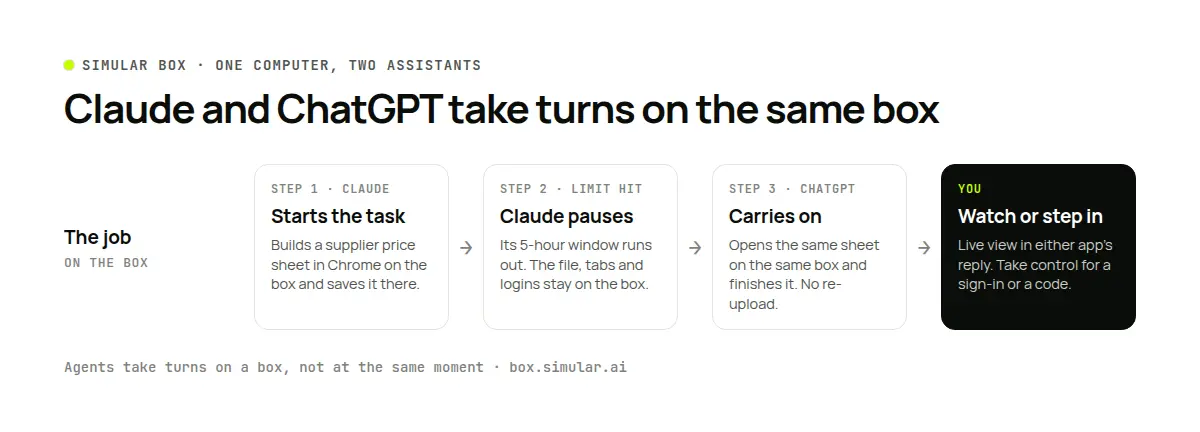
Claude starts a job on the box (say, building a spreadsheet of supplier prices). When Claude hits its 5-hour limit, ChatGPT opens the same file on the same box and finishes it. The agents take turns, not at the same moment. You can watch the desktop live in either app's reply, on the web, Mac or iPhone, and tap Take control for a sign-in or a code. Step by step: three AIs, one box.
In ChatGPT, search box by Simular in Plugins and install it in one click. For Claude and Claude Code, see the box docs. No SDK or code. Claude Free allows one custom connector.
Free plan with 5,000 credits to start. Pay as you go from $5 (200 credits per box-hour, $0.20 an hour); S $19 a month; M $39 a month. Added to a $20 Claude or ChatGPT plan, that's a few dollars for what agent apps charge far more for.
box's own agent never enters payment details; it hands that step to you. Your passwords and cookies stay in Chrome on the box.
Model names and allowances change often; both companies changed their model pickers in recent months. ChatGPT Free and Go may show ads. Claude has no image-generation model, and its 1M context uses your usage budget faster. box adds a computer, not a model: the quality of the thinking still comes from Claude or ChatGPT.
ChatGPT may show ads on Free and Go. Plus and higher have none. Claude shows no ads.
Both can act in a browser. With Simular Box, either gets a full cloud desktop that keeps logins and files and keeps going after you close the chat.
Yes. Connect both to the same box and they take turns on the same files.
Checked Nov 24, 2026: ChatGPT pricing, GPT-6 and other models in ChatGPT, OpenAI API pricing, ChatGPT Pro tiers, ads in ChatGPT, Codex, Claude pricing, Claude models overview, box + ChatGPT guide, Simular Box.