
Oops! Something went wrong while submitting the form.
Claude Pro and ChatGPT Plus both cost $20 a month (Claude Pro is $17 a month if you pay $200 for the year). Both remove ads, unlock the stronger models and add a coding agent. The difference is in what's on the receipt: ChatGPT Plus buys breadth (images, voice with video, custom GPTs, plugins, several GPT models across Chat, Work and Codex), while Claude Pro buys depth (a 1M-token context on every model, Claude Code, Opus, and Claude inside Microsoft 365). Here it is, item by item.
The short answer: choose ChatGPT Plus if you want one app for images, voice, custom GPTs and everyday tasks. Choose Claude Pro if you work with long documents, write a lot or code most days. If what you really want is for the AI to finish tasks on a computer, either plan plus Simular Box costs far less than jumping to a $100 tier.
Every line item comes from OpenAI's and Anthropic's own pricing pages, help centers and model docs; each source is linked at the end. We didn't run our own benchmark tests, so we compare what each company publishes for its $20 plan.
We compared Claude Pro and ChatGPT Plus on:
| Line item | What you get |
|---|---|
| Chat models | GPT-6 / GPT-6.2 (Sol) at Instant, Medium and High thinking. Extra High and GPT-6 Pro are not included |
| Models in Work and Codex | GPT-6 Astra, plus GPT-5.6 Sol, Terra and Luna; newer GPT-6.1 and 6.2 options appear in the Work and Codex pickers as they roll out |
| Context | 54K tokens (Instant), 256K (reasoning) |
| Coding | Expanded Codex |
| Getting things done | ChatGPT Work on desktop, web and mobile; scheduled tasks |
| Organizing | Projects, custom GPTs, memory with past chats |
| Office | Extensions for Excel, Word, PowerPoint and Google Sheets |
| Media | Image creation and editing, voice and voice with video, Intelligent UI answers with visuals |
| Research | Expanded deep research |
| Ads | None |
| When you hit a thinking limit | ChatGPT may continue with another available model until the allowance resets |
What these lines mean in practice.
| Line item | What you get |
|---|---|
| Chat models | Opus, Sonnet and Haiku (current versions 5.5); Fable 5.2 via usage credits |
| Context | Up to 1M tokens, on every model |
| Max output per reply | 128K tokens |
| Usage | At least five times Free's usage per 5-hour window, plus a weekly limit |
| Coding | Claude Code included |
| Getting things done | Claude in Chrome; hand off and schedule tasks |
| Office | Claude for Microsoft 365 and Outlook; Claude Data plus Sheets and Whiteboards (beta) |
| Organizing | Unlimited projects, artifacts, connectors, memory, skills |
| Research | Research mode |
| Media | Voice mode; Claude Design, Slides and Docs; no image generation |
| Ads | None; model training is opt-out |
| When you hit a limit | Wait for the 5-hour window to reset, or switch on usage credits at standard API rates |
What these lines mean in practice.
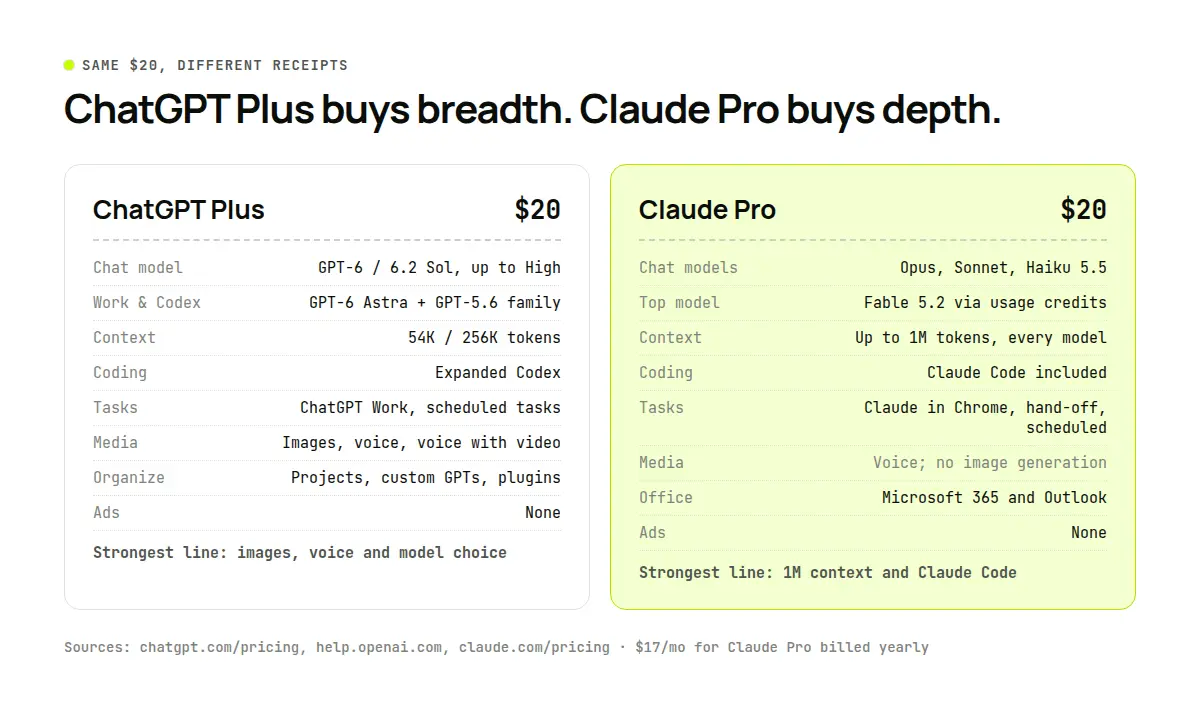
ChatGPT Plus gives you more model choices: several thinking levels in Chat and a wider set of GPT models in Work and Codex, including GPT-6 Astra. Claude Pro gives you fewer, more distinct choices: Haiku, Sonnet and Opus, all with the same long context. If you like picking the right model for each task, Plus has more knobs. If you want one strong model for long work, Opus on Pro is the simpler choice.
This is where the receipts differ most. Claude Pro reads up to 1M tokens on every model. ChatGPT Plus reads 54K in Instant mode and 256K in reasoning mode. If you regularly paste in long reports, legal documents, transcripts or code, Claude Pro will see all of it at once; ChatGPT Plus may need you to split it up.
Claude is the common choice for long-form writing that has to sound like a person, and Claude Docs keeps a working document alongside the chat. ChatGPT Plus is fast for short copy, and custom GPTs and Canvas-style editing help with repeat writing jobs. For a 30-page report built from source material, Claude Pro has the edge; for daily emails, posts and quick drafts with an image attached, Plus covers more in one place.
Both include a real coding agent. Claude Code works in your terminal and shares Pro's usage; its 1M context helps on large projects. Codex on Plus offers more model choices (Sol, Terra, Luna and GPT-6 Astra) and can keep running in the cloud. Developers who live in one large codebase often lean Claude Pro; those who want several parallel agents and model choice often lean Plus. Plenty use both.
ChatGPT Plus has ChatGPT Work with a cloud browser and a built-in browser, plus scheduled tasks. Claude Pro has Claude in Chrome (in your own browser) and hand-off and scheduled tasks. Both mostly act in a browser, and each step usually costs a screenshot and another model turn from your plan.
ChatGPT Plus wins this line outright: image creation and editing, voice, voice with video, and Intelligent UI answers with visuals. Claude Pro has voice mode and can build designs, slides and documents, but has no image-generation model.
Both reach into office apps. Claude Pro adds Claude for Microsoft 365 and Outlook, plus Claude Data and Sheets (beta). ChatGPT Plus offers extensions for Excel, Word, PowerPoint and Google Sheets. If your day is in Outlook and Word, try Claude's integration; if you're in Google Sheets, ChatGPT's extension is there.
ChatGPT Plus: projects, custom GPTs, memory with past chats and a plugin catalog. Claude Pro: unlimited projects, artifacts, connectors, memory and skills. Both keep files and instructions together; ChatGPT's custom GPTs are the easier way to package a repeat job for other people.
ChatGPT Plus meters tools and thinking modes separately; when you hit a thinking limit, it may continue with another model until the allowance resets. Claude Pro meters everything from one pool that resets every 5 hours, plus a weekly limit; you can turn on usage credits to keep going at API rates. In practice, heavy casual chatting fits Plus's model better, and long file-heavy sessions fit Claude's bigger context but use its budget faster.
Price, no ads, projects, scheduled or hand-off tasks, a capable coding agent, web search and memory.
On Claude Pro your strongest everyday option is Opus 5.5, which Anthropic positions for long-running agentic coding and knowledge work, with Fable 5.2 available through usage credits for the hardest reasoning. On ChatGPT Plus it's GPT-6 / 6.2 Sol at High thinking in Chat, and GPT-6 Astra inside ChatGPT Work and Codex.
In the API, the comparable price points show how the companies position them: Opus 5.5 at $4 / $20 per million tokens (in / out), GPT-6.2 Sol at $2 / $10, and the top models (GPT-6.2 Astra and Claude Fable 5.2) both at $8 / $40. You don't pay these rates on a $20 plan, but they're a useful guide to which model is meant for which job.
| ChatGPT | Claude | |
|---|---|---|
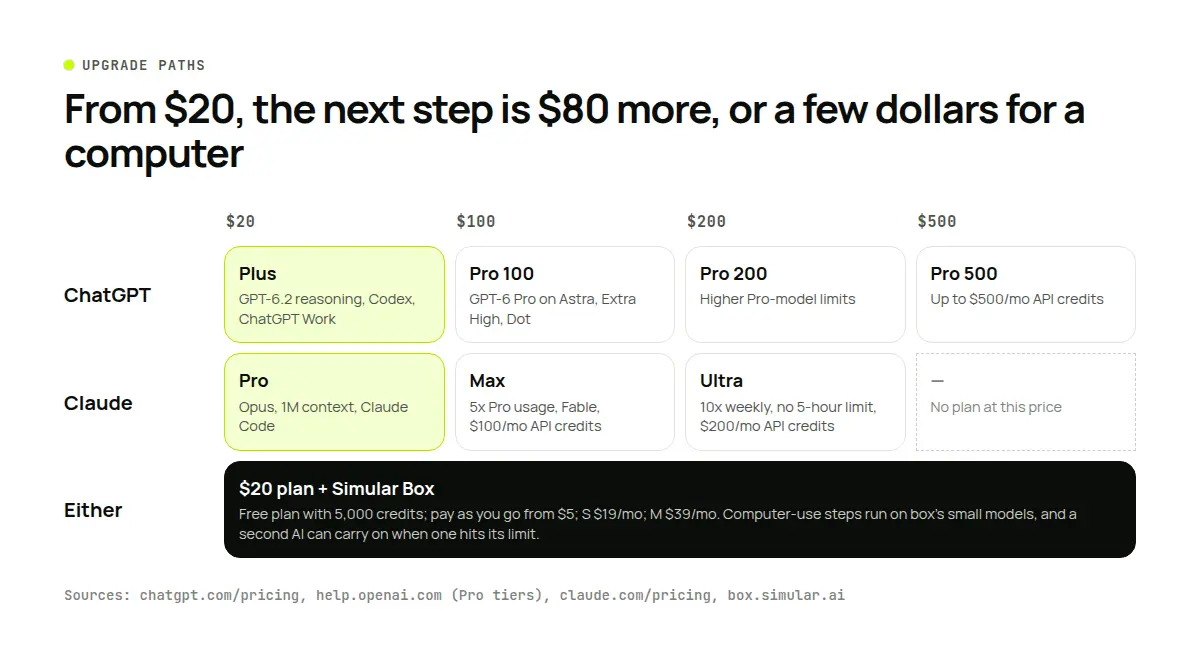
| ~$100 | Pro $100: GPT-6 Pro (Astra), Extra High thinking, Dot always-on agent, longer Codex and ChatGPT Work sessions; GPT-6 Pro and GPT-5.6 Sol Pro share one weekly allowance | Max $100: 5x Pro usage every 5 hours and every week, Fable 5.2 up to half the weekly limit, $100 a month in API credits, priority at busy times |
| ~$200 | Pro $200: higher Pro-model limits; after the GPT-6 Pro weekly limit, it switches to GPT-5.6 Thinking at Medium | Ultra $200: 10x Pro's weekly usage, no 5-hour limit for verified accounts, $200 a month in API credits |
| Top | Pro $500, with up to $500 a month in API credits | n/a |
When the upgrade is worth it. If you hit the limit most days and need the top model (GPT-6 Pro, or Opus and Fable at volume), the $100 tier pays for itself in saved waiting. If what keeps pushing you to the limit is long tasks on a computer (browsing, clicking, filling forms, moving files), there's a cheaper route.
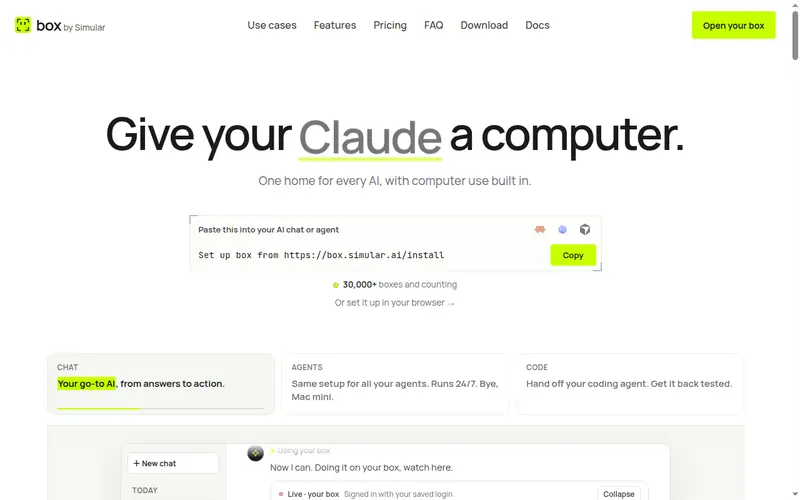
Simular Box gives the AI you already use its own computer, so it can actually get things done instead of just answering. It's a cloud desktop with Chrome, apps, files and a terminal that works with both Claude and ChatGPT, and with Claude Code and Codex.
| Problem on a $20 plan | What box changes |
|---|---|
| Computer tasks burn your usage on screenshots and clicks | box finds buttons and fields and runs a whole plan of clicks in one call, screenshotting only when needed. Fewer turns, fewer tokens |
| Computer work counts against your plan | Computer-use steps run on box's small models, billed by usage; Claude's or ChatGPT's own calls aren't billed by box |
| You hit the limit mid-task | If you keep both plans, Claude Pro hands off to ChatGPT Plus (or Codex, Gemini CLI) on the same box, same files. Agents take turns |
| The task stops when you close the laptop | Hand off a task and take it back later; files are saved every few minutes |
| You can't see what happened | The box's desktop shows live in the reply; Take control any time |
| Logins don't carry over between tools | Sign in once on the box; Chrome there stays signed in for every agent you connect |
In ChatGPT, search box by Simular in Plugins and install it in one click. For Claude and Claude Code, see the box docs. Free plan with 5,000 credits to start; pay as you go from $5 (200 credits per box-hour, $0.20 an hour); S $19 a month; M $39 a month. That's a few dollars on top of $20, next to an $80 to $180 jump to the next tier.
box's own agent never enters payment details; that step comes back to you.
Match the plan to what you do most:
Still unsure? Use both free tiers for a week on your real work, then pay for the one you kept opening.
Both companies change models and allowances often; the GPT-6.2 and Claude 5.5 lineups both arrived in recent months. Claude Pro has no image generation. ChatGPT Plus has a smaller context window. Neither $20 plan includes the very top model for daily heavy use. box adds a computer, not a model.
Both include a coding agent. Claude Code's long context suits large projects; Codex offers more model choices and parallel agents.
Claude Max ($100) gives 5x Pro usage, Fable 5.2 and a $100 API credit. ChatGPT Pro ($100) gives GPT-6 Pro on Astra, Extra High thinking and Dot.
If what you need is longer computer tasks, Simular Box moves the clicking onto its own small models and lets a second AI continue when one hits its limit.
Checked Nov 25, 2026: Claude pricing, Claude models overview, ChatGPT pricing, GPT-6 and other models in ChatGPT, ChatGPT Pro tiers, OpenAI API pricing, Codex, Simular Box.